
Miniature Storage Arrays Deliver Space-Saving Punch
One of my ongoing side projects involves building an iSCSI/NAS server for use in my labs. As part of that effort, I've been looking at a bunch of different removable drive cages so I can swap drives in and out of the box as needed. There's actually a fair number of these things to choose from, and they come in a surprisingly large number of form factors, with just as many features.
But one class of units in particular really grabbed my attention, not because they would be usable for this particular application, but because I couldn't really figure out what they would actually be useful for. What I'm talking here about the miniature drive cages that cram multiple 2.5" SATA drives—laptop drives, basically—in a single 5.25" bay, such as the QuadraPack Q14 from Enhance Technology (shown below), the XC-12-2 from AIC, and the MiniSTOR 2 from Rancho, among others.
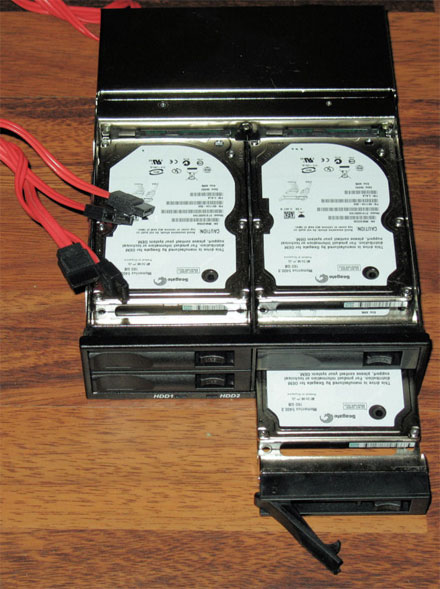
The natural immediate response to seeing these kinds of units is that they seem like a pretty clever engineering hack. Since a pair of 2.5" drives side-by-side are less than 5.25" wide, and since the drives are thin enough to be stacked pretty tightly, it's possible to fit up to six of them into a single 5.25" drive bay. But then there are the practical details...
For one, there is the performance factor. Generally speaking, 2.5" drives have modest RPM speeds and small buffer sizes, reflecting on their common usage in applications where size matters more than performance, such as laptops, portable USB drives, networked printers and copiers, and other tight-fitting systems that cannot make performance the top priority.
While there are high-performance 2.5" Serial-Attached SCSI (SAS) drives that are entirely suitable for general-purpose storage (and which are commonly used in upscale applications such as blade servers), those drives also have prices that are 4 times to 6 times higher than the drives that are typically used for compact applications.
Moreover, these 2.5" drive cages are small, but they're not that small—they use a whole 5.25" drive bay—and anything that can hold a full-sized drive would also be big enough to hold a regular-sized drive. Simply put, the size penalty ought to be a non-issue for the kind of applications where these cages would be installed.
Also, you can get a regular-sized hard drive that holds up to 750 GB of storage, while the largest 2.5" drives only hold 160 GB, meaning that a single normal drive will deliver more capacity than some of these drive cages even when they are fully populated. And while 2.5" SATA drives are a fraction of the cost of their SAS counterparts, a regular 3.5" desktop-class SATA drive is cheaper still, especially if you only have to buy one of them.
Overall, common sense tells us that there just isn't much of a reason to use these things, and that they are probably engineering novelty items with little or no practical application. That was also the consensus opinion among friends and peers that I showed these units to, and only one other person expressed the sentiment that they might be feasible in narrow applications. Even some of the storage vendors that I talked to expressed discomfort at the idea of using these drives for anything significant, with only a couple of them pointing out that 2.5" drives are routinely used by OEMs and VARs for vertical applications.
After testing some drives and carriers over the past few weeks, however, I'm happy to report that the consensus opinion has proven to be wrong, and that these devices are entirely practical for several important applications. In particular, the form-factor makes them especially useful for rack-mount and small-form-factor systems like departmental NAS boxes that require RAID for local storage, but which do not have enough physical space for four full-sized drives. Another area of potential use is mobile or industrial systems, since laptop drives typically have very high shock and vibration ratings.
Furthermore, once the SATA drives were bundled together into a RAID setup, the magic of multiple spindles made performance a non-issue, with throughput numbers that were significantly higher what is available from a single desktop-class SATA disk. While the numbers aren't impressive enough to consider this option for enterprise-grade storage, they are more than sufficient for things like boot drives and local backup storage.
In fact, I'm so impressed with these things that I'm now considering this application for use in my lab, either as RAID boot drives for some local systems, or for RAID storage on my rack-mount servers at the remote data center (a co-hosting facility), none of which have sufficient space to handle four full-sized drives easily. All could benefit from the reliability and performance afforded by these miniature RAID arrays.
Playtime
For my testing, Enhance Technology sent one of its QuadraPack Q14 cages with internal and external SATA connectors. Fujitsu sent four of its MHV2040BH SATA drives, and Seagate sent four of its brand-new ST9160821AS SATA drives.
I used SATA controllers that I already had available, including a pair of motherboards with on-board Intel ICH7-R SATA-II controllers, a 3Ware 95550SX-8LP SATA-II controller, and an old Intel SRCS14L SATA-I controller that I had used for some earlier testing.
The Q14 has room for four drives, each of which mount to steel plates that have levered locking handles. The drives can then be slid into the bay, where they will mate to the backplane, and a button on the front releases the handle which allows them to be pulled back out. There are four drive LEDs on the front of the Q14 that light green when each of the associated drives is getting power, and flicker yellow whenever the drive reports activity via a pin-11 signal. The LEDs can also be made to flicker for identification or fault purposes, if the controller supports SES signaling.
The Q14 backplane is a SAS backplane, so it can support multiple protocol formats and connectors—you can get it with SATA cables hanging out the back (the unit I tested), or with a pair of high-density SCSI connectors. There is a single 4-pin Molex connector on the rear of the unit that provides all drive power, and a 40-mm fan that provides airflow across the drives.
The Fujitsu and Seagate drives are 1.5 GB/s SATA with NCQ, 8 MB buffers, and 5400 RPM platter speed, making them pretty much run-of-the-mill for 2.5" SATA drives. The Fujitsu drives have a capacity of 40 GB (the low end of the Fujitsu line), while the Seagate drives use perpendicular recording to get 160 GB. Fujitsu announced itsown 160 GB perpendicular recording drive last week, but I did not get any for testing.
The Fujitsu drives I did test used pin-11 signaling for drive activity and thus caused the Q14 LEDs to flicker when active, while the Seagate drives are primarily intended for laptops and thus use a DASP signal for drive activity, so the Q14 LEDs did not flicker with those drives.
The drives and carrier were installed in two different systems: a basic rack-mount system for performance testing, and a small-form-factor micro ATX chassis for general usability testing. The latter (shown below) is used for general-purpose file-and-print sharing and some common Internet applications, and only had a single exposed 5.25" drive bay remaining. The combination of the Q14 drive cage and the four SATA drives proved to be an excellent match for both systems, due to the space restrictions in the chassis.
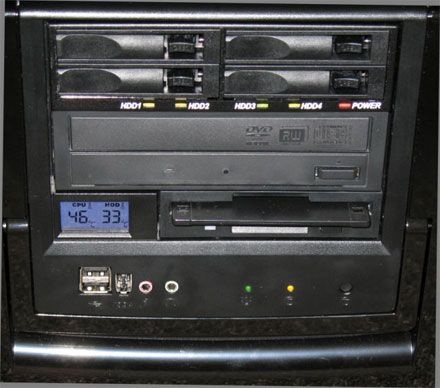
Overall the Q14 is very well made, and has a surprisingly hefty feel to it. It fit into both of my test systems without any difficulty, with the attached cables proving plenty long enough. The cables can be replaced if they aren't long enough for your application. The unit runs extremely quiet, and none of the drives ever got hotter than 35 degree Celsius. Removing and replacing drives while the system was running worked without difficulty for the most part.
My only complaints are that the yellow and green LEDs on the Q14 are nearly indistinguishable— and I'm not even color blind—and that the drive plates had a tendency to lift at the rear when inserted, which made it harder than expected to hot-swap the drives. A simple spring-clip or side-mounted rail would probably fix this.
Zoom Zoom
For benchmarking purposes, I used random-read tests from HD Tune 2.52, HD Tach 3.0.1.0, and Everest 3.01. To establish a baseline, I tested a basic Western Digital WD800JD Caviar SATA-II drive on the Intel ICH7R controller, which yielded an average transfer rate of 49.7 MB/s and a maximum burst rate of 122.7 MB/s (all numbers are from HD Tune except where noted). By comparison, a single Fujitsu MHV2040BH drive on the same system reported a mere 27.3 MB/s average transfer rate with a burst rate of 84.8 MB/s. Clearly, laptop-grade drives that are used in isolation are about as weak as most people expect.
But when they are put into a RAID-10 or RAID-5 array where the multiple spindles can be used to increase read and write performance, throughput numbers jump considerably. For example, when the Fujitsu drives were used in a RAID-5 array with 128 KB strip sizes on the ICH7-R controller, they returned an average transfer rate of 71.6 MB/s with a maximum burst rate of 941.5 MB/s—a 44% increase in average transfer performance, and an eight-fold increase in burst transfers over the lone Caviar. I should note that these remarkably high burst transfers did not appear in any other combination of equipment or strip sizes, and may be a result of firmware optimization.
Meanwhile, the Seagate ST9160821AS drives in the same configuration returned an average transfer rate of 80.1 MB/s and a maximum burst rate of 94.5 MB/s, which is over twice the average throughput of the Caviar drives, but with a slightly lower burst rate. Given the similarities between the Seagate and Fujitsu drives, my guess is that the higher sustained throughput numbers are probably due to the use of perpendicular recording technology on the Seagate drives, which produces much higher data density.
The absolute best throughput numbers came from using HD Tach read tests, with the Seagate drives on the ICH7-R in a RAID-5 array with 64 KB strips, which peaked at just over 140 MB/s with an average of 102.4 MB/s and a burst rate of 207.5 MB/s (see the screen shot below). The 9550SX in the same configuration yielded peak transfers of over 130 MB/s with an average of 99.8 MB/s, and a burst rate of 194.4 MB/s.
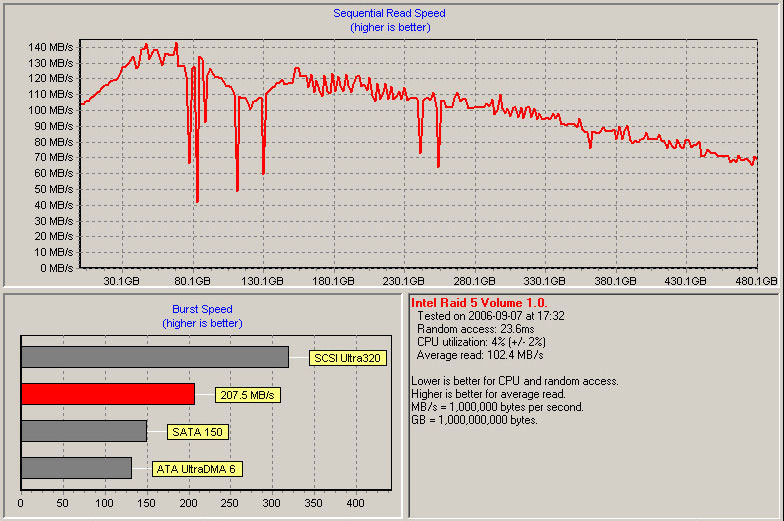
These are pretty impressive numbers for a "laptop RAID," and dispel the myth that these drives are unusable for general purpose applications. Granted, these drives cannot reliably keep a gigabit Ethernet pipe consistently full, but that's not really the appropriate measure either. Instead, if you compare them to the performance of a single workstation-grade SATA drive, then these numbers show that the laptop drives are more than capable of delivering far better performance in the same amount of physical space—as long as they're arranged into an array that will utilize the multiple spindles, anyway—and make a good alternative for those kinds of uses.
And since that describes the majority of my systems—most of which have a limited number of exposed drive bays and are therefore usually constrained to one or two disks—this means that most of my systems are actually good candidates for this kind of solution. Only a few of my machines have enough bays to hold four full-sized drives to get the full benefit of RAID-10 or RAID-5, while these micro-drive boxes provide a nice alternative that uses less space and power, but does not require sacrificing performance.
The only remaining argument against this solution is price. Since laptop drives are 20% to 50% more expensive than their desktop counterparts, and since you'll need to include the cost of the drive cage ($175 retail for the QuadraPack Q14), you're looking at a significant cost increase over workstation-grade SATA drives. However, the entire solution is only slightly more expensive than a single enterprise-grade SAS drive that would only provide a fraction of the storage capacity and none of the reliability of a RAID array, meaning that it is still a pretty good deal.

Copyright © 2010-2017 Eric A. Hall.
Portions copyright © 2006 CMP Media, Inc. Used with permission.