
Use Windows For UNIX Services
Sooner or later, every administrator finds himself wanting to run applications from multiple operating systems on the same physical machine simultaneously, and then struggles to figure out a solution that works somewhat seamlessly.
Maybe you're married to Microsoft Exchange, but you secretly pine for open-source e-mail tools like SpamAssassin or fetchmail. Or maybe you're using Unix-based applications for some network services, but you really want to run them under Windows so you can integrate them into your overall network security model. Whatever the case, wishing that you could run best-of-breed applications from different operating systems simultaneously is pretty common, and often unavoidable.
In my case, I ran into this situation when upgrading an aging utility server, and I made the mistake of buying a brand-new Intel motherboard that does not yet have adequate Linux driver support. If I was going to use this system at all, it had to run Windows, but most of the software that this particular system is meant to run was designed for Unix.
The traditional solution to this dilemma is to force yourself to pick one platform—either by developing detailed lists of the weighted pros and cons for each operating system, or by using the proven decision-making technique of eenie-meenie-minie-moe—and then making do with the tools that are available for the winner. But the reason you find yourself in this dilemma in the first place is because you want to use the best applications from multiple platforms, so "making do" with almost-as-good alternative applications means using something other than "the best" applications, and is sub-optimal by definition.
Another option here, and one that is increasingly viable, is to run multiple systems in parallel, or to use virtualization technology to run multiple platforms on a single system simultaneously. Given the relatively low cost of high-powered modern hardware, not to mention the availability of zero-cost virtualization products, this is at least more feasible than it used to be. However, there are additional problems that are created by this kind of approach, particularly in the areas of user and device integration.
But there is another option available that hardly anyone seems to know about, which is to simply run your Unix-based applications under Windows itself, using the Posix subsystem from Microsoft's Services for Unix package. In this model, the actual operating system itself is Windows, while system libraries and executables provide a Posix-compliant front-end to the operating system's resources. Simply put, Unix-based applications think they are using regular Unix, but are actually using the Windows resources instead.
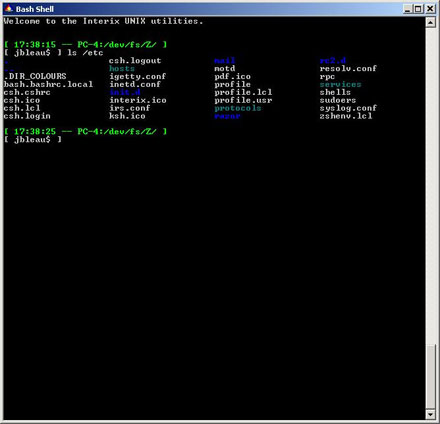
This is easier shown than explained, and since a picture is worth a thousand words anyway, the screenshot in Figure 1 shows what I mean. In that example, a Windows domain user is logged into a Windows XP PC via a local bash shell, using the Posix subsystem in SFU. To the user and applications, the environment looks and feels pretty much like a regular Unix system, but it is in fact Windows XP.
The Posix Subsystem
The Posix subsystem for Windows has actually been around for quite some time. The technology used to be called Interix (and still is in some quarters), and was developed by a company called Softway Solutions for use with Windows NT. Microsoft acquired the company in the fall of 1999, and then combined Interix with some separate NFS and NIS technology into a retail add-on package called Services for Unix v2.0, also known as SFU. (I reviewed parts of SFU 2.0 for Network Computing magazine back in 2000, which you can read here.) Over the years since, the product has been further developed and enhanced to become SFU v3.0, and then SFU v3.5, becoming a free-for-download package along the way.
Microsoft is transitioning the product line again, integrating it directly into Windows, with the Posix component being renamed to Subsystem for Unix Applications (SUA). This transition actually started with Windows Server R2, but it's also the strategy going forward with Vista. The new labeling also signifies the fact that SUA is essentially a ground-up rewrite of the Posix environment—including 64-bit platform support, Open Database Connectivity (ODBC) interfaces, and better integration with Microsoft Visual Studio. But to user-space applications it's all still Interix.
The Posix subsystem essentially maps Windows resources to the Unix environment, providing an alternative "personality" for the Windows kernel through a Unix-like set of APIs and representations. For example, user accounts are not stored in a traditional /etc/passwd file, but instead are accessed through library calls like getpwnam and getpwuid, which the Posix subsystem then maps to the Windows authentication system via the legacy SAM database API.
This model allows the Windows authentication store to work somewhat seamlessly, regardless of whether the store itself is a local users and groups database, a legacy NT domain, or an Active Directory domain. The downside is that user account data is limited to what can be stored in the SAM database, which isn't much. Worse, the NIS server component of SFU provides Posix extensions for Active Directory, but those attributes cannot be used because the Posix subsystem can speak only to the SAM database API.
Likewise, the Posix file system is simply a representation of the underlying Windows file system, and can use only what Windows can provide. The root of the Unix file system is mapped to C:\SFU by default, although other parts of the Windows file system can be accessed through device aliases. (For instance, the root of the C: drive can be accessed via /dev/fs/C.)
Since there are no mount services to speak of, the only way to access remote file systems from the Posix subsystem is to set up a connection in Windows. For example, if you need to use a remote SMB share for a user's home directory, then you need to make sure the resource is mapped to a drive letter by Windows during the login process, either by the user's profile settings, or by using a login script. (This can be seen in the first screenshot above, which shows the user's home directory being mapped to Z:, or /dev/fs/Z in the Posix space.) This can be another point of weak integration in some cases. Because the user's home directory attribute gets used for the user's Posix home directory as well, you are stuck with UNC and drive letter paths for the SFU home directory, while remote systems can use NFS mount points and paths.
Windows and the Posix subsystem also share a common command environment, so you can call Windows executables from within a Unix shell simply by calling the executable like you would from any command prompt. The opposite works too—such as using "ls" to get a Unix-style directory listing from within the CMD command shell. But if you need the whole Posix subsystem—including file system mapping and the like—then you need to use the POSIX.EXE command as a front-end loader for the Unix-style command to create the full environment.
One area of disconnect here is in the background services: the Posix subsystem includes its own /etc/init.d startup scripts and cron scheduler, which are completely independent of the Windows service engine and Task Scheduler. Experimentation shows that it is possible to launch some of the Unix services as fake Windows services by using the "instsrv" utility from the Windows Resource Kit and "psxrun" (POSIX.EXE with the terminal I/O functions removed), although this is a crude hack at best. It would be nice if Microsoft could find a way to improve some of these mappings.
Unix Applications
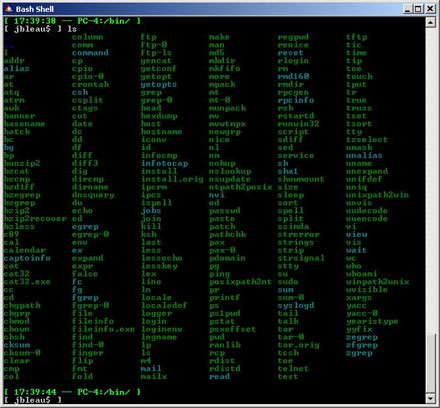
Apart from the base components, SFU also includes scores of classic Unix utilities, as well as the development tools that are needed to compile new ones, including GNU tools like gcc and gmake. The screenshot in Figure 2 shows the contents of the /bin directory, as populated by the default installation and some updates.
Depending on whether you use SFU or SUA, the tools will either be bundled into the installation package directly (SFU), or will be downloaded from a Microsoft repository as part of the installation process (SUA).
Interop Systems, a third-party company that was founded by some of the original employees of Softway Systems, also maintains ports of several common open-source applications. Some of the packages are simply updates to the utilities that are bundled into SFU and SUA, but Interop Systems also maintains ports of other, critical applications like OpenSSH and Apache, among others. Interop Systems charges a one-time fee of $20 for access to its repository of ports, but the cost is well worth it.
You can also try your hand at porting applications yourself, using the bundled development tools (or the updated versions from Interop Systems). In my experience, this can be done for some things fairly easily, while other applications are extremely difficult to work with. Generally speaking, if the source tarball uses GNU configure scripts that support Interix as a platform, and if the application does not expect to work with Unix-specific resources such as /etc/passwd directly, then you have a pretty good chance of being able to successfully compile the application, although it still may not run. If the application is written to specific target platforms and it does not have explicit support for Interix as a target, then you are probably not going to get it working unless you spend a fair amount of effort on hacking the code.
As a quick sampling of the feasibility here, I was able to get the latest version of Berkeley DB to compile and run without a problem, and I was also able to get some OpenLDAP tools to compile (but not all of them, and the winners did not run fully). I was also able to get SpamAssassin and some support modules to compile and run (including Net::LDAP, although I had to upgrade Perl from Interop Systems' repository first). A few other Perl modules would not compile or would not pass the "make test" phase. Nor was I able to get the CMU SASL libraries to compile, while UW IMAPD and Cyrus IMAP are written to specific platforms that do not include support for Interix, so I was not able to compile those either.
As for my specific usage needs, the only two Unix applications that I really need for this system are OpenSSH and Squid, and I am easily able to use Windows services for everything else. In some cases, like printer management, I am far better off with the Windows services. Since Squid and OpenSSH are available from Interop Systems in pre-built form, my needs were met easily. In short, I'm able to run best-of-breed open source applications under Windows just as if they were running under Unix, and am also able to benefit from tight integration with the Windows environment.

Copyright © 2010-2017 Eric A. Hall.
Portions copyright © 2006 CMP Media, Inc. Used with permission.