
Hardware Monitoring On Windows
In the last article, I wrote about the hardware-level monitoring tools that are available for Linux, and in this article I'll look at the same kinds of tools that are available for Windows.
Surprisingly, hardware monitoring on Windows is much more complicated than it is on Linux. For one thing, there's no single extensible sensor engine like lm_sensors on Linux. Instead, there are a handful of monolithic engines for Windows that each have significant limitations. Worse is that the most extensible engine was abandoned a couple of years ago, while some of the more modern packages are lacking the basic functionality needed for hands-off management and reporting.
The big daddy in this space is Motherboard Monitor 5.3. MBM is a highly configurable user application with documented interfaces for extensions and shared-memory access. Cumulatively, MBM offers the richest collection of features: Sensor devices can be extensively tweaked, it has a good set of local reporting options (including a dashboard and logging to file), and there are third-party tools that do things like run MBM as a system service or pipe sensor readings into the Windows SNMP agent for remote monitoring purposes.
Unfortunately, development on MBM was ceased in 2004 (and due to the large amount of proprietary sensor code, it wasn't released as open source), meaning systems with relatively modern sensor chips are unable to use MBM for much of anything. Having said that, if you have sensors that do work with MBM, it's pretty much the best choice available right now.
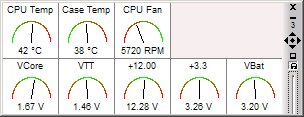
The screenshot below shows what the MBM5 dashboard looks like on an old PIII server running Windows Server 2003.
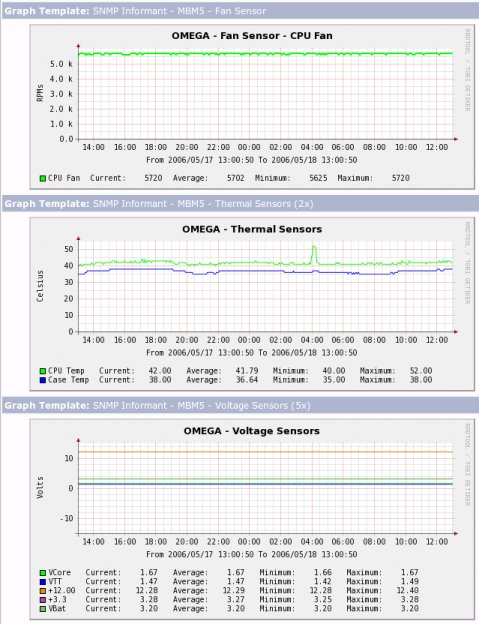
Meanwhile, the screenshot below shows the past 24 hours of sensor data from that server and comes from a Cacti script template I wrote that reads data from the SNMP Informant MBM extension to the Windows SNMP agent.
The most widely used alternatives to MBM is SpeedFan, another shareware user application. SpeedFan has some basic reporting and eventing tools, and the database of sensor chips seems to be pretty well maintained. SpeedFan also seems to have a shared-memory interface (although I'm unable to find the documentation), and there's a limited third-party SNMP agent available. However, SpeedFan doesn't seem to have the ability to run as a service (a showstopper when it comes to hands-free monitoring), and I've had some general configuration problems with it on some systems. But for the most part, SpeedFan is picking up steam in the user community, and with some additional development it could become pretty useful.
There are also a handful of other sensor-monitoring tools, some of which have really good sensor databases, but which are all even less functional than SpeedFan when it comes to remote reporting.
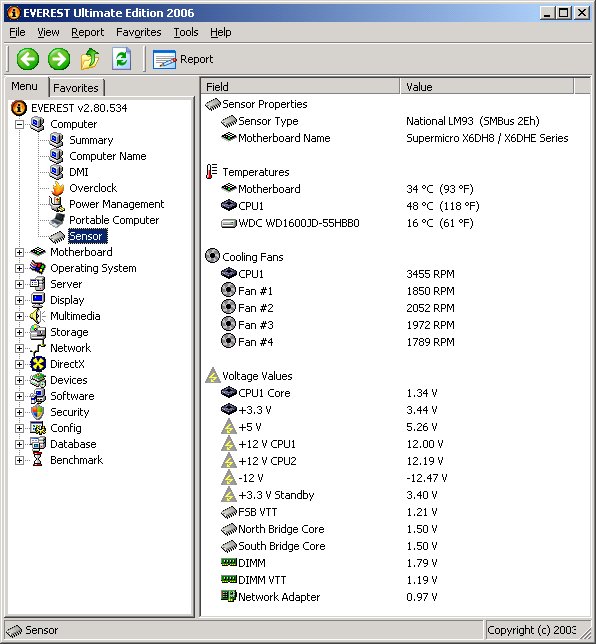
In particular, the commercial line of Everest diagnostic tools probably has the best all-around database of sensors and systems on the market, although the software doesn't allow for sensor customization (you can't rename or change the interpretation of a sensor; instead, you have to file a report with the developers, who will then update their hardware database with your system-specific configuration). Everest has pretty good logging mechanisms and some limited on-screen display options, but they don't provide any APIs for third-party tools to tap into. It's a great tool for local monitoring of desktop PCs (I use it on my laptop because of this), and the extensive sensor database makes it extremely useful for local monitoring of server systems, too (it's the only tool that recognizes all the sensors on my Supermicro Xeon server, as shown in the screenshot below), but it lacks the interfaces needed for it to be usable with hands-free remote monitoring. If the vendor added an API, it would probably be the best tool on the market.
Another commercial tool worth looking at in this space is Hmonitor, although I don't recommend it. Hmonitor has a pretty good sensor database, but like Everest it can't be configured locally. And unlike Everest, the developer of Hmonitor doesn't maintain a database of system-specific configurations either, so you're pretty much stuck with whatever the developer thinks the sensors should be according to the canonical specifications, instead of what they actually are. Hmonitor provides some local logging capabilities, and the "Pro" version appears to support WMI, meaning remote monitoring should be possible, although my understanding is that this functionality is limited to temperature readings only.
There are a handful of other tools out there that provide even less functionality, but you get the idea. Overall, the hardware monitoring solutions currently available for Windows systems are individually and collectively weak, and you're stuck with having to use outdated tools or limiting yourself to local monitoring only. In the best-case scenario, you may have to write a script that converts local log files into some kind of network report, and even that assumes you can run the tool as a system service, which isn't very common.
The only good news here is that most of the above-market system vendors include SNMP tools for their systems, meaning third-party monitoring solutions aren't as important as they are for Linux. However, many of these tools are poorly designed (the Supermicro agent also includes a Web server and a remote control agent, none of which I want on my system), and they also require multiple system-specific MIBs and scripts. Meanwhile, some of the lesser systems that might be useful for departmental or appliance projects don't even provide this level of support, which puts you right back into needing a third-party solution all over again.
There's a real opportunity space here for a vendor to step forward and fill this gap, and hopefully someone will pick up on it.

Copyright © 2010-2017 Eric A. Hall.
Portions copyright © 2006 CMP Media, Used with permission.