
Hardware Monitoring On Linux
For the past couple of weeks I've been writing about hardware-level management issues, but I haven't really talked about the tools and technologies that can be used to keep an eye on this stuff. This post looks at the tools that are available for Linux (and Unix in general), while the next article will look at the tools available for Windows.
Hardware monitoring on Linux is actually pretty straightforward, but like most other things, even the simplest stuff can be complicated. Basically there are three "layers" of software involved, all of which are based around the lm_sensors software package. At the low end are loadable kernel modules that communicate with the individual sensor devices on the system. In the middle is the lm_sensors engine itself, which is essentially a kernel extension that communicates with the various sensor modules and normalizes the output for the upper layer. Finally, there are a variety of different client agents that communicate with the lm_sensors engine and republish the data to different management channels.
The lm_sensors package (which is bundled into many Linux distributions by default) usually contains the low-level kernel modules, support files, and a command-line client tool for reading the current sensor data. Additional sensor driver modules and clients can also be found around the Internet.
Configuring lm_sensors to work with your system usually requires a couple of discrete steps. First you have to determine which kernel modules you'll need, which is done by running the "sensors-detect" script from the lm_sensors package. Once it has found all the recognized sensors, the script will then store the information on a configuration file that's read when the engine is started or restarted.
In some cases, there may not be a kernel module that works for your system's sensors out of the box. Depending on your hardware and/or system vendor, you may or may not be able to find a driver for your system's sensor chips (some Dell systems use a proprietary chip that's not publicly documented, for example). I ran into this problem with my Supermicro motherboard, which has two sensor chips that weren't accessible (one of them required kernel modifications that I was unwilling to perform, and the other wasn't supported at all). However, that system also has an Intelligent Platform Management Interface management card, and I was able to use a third-party IPMI lm_sensors driver to read the sensor data through that channel.
Apart from that one hiccup, though, all my other systems' sensor chips were supported and immediately detected, and getting up and running was pretty simple. On my local kick-around server (a vanilla VIA motherboard with an AMD Athlon XP processor), lm_sensors uses a handful of i2c and VIA support modules, as well as the "w83627hf" module to talk to the sensor chip itself.
The second part of the configuration process involves tweaking the configuration file to make sure sensor data is being interpreted correctly. Although many different systems often use the same chips, they'll also use those chips for different tasks, and you may need to adjust some of the readings accordingly. As an obvious example of this, one vendor may use a fan sensor to monitor a chassis fan, while another vendor may use the same sensor to monitor a Northbridge fan, and you'll want to label them correctly or maybe even disable one of them when not in use. Similarly, one vendor may use a voltage sensor to monitor a 3.3V line, while another vendor may use the same sensor to monitor a 5V line, and if you don't configure lm_sensors correctly for your sensor, then you're likely to end up with readings that are completely wrong.
Sometimes you can get this information from your vendor, but usually you have to rely on Internet postings to find the right configuration settings for your specific system. Another option here is to use the BIOS "health monitor" (if it has one) and see which readings correlate to which sensor. The latter method can involve some guesswork, but it usually results in eventual success.
Once lm_sensors has been configured and started, you can use a variety of client tools to read and republish the data. As mentioned above, the lm_sensors package includes a basic command-line client called "sensors" that will simply spit out whatever has been found by the lm_sensors engine. Here's the output from that tool on my local server:
[ ehall$ ] sensors
w83697hf-isa-0290
Adapter: ISA adapter
VCore:     +1.65 V  (min =  +1.71 V, max =  +1.89 V)
+3.3V:     +3.38 V  (min =  +3.14 V, max =  +3.47 V)
+5V:       +5.08 V  (min =  +4.76 V, max =  +5.24 V)
+12V:     +12.04 V  (min = +10.82 V, max = +13.19 V)
-12V:     -12.28 V  (min = -13.18 V, max = -10.80 V)
5V:        -4.95 V  (min =  -5.25 V, max =  -4.75 V)
V5SB:      +5.67 V  (min =  +4.76 V, max =  +5.24 V)
VBat:      +3.66 V  (min =  +2.40 V, max =  +3.60 V)
CPU Fan:  5273 RPM  (min = 33750 RPM, div = 2)
NB Fan:   4272 RPM  (min = 3970 RPM, div = 2)
Case Temp:   +37°C  (high =   +88°C, hyst =  -104°C)
CPU Temp:  +46.5°C  (high =   +80°C, hyst =   +75°C)
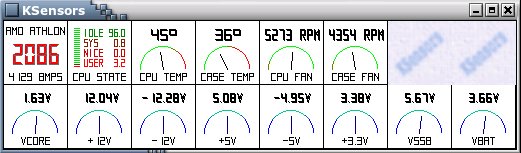
There are also some GUI front ends for lm_sensors available. For example, the screenshot below shows the output from the KSensors application for KDE (but running under Gnome in this example). KSensors provides a nice dashboard-style snapshot of a system's health and also has some rudimentary alerting features.
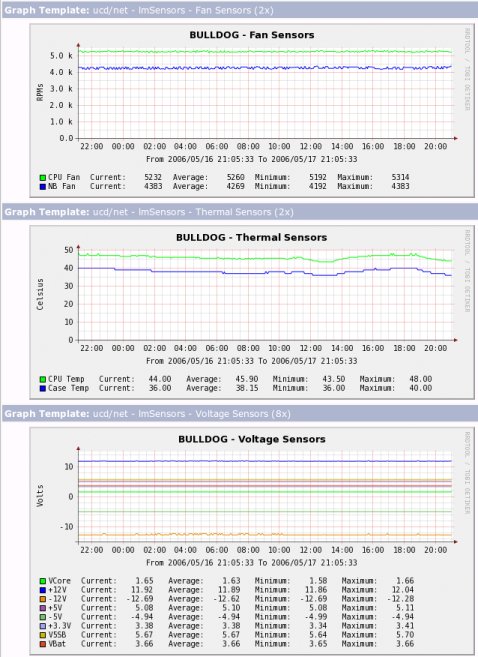
The current release of Net-SNMP also includes an lm_sensors extension agent that can publish the local sensor readings to the network, although this support is currently classified as experimental and has some difficulties (see below). Depending on the Linux distribution you use, the lm_sensors support code may already be compiled and installed on your system (it's not included by default in SuSE Professional 9.3, so I had to recompile the source code with the extension enabled). For example, the screenshot below shows the past 24 hours of sensor readings on my server and comes from a Cacti script template I wrote that reads the lm_sensors data through SNMP. One thing to watch for when using the Net-SNMP agent is that the agent code currently relies on simple string-matching techniques to determine the type of sensor being used. For example, Net-SNMP will map sensors that have the word "fan" to the fan index and sensors with a "V" in the name to the voltage index. If you don't use these strings in the lm_sensors configuration file, the sensors won't show up in Net-SNMP like you'd expect.
As an aside here, most modern server-class systems provide SNMP agents of their own that can be used if you can't get lm_sensors talking to your hardware. However, if you can normalize around the use of lm_sensors, I strongly suggest it because it provides a common management interface to all your systems. In particular, you only have to manage a single Net-SNMP lm_sensors MIB instead of multiple vendor-specific MIBs, which makes automation much simpler overall.

Copyright © 2010-2017 Eric A. Hall.
Portions copyright © 2006 CMP Media, Used with permission.