
Get A Grip On Athlon Power Utilization
Like most systems managers, I have a variety of problems that stem from high CPU temperatures and power consumption. Although I've been pretty successful at getting most of my systems under control, my older Athlon-based systems have proven to be more stubborn, running at a relatively high power utilization level even under idle conditions. Today I got this fixed, and given that the industry is now starting to pay attention to the problem of wasted power and heat, I thought I'd share what I learned here.
Before getting too far into this, let's step back a moment and talk about the problem space a little. First off, all modern-day CPUs consume relatively high amounts of power, ranging from around 70 watts at the low end to around 250 watts at the high end. This can translate into a significant amount of kilowatt-hours at the end of the month if you don't stay on top of things.
Second, a huge amount of this energy gets converted into heat-waste by the processor whenever it's running. As a rule of thumb, the amount of energy needed to eliminate the heat is roughly equal to the amount of power being consumed by the CPU itself (this is the same rule that applies to your home energy consumption: If you burn a 100 watt lightbulb in your house, you'll probably burn another 100 watts on air conditioning to get rid of the heat created by that lightbulb). Apart from the cost factor, the heat also damages components and reduces the mean-time-between-failure of your gear. And if you have a system in a closed space like an office, it will make your workers uncomfortable and unproductive.
In order to alleviate some of these problems, all the Intel and AMD processors released in the last few years have a "Halt" instruction that allows the CPU to temporarily go into a low-power mode when nothing else is happening. This prevents the CPU from consuming full power, which in turn keeps heat-waste low. Usually this is handled by the operating system, which will tell the CPU to halt whenever the kernel is idle (this is the purpose of the System Idle Process, as seen in the Windows XP Task Manager applet—it tells the CPU to shut down when no other threads need to be executed). Most of the time, this basic functionality is enough to get you most of the way toward decent power and thermal management, although sometimes you need to do some other things like use better fans or heatsinks.
In my case, I have a handful of systems that weren't going into low-power mode on idle and were therefore wasting a lot of energy and generating substantial amounts of excess heat. One of those systems is a basic office server, which was running at a steady 58 degrees Celsius at idle, even with multiple fans and a high-quality heatsink doing their best to shed the heat. I also have a basic workstation that idles at 52 degrees Celsius and a mail/web server at a hosting facility that idles in the 40s thanks to the industrial air conditioning. By comparison, the 3.2 GHz Pentium 4 workstation in my office idles around 40 degrees Celsius and only gets up to about 62 degrees Celsius when I torture the CPU with 3D games.
All these systems are using 32-bit Athlon XP 2800+ processors, which were originally purchased for their high horsepower-to-price ratio (unfortunately, the line was discontinued by AMD last year, although, notably, there was never a very good selection of high-end motherboards for these chips, given their memory and bus constraints). For completeness, the workstation system runs Windows XP Professional, while the two servers run Suse Linux Professional 9.3.
During my research on this problem, I stumbled across a handful of Web pages that discuss the problem in various levels of detail and also propose a variety of fixes. First up is The Athlon Idle X Files, which states the problem succinctly by citing the relevant AMD documentation:
"Significant power savings of the AMD Duron Processor Model 3 only occurs if the processor is disconnected from the system bus by the Northbridge while in the Halt or Stop Grant state. The Northbridge can optionally initiate a bus disconnect upon the receipt of a Halt or Stop Grant special cycle. The option of disconnecting is controlled by an enable bit in the Northbridge"
In a nutshell, the Halt instruction essentially only works when the CPU can be disconnected from the system bus by the Northbridge chipset, which only works when the chipset is fed its own special instruction that allows the processor to be disconnected. To summarize even further, you need to set a flag in the chipset before the Halt instruction will be acted upon by the processor.
Next up is the Athlon Powersaving HOWTO, which describes a couple of potential solutions for Linux systems.
The recommended fix is athcool, a command-line utility that looks for a supported chipset and then enables the necessary Northbridge flag, thereby allowing the kernel to shut down the processor through normal ACPI channels. I downloaded, compiled, and installed the utility on both of my Linux systems in a matter of minutes (it took longer to find and install the required pciutils development package), and then ran the command to enable the flags.
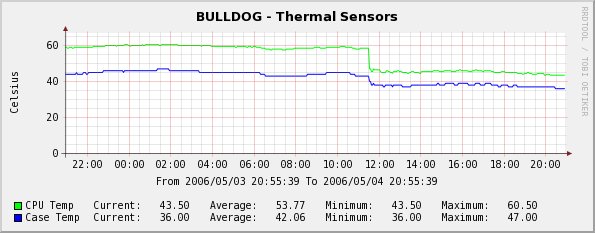
The results speak for themselves. The first chart below shows the before-and-after temperature readings for the local server: Before the tweak, the idle temperature was around 58 degrees Celsius, but it dropped down to 43 degrees afterwards, a whopping 15 degrees difference.
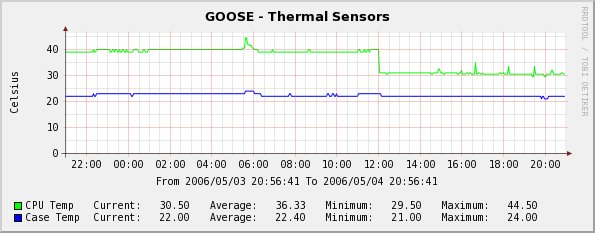
The next chart shows the same kind of change on my remote Web server: Before the tweak, the idle temperature was around 40 degrees Celsius (thanks to the industrial AC), but dropped to below 30 afterwards.
Another interesting site that turned up in my search is Saving Power on Idle PCs, which documents some common power utilization levels for different systems and processors. According to that site, an Athlon XP 2000+ in its normal state uses 145 watts, while the same system with athcool enabled only uses 87 watts at idle. That's the difference of a 60 watt lightbulb being on or off all day long, which adds up to a significant energy savings over time (especially considering the fact that another 60 watts is being spent on eliminating the excess heat).
One note of caution here is that some of these tweaks have the potential to create problems in some cases. In particular, if your system is using the system bus for other duties (such as running a sound card or a video-capture board), you may see some problems resulting from the bus disconnects. Before you roll this out, you should probably test it for a while first. In my case, however, I've noticed no problems as of yet, and I'm extremely pleased to have nailed this down and to have fixed it so easily.
Update: I have tried a couple of similar utilities for Windows XP, and the idle temperature on my workstation has now dropped from 52 down to 43. The two utilities I have tried are CoolOn and S2kCtl. Both of them provide the same basic functionality, although S2kCtl is packaged better and is much simpler to use. In both cases, the software allows you to adjust the rate at which halting occurs with a pair of "divisor" controls; the higher the value, the more frequent the halting, although values that are too high are known to produce more errors. In my case I was able to set the divisor values to 128 and haven't had any problems yet.

Copyright © 2010-2017 Eric A. Hall.
Portions copyright © 2006 CMP Media, Used with permission.