
Trapping Windows Events with SNMP
When it comes to managing Windows-based systems, there is no greater source of information than the native event-logging subsystem. Windows and the applications that run on it use the event log repository to record all kinds of significant system events, ranging from excessive user authentication failures that may indicate a hack attempt, to tracking down time- and directory-synchronization problems that underlay secondary application problems, to discovering that a hard drive is starting to show problems at the filesystem level that may indicate a particular drive is on the verge of failure, and numerous other problems.
Unfortunately, trying to pull information out of multiple event logs in a way that is both timely and usable can be difficult and convoluted. In one common scenario, network administrators will try to integrate the Windows event logs into a broader logfile-analysis toolkit that requires all of the system messages to be transmitted to a central server for string and context analysis. As a result of the complexity and overhead of managing this kind of multi-system synchronization architecture, many administrators will often limit this effort to specific servers (leaving their workstations and secondary servers as completely unsupervised), or will forgo the effort entirely.
There is a better way, however, and one which reuses SNMP technology that is already bundled into Windows to generate lightweight alerts against pre-selected events, thus providing the basis for a flexible and scalable notification system that can work with existing network management tools. Cumulatively, this means that network administrators can use the built-in alert system and an SNMP management station to trap critical events and automatically respond to them as soon as they happen, with the only additional requirements being the desired features of the network management console that is used to monitor and respond to the event traps.
The Pieces
All of the 32-bit Windows versions come with an SNMP agent that has the ability to generate explicit SNMP trap messages from any of the discrete Windows event messages that can be logged. However, the component pieces to get this working are not visible by default, and some of them are entirely undocumented. In this primer, we'll walk through these components and explain how to go about generating and trapping the specific SNMP trap messages that you may be interested in.
The first part of the puzzle is the SNMP agent itself, which is bundled with Windows, but isn't installed by default. Once this component is installed, it also has to be configured with basic SNMP settings such as the trap destination(s), the community string(s) to use, and other kinds of site-specific SNMP details. Once the basic SNMP agent is configured, you then need to delve into the event agent components, which is where you actually define the event messages that you want to capture and retransmit as SNMP messages.
The next part involves the actual generation of the system events. Although Windows will log several thousand events on its own accord out-of-the-box, some applications and subsystems require additional configuration tweaks before the desired events will be generated in the first place. For example, Windows does not log login events until it is told to do so, while some third-party applications may require some kind of syslog-to-eventlog proxy agent before its events can be captured.
At the other end of the wire, some kind of SNMP management station is also needed to receive and process the alerts that are generated. There are dozens of such products on the market today, ranging in price from a few hundred dollars to tens of thousands of dollars, offering different features for event disposition, escalation and automation. You may even have an SNMP management station already that you just don't know about - the system-management products included with IBM and HP servers have SNMP capabilities, for example - but finding a workable platform isn't too difficult if you don't.
The last major component to this architecture is extending the management console to support the Windows event traps. Most of the SNMP management systems provide some kind of option to compile Management Information Base (MIB) files, so this isn't very difficult in principle. However, the windows SNMP event agent does not include a pre-built MIB (the reasons for this will become clear later in this primer), and you will need to manually construct this MIB such that it specifically reflects the events that you are wanting to trap. For example, if you want to trap DNS-related events, you will need to construct the MIB file so that those events are accurately recognized, and then import and compile the resulting MIB in your management system.
Once these components are configured and operational, it's effectively possible to generate structured SNMP traps for almost any event that can be logged, and for your SNMP management station to capture and react to these events according to its capabilities. Having said that, however, it's also important to recognize that there are some significant caveats with this overall approach, and these are also discussed later in this primer.
Generating Windows Events
By default, Windows systems will log most system-level events on their own without any further administrative action being required. Some events are only enabled after a related set of system "auditing" features are also enabled. For example, if you want to generate events and traps whenever logon operations fail, you will need to enable the "Audit logon events" option in the appropriate Windows policy editor. Similarly, if you want to generate events and traps whenever a system is rebooted, you'll need to enable the "Audit system events" option in the same policy editor.
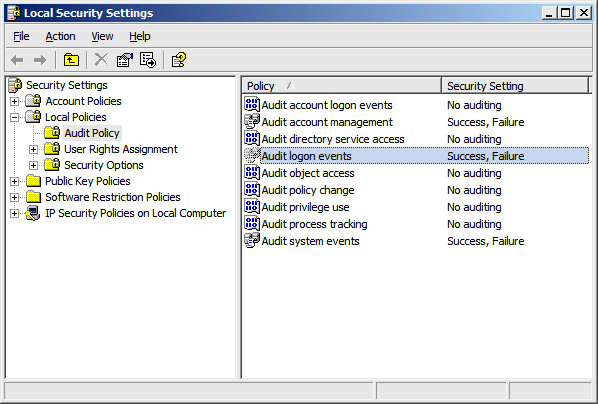
You can define these kinds of policy settings on a per-system basis by using the "Local Security Settings" applet in the "Administrative Tools" program group, or can enable them on a domain-wide basis by using one of the policy editors available for your server operating system. Figure 1 shows what the domain-wide settings look like inside the Local Security Settings applet (the padlock and domain indicators show that these are domain-wide settings that cannot be overridden locally).
Some events simply cannot be trapped in the Windows event log without the use of external tools. For example, programs that write event data to their own specific logfile and don't use the Windows event system cannot be integrated with SNMP traps unless you use a third-party tool to stuff the logfile entries into the event log, while open source applications that have been ported to Windows often rely on a "syslog" interface that may require a local proxy. Even in these cases, however, you still may not be able to trap individual events, with the overall functionality being dependant upon whether or not the external program is able to generate discrete system events for different kinds of entries.
But in general, if you are able to cause events to be stored into one of the Windows event logs, then you should be able to generate SNMP traps from those entries.
Managing the Event-to-Trap Mappings
Once your systems are generating the relevant events, you have to instruct the Windows SNMP event subsystem to generate SNMP traps for each of the desired events.
To manage the event-to-trap mappings, you have three basic choices. The easiest tool to use is evntwin.exe, the "Event to Trap Translator" program, which provides a graphical list of all the registered events and lets you choose the ones that you want to map to SNMP traps. This program isn't linked into any of the default program groups, so you'll have to type in the name from the "Run" menu or a command prompt. By default, the program starts in a "view" mode, and you'll need to click the "Edit" button to actually manage the available events and their corresponding SNMP traps.
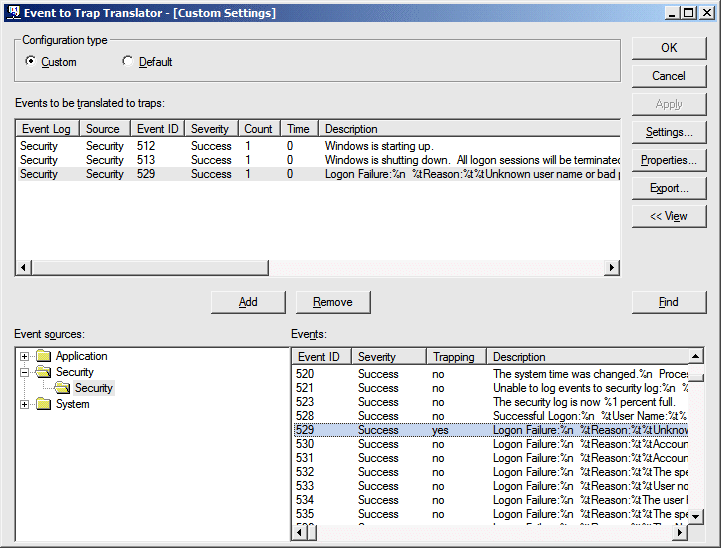
Once the "edit" view is open, you'll see something similar to what's shown in Figure 2. The top half of the screen contains a list of all the events that are already configured, while the bottom left shows a list of the available event logs and their subordinate event sources, and the bottom right showing the events that are known for each of the sources. Double-click an event that you want to monitor, and another dialog opens to let you set any rate-limiting options that you may need (more on this later). If you choose the "OK" button the event will get added to the top window list, while the "Cancel" button does what you'd expect. The buttons along the right side of the main window also allow you to set these same options, as well as some global options. You can remove entries from the top list by deleting them directly, or by using the right-mouse menu options. Once the list of desired events is constructed, you can export and import the list among multiple systems.
There is also a bare-bones, command-line utility called evntcmd.exe, but it is only really suitable for importing configuration settings into a system. However, if you have already configured the list of events that you want to trap somewhere else, you can use this tool to import the list into other systems through a network logon script or some kind of shell interface. This utility also has the ability to write to a remote system's registry, allowing you to push configuration settings down to a node immediately if you don't want to wait for a script to run later.
Both of the above utilities are really just front-ends to the registry. As such, a third option is to find the desired registry entries and then manipulate them directly with other tools (such as through policy-manager extensions or any of the other tools).
Either way, once you have configured the events that you want to trap, you'll need to restart the SNMP service in order for the changes to be recognized. Once that's done, the event monitoring subsystem will wait for the selected events to fire, and will then shoot off a relevant SNMP trap to the specified trap destination(s).
The SNMP Trap Structure
By far, the most complicated part of this process comes from defining the SNMP MIB data that your management station needs to properly handle the events. Part of this complexity is due to the fact that Microsoft doesn't document the SNMP trap format, and also because the traps use a free-form model that is not entirely predictable. As such, making the whole system work depends in large part on your willingness to poke around inside the SNMP traps.
A sample MIB file that traps a handful of events is available for download from http://www.eric-a-hall.com/software/EVNTAGENT-MIB.mib, and illustrates the kind of information that has to be filled-in by the administrator. We suggest that readers download this MIB file and use it as a reference throughout the remainder of this discussion, as some points are best understood by studying the example.
To start with, the default base OID for the SNMP traps is defined as "1.3.6.1.4.1.311.1.13.1", and all of the OID sequences in the event agent will use this base OID value (this can be overridden by changing the "BaseEnterpriseOID" registry key value if needed, although this should not be necessary). The "1.3.6.1.4.1" sequence is the "enterprise" branch of the public OID hierarchy, while "311" is the OID assigned to Microsoft Corporation, and "1" is the OID that Microsoft uses for "software". The "13.1" OID pair represents the event log messages that are sent as SNMP traps, although there is no known authoritative reference for these OID values, and Microsoft did not provide definitive names for these values when asked (we have unilaterally defined them as "eventlog" and "evntagent" respectively, but they could be anything).
The Event Traps
The SNMP traps have additional OID values under the base OID that identify the named event source for the canonical Windows event. Specifically, these OID sequences indicate the length of the event source name, and also carry the ASCII values of each letter from that name. For example, events from the "DNS" source will have the OID sequence of "3.68.78.83" under the base OID described above, where "3" indicates that there are three characters in the name of the event source, with the ASCII decimal values of "68" ("D"), "78" ("N"), and "83" ("S") respectively. Along these same lines, events from the "Security" event source are identified by the OID sequence of "8.83.101.99.117.114.105.116.121", and so forth.
The last OID in the full sequence indicates the canonical Windows event that was fired. Sometimes these OID values mirror the event number, but most of the time it is a calculated value of some kind. For example, the explicit OID for "logon failure" is "529", which is the same value as the event identifier for the canonical event itself. On the other hand, the explicit OID for the NTP synchronization success event is "1113194531", which is nothing at all like the canonical Windows event identifier. Because of this vagary, you will likely need to use some kind of network analyzer in order to determine which exact OID value will be generated.
Most MIBs require naming contexts, but Microsoft does not provide any kind of naming or guidance here, so you will have to come up with your own. While most MIBs map single OID values to a logical name, this doesn't work with the approach that Microsoft has taken, and you will instead need to map a sequence of relative values to a single name in order to manage categories. For example, you can define the relative OID sequence of "3 68 78 83" (without the dot-separators) as "w32Dns" (or something similar), and then define discrete children OID values with their own trap names. We have tried to be flexible and predictable here, using names like "w32LogonFailure" to indicate login failure errors, and we would encourage others to behave similarly in case their definitions leak out to the external world.
The Trap Details
The SNMP trap data itself is provided as an enterprise-specific alert, using the OID value of 9999 after the base OID value described above. Every trap message has at least five sub-fields, while some of them can provide a dozen or more additional event-specific variables. The five fields that are always present are the textual event message, the user ID of the process that triggered the event, the computer name of the event system, a numeric representation of the event "type", and a numeric representation of the event "category", in that order. We have named these as "eventText", "eventUserId", "eventSystem", "eventType" and "eventCategory" respectively in our sample MIB.
Note that the event "type" value indicates whether the SNMP trap carries an error, a warning, an information message, an audited success event, or an audited failure event. Meanwhile, the event "category" values are the same as the categories that are available in the Event Viewer for filtering purposes, except they have a numeric value instead of a textual representation (events from the "login/logout" category have a numeric value of "2", for example). Finally, note that the event-specific variable data changes for each event (for example, authentication events typically provide information about the user account, the authentication domain, the security provider, and so forth), and will mirror the structure of the canonical event. Since the event-specific variable data is so unpredictable, it is best to define it that way, and in our case we have created MIB definitions for "eventVar1" through "eventVar20" just to catch them all.
Overall, this may seem like a goofy design model, but it makes some sense when you consider the open-ended nature of the Windows event subsystem. New event logs, sources and canonical events can be defined at will in the Windows logging model, so some kind of extensible model had to be used for the SNMP traps as well (and preferably one which did not require developers to register their logging extensions with Microsoft). This model achieves that goal, but with the unfortunate side effect that administrators have to do some legwork if they want to trap a variety of events from a variety of different sources. Conversely, Microsoft could provide a MIB file that defined all known Windows events, but it would be huge (there are thousands of discrete events), and it would not easily facilitate extensibility.
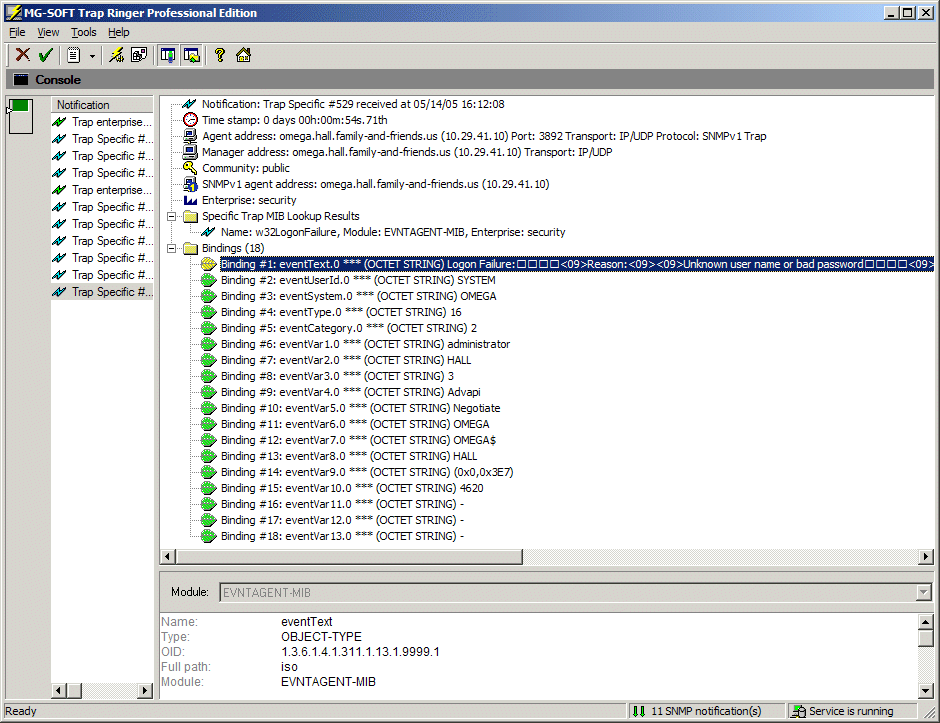
An example SNMP trap is shown in Figure 3, using the w32LogonFailure event discussed above. In that example, we used MG-SOFT's Trap Ringer software to compile the MIB definition, and then pointed the systems on our LAN to that server. We successfully used the same MIB with IBM Director as well. All of these tools allowed us to associate actions with these events, such as paging a manager when login failures were detected on one of the monitored systems.
Caveats Galore
Overall, this mechanism is extremely useful for monitoring the systems on our network for a variety of trouble indicators. For example, we can monitor for Service Control Manager events that indicate a service has crashed or has refused to start. Similarly, we can monitor for NTP synchronization problems among our different servers, and for filesystem errors that indicate a disk error may be coming. We can also be alerted to login attempts, and notified when an event log has been purged, among many other potential security considerations. Best of all, this is all taken care of through our existing management systems, and we don't need to manage secondary systems for the exclusive purpose of managing event logs in particular.
However, not everything is rosy with this model, and there are some areas of concern. For one thing, Microsoft has stated that the alerting mechanism won't always fire, or that it may be slow sometimes (essentially, the events aren't always trapped immediately). Also, some events will fire multiple times, and those have to be managed a little differently (this is what the rate-limiting options in the GUI tool are for).
One of the more annoying factors here is that different systems will behave differently, making it hard to get a universally-applicable solution in place. For example, Windows XP will trap the "Shutdown" security audit events, but doesn't trap the corresponding "Startup" events, while Windows Server 2003 does the exact opposite. [update 10/31/2005: Shaun Skillin has pointed out that the eventcreate tool can be used in the startup and shutdown scripts to overcome some of these annoyances.]
We've also encountered some problems with very large OID values. Although the SNMP specifications state that these values are unsigned 32-bit integers, some management systems insist on treating them as signed values, so some of the high-numbered OIDs are not recognized correctly on those systems.
There are also many people who have ongoing security concerns with SNMP and the use of unencoded community names. In particular, by installing SNMP on each of the managed nodes, we are potentially exposing a tremendous amount of information that we would rather keep private. This isn't much of a problem for our internal network resources, but we certainly appreciate the concerns that people have here, and share in some of them.

Copyright © 2010-2017 Eric A. Hall.
Portions copyright © 2005 Eric A. Hall