
Email Filtering Principles and Techniques
Over the past few years, unsolicited bulk email has gone from being a nuisance to a significant burden on messaging networks of all kinds. Public data from Brightmail shows that 64% of the email messages that they processed in May 2004 were spam, while Postini published a figure of 78% for the same period. Meanwhile, Network Computing Magazine's internal logs show that up to 87% of any day's incoming messages were flagged as undesirable (this figure includes worms and viruses). No matter how you slice it, the majority of all email sent today is junk.
The costs for transporting and processing junk mail can be quite high. For example, if an average user at an average company gets 30 legitimate email messages per business day, then this same user would receive a corresponding average of approximately 70 junk messages per day as well. At an average transfer size of three kilobytes per message, and an average 22 working days per month, then each unique recipient would receive almost five megabytes of data each month that they do not want. For an organization with 100 such recipients, that's as much as 500 megabytes of data per month that nobody wants, and which has to be transferred and stored at the expense of the affected organization. If your organization uses measured-rate Internet connectivity and provides long-term storage for deleted email messages, then spam is probably a big part of your budget, albeit one that may be hidden.
Connectivity and storage aren't the only costs associated with spam, either. In a report issued last month, Nucleus Research estimated that spam accounts for almost $2,000 in lost wages per employee per year, and that figure used relatively low levels of spam as the primary input. Using a baseline of 70 unwanted messages per workday, the estimated costs in lost productivity come out over $4,000 per employee per year. Add these costs to the bandwidth and storage concerns, and it's clear that spam represents a potentially formidable money sink for any connected organization, and no longer a mere nuisance.
Appropriate Filtering
The only way to eliminate the costs associated with spam is to eliminate the spam itself, which is usually achieved by implementing one or more email filtering systems. There are numerous options for filtering email (many of which are described throughout the remainder of this article), although not all of these mechanisms are viable for every organization, nor will they always even be viable for every user within a single organization. Furthermore, different mechanisms require different placement strategies, with some filters operating best at the edge of the network, while other mechanisms require direct manipulation by the end-user.
Broad-based edge filters provide the highest potential for savings, in that they have the potential to keep junk mail from ever being received by any server on your network, while the potential for cost savings get smaller as filters are moved closer towards the end-user, with increasing amounts of cumulative bandwidth, storage and processing capacity being required as unfiltered mail is allowed to travel further into the messaging network. Furthermore, rejecting mail at the edge of the network means that you don't have to generate delivery-failure notification messages (the sending system will be responsible for generating any such notifications), which alleviates a lot of related problems. All told, the sooner you can reject incoming mail, the lower your overall costs of operation will be.
On the other hand, user-based filters that examine each message in the context of each specific recipient are usually able to keep mailboxes remarkably clean with a small amount of false positives, but carry the highest cumulative resource costs and also present the greatest opportunities for productivity losses due to the higher amount of manual administration. For example, if each recipient's unique copy of a single spam message is processed independently of all the other copies, the cumulative demands for transferring, storing and processing every instance of each message will be multiples of the cost that would have been incurred if this work had been performed within an edge filter. However, user-specific processing is best able to adapt to the specific working environments and demands of each recipient, allowing for very precise tuning, and thus allowing for the most accurate filtering.
Tiered Filtering Architectures
Mixing and matching a variety of different mechanisms offers the best protection, while still preserving a reasonable cost savings. In this kind of model, edge filters can be deployed that simply reject obvious junk mail, while additional filtering mechanisms can operate inside the messaging network that reflect user-specific requirements. These kinds of layered installations offer the highest actual prevention against junk mail since they can be molded to specific characteristics without triggering an excessive number of false positives, while the elimination of obvious spam at the edge means that fewer actual resources are needed to process the reduced number of messages at the final point of delivery.
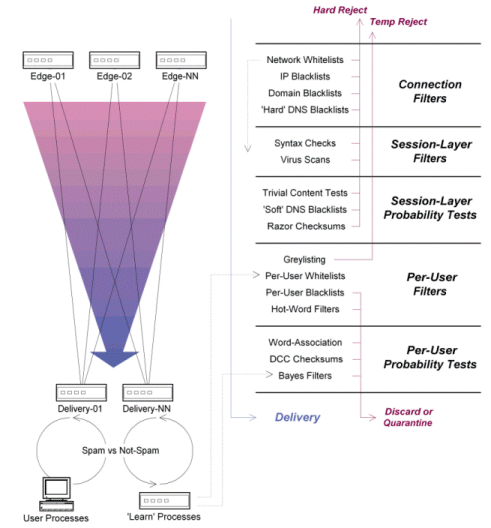
An example of a tiered topology can be seen in Figure 1. In that example, the edge filters are responsible for weeding out obvious spam through the use of numerous connection- and session-layer tests, and the messages which survive are then passed to the internal delivery servers where user-specific filters are applied.
This kind of tiered model requires careful planning, however. For example, some end-users are required by law to keep a copy of every message that they send or receive, and these users may require some kind of exception handling at the edge server which defers processing until all the recipients have been itemized. Along these same lines, it's usually a good idea to let email messages for the postmaster role account pass through the filters so that misidentified senders can get out of the filter jail, although you still need a way to reject spam to these accounts since some miscreants are known to actively target such accounts. As a result of these considerations, tiered architectures can provide the best overall protection at reasonable costs, but usually require careful attention to filter placement and enforcement rules.
If your network is sufficiently complex - and if you have the administrative resources available to monitor and adjust the filters that you need - then you are likely to find that internally-developed solutions will provide the highest actual value. However, if you are operating under a tight budget or if your administrative resources are already stretched thin, then you may be better off looking to one of the vendors that sell pre-packaged integrated systems. Similarly, you may also wish to consider outsourcing some or all of you spam management problem to a service provider, who will accept all incoming mail on your behalf and only forward the clean traffic to you. However, keep in mind that these offerings are usually designed for common scenarios, and that some amount of internal filtering is probably going to be required in any event.
Managing Probabilities
One of the more subtle aspects of running a multi-layered design is in the effective management of the weights that are assigned to different kinds of filters. This is particularly true when tiered filtering systems are deployed, because edge filters may need to have entirely different probability ratings than their internal counterparts.
In simple terms, probability scores are useful whenever two or more tests need to be triggered before a message can be reliably rejected. This is typically needed whenever any single test is not strong enough to be used as a reject match in isolation, and can also be useful with filters that are known to periodically return false positives. For example, an organization may decide that most of the email arriving from a specific domain is spam, but all of the mail from that domain cannot be totally refused. Similarly, an organization may decide that email messages which contain a certain string are probably spam, but this cannot be relied upon with absolute certainty (perhaps the internal accounting department deals with financial mail, or a human resources employee is actively looking for discount pharmaceutical products). In these kinds of cases, absolute filters are not going to be useful, and probability weights are going to be necessary.
The most popular probability engine in use today is SpamAssassin, which comes bundled with numerous filters that can be configured to return whatever probability values suit the needs of the organization. New filters can also be written that provide additional scoring metrics, if needed. For example, SpamAssassin comes with built-in parsing tools that will assign a probabilistic score to a message based on the amount of uppercase text or colored HTML in the message body, and can also call upon external filters such as DNS-based distributed blacklists. SpamAssassin can also be configured to check for the presence of custom header fields which may have been inserted by your SMTP server, and can also call upon customized external tests. Once these are done, SpamAssassin adds the scores together and compares the final value to user-defined threshold values, with the message either being discarded, quarantined for later examination, or allowed to pass through to the next point in the delivery path.
In the case of the sample messaging network shown in Figure 1, SpamAssassin is run twice: once at the edge, and again at the core of the messaging network prior to delivery. By limiting the tests which are called upon at each juncture - and by tweaking the scores of each test suite to reflect the targeted attributes - the amount of cumulative processing can be minimized while each transit point gets the most appropriate benefits. In both cases, the most expensive tests are only called upon after the static (cheap) filters have already been called, which further reduces the cumulative load.
Also note that some mail systems allow external tools like SpamAssassin to be called while the session is still active, which means that the server can reject the mail outright based on the probability value that is returned. For example, Postfix 2.0 can be configured to pass an incoming message to SpamAssassin after the internal tests have all been run, and for the final probability score to be used in deciding whether or not the mail should be accepted. This allows Postfix to refuse the mail while the session is still active, thereby eliminating the need for out-of-band delivery-failure notification messages. Recent versions of Sendmail also support these kinds of in-line calling features by way of its "milter" API, as do a few other high-end SMTP servers.
Network Blacklists
Network blacklists that flat-out refuse traffic from specific IP addresses and networks are usually easy to implement, given that most email servers support these filters directly. And because they are easy to implement, most email administrators usually start out by trying to block email from known offenders through these mechanisms. However, this is not a particularly practical strategy today, except in a handful of special situations.
For one thing, the number of virus-infected systems on the Internet today allows spammers to use almost any network for transmission purposes, and it is impossible to maintain a local list of addresses that accurately reflects the complete set of infected systems. Similarly, open relays and other problematic hosts come and go at a fairly constant rate, and it is impossible to maintain a complete and accurate list of these systems either. In these kinds of cases, you will usually only discover the hosts after they have sent their junk, and by the time you block them they may have already been fixed, meaning that your list will be useless both before and after the offending event.
This does not mean that IP-based blacklists are ineffective or that they should never be used. In particular, network blacklists can be very useful with problematic ISPs that host known spammers, or that don't respond to complaints, and where another kind of filter is not suitable. However, keep in mind that any of the blocked organizations may be assigned new address blocks at any time, thereby rendering the local list obsolete, and potentially causing harm to anybody that may be assigned the old addresses. Furthermore, since these kinds of filters block all traffic from the affected networks, it is not possible for an innocent bystander in those networks to email the local postmaster account to discuss the problem (although they can still send mail from another physical network). For these reasons, these entries should be rare, and other kinds of filters should be given preference.
Domain-based blacklists are also widely supported in SMTP servers, and are somewhat more effective than IP-based based blacklists. In particular, these filters are useful with "professional marketing" organizations that do not attempt to camouflage their connections and email addresses behind random dial-up accounts or fake email addresses. However, these filters are not at all useful with the bottom-crawling spammers that break every rule in the book.
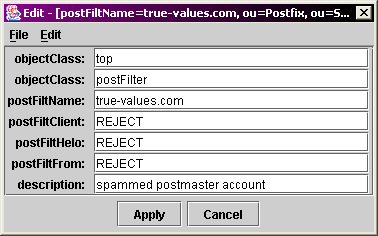
Domain blacklists can trap senders at a variety of different points in the transfer process, although the extent to which your filters will work will depend in large part upon the capabilities of your server's filtering mechanisms. For example, Postfix allows domain filters to be used against the domain name of a connecting client, the hostname parameter from the HELO and EHLO commands, and the domain name of the envelope sender, and can even be used to block mail from domains that share common DNS and SMTP servers with known bad guys. Postfix also allows these kinds of filters to be defined and stored in LDAP directories, which simplifies sharing the blacklists across multiple servers.
Distributed DNS Blacklists
Distributed DNS blacklists are a fairly recent addition to the anti-spam arsenal, but have proven to be extremely useful in their short lifetime. These blacklists use name-to-value lookup services over DNS, with the query identifying the suspicious host, and with the answer indicating whether or not that specific host is listed in one or more of the queried blacklists. There are well over 200 publicly-available free-of-charge blacklists available for use that describe almost every kind of network (see http://www.moensted.dk/spam/ for a comprehensive list of current DNS blacklists). There are blacklists for known spammers, open mail relays, dialup clients that shouldn't be sending email directly, systems that have been compromised by worms and viruses, and even blacklists that itemize networks which have been delegated to specific service providers and countries. By combining these lists and tweaking the local probability weights for each list, you can get very explicit in your filtering rules, such as specifically blocking known-infected systems on broadband networks in Brazil, for example.
There are also a handful of "right-hand" blacklists which operate against the domain name provided in the sender email address, rather than using the IP address of the connecting client. If an email arrived from "user@example.net", a query would be generated for the "example.net" domain name at the target server, and the response codes would indicate whether or not the sender's domain was listed in the queried blacklist. There are several "right-hand" blacklists for tracking domain-related problems, such as whether or not the domain has an active and valid abuse mailbox, but these blacklists are not as common as the host-based blacklists described above.
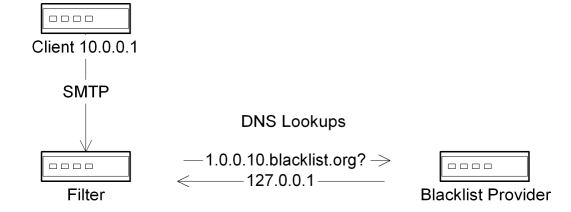
In general, it's a good idea to make limited use of a small and highly-trusted subset of these lookup services, but not to use too many of them. In particular, performing one or two lookups against a couple of good blacklists can eliminate large numbers of incoming spam from your network, and this one step is likely to free up significant amounts of network resources for additional filtering processes. And even if you are unable to use these filters to completely reject incoming email, you can use some of the blacklists for delayed probability tests, such as having SpamAssassin call on the blacklists instead of having your SMTP client do it alone (or in conjunction with the SMTP server, as is demonstrated in Figure 1). In that kind of model, the junk mail that isn't killed by the local filters can still be eliminated by the secondary tests before the messages reach the internal servers.
As with local blacklists, distributed blacklists can be incomplete or contain outdated information, and they can end up blocking mail to all recipients even when this is not desired. Furthermore, DNS-based blacklists have also been known to suddenly disappear from the network, or to suddenly list the entire Internet as offensive, or to develop some kind of other problem. If you are going to use these tools, make sure that you allocate time and responsibility towards their administration.
Whitelists
Blacklists are great for keeping known-junk off your network, but they are guaranteed to make some number of errors, regardless of how well you maintain your lists. In those cases, you need some kind of whitelisting system in order to help email messages from known-good senders get through your filtering minefield. Most of the email systems that support whitelists allow them to be used with the same range of filters as their blacklist counterparts. For example, the LDAP-based blacklists provided with Postfix can be used to return "accept" codes at the same junctures as they would return "reject" codes, so that a single database can serve double-duty. There are also a handful of operators that run distributed DNS whitelists (similar in design to their blacklist counterparts), including commercial trust-brokers such as Habeas and Bonded Sender.
There are a couple of important considerations with the use of whitelists in a distributed filtering system. First of all, it is extremely important to put your whitelist filters in front of your blacklists, and to allow whitelisted email to completely bypass any other filters if at all possible. For example, Postfix allows certain kinds of whitelisted entries (such as "trusted networks") to completely bypass all additional local filtering, but the free ride comes to an end once the mail is handed off to any external tools like SpamAssassin. Note that SpamAssassin does not provide a "bypass" feature for whitelisted mail, but instead simply assigns negative probabilities, but which are usually high enough to offset any other matches.
Another important consideration here is that you may need to add the whitelist entry to every filtering system in the transfer path in order to ensure successful delivery. Whereas blacklists can be effective at any point in the transfer path - one reject is enough to keep the message from getting any further into the network - whitelists have to be used at every transfer point in order to ensure that the messages are not killed.
Auto-Whitelisting Tools
Maintaining whitelists can be somewhat tedious, and several technologies have been developed which can be used to automate part of this process. For example, there are a handful of simple systems that will tracking outgoing email messages, and which automatically add all of the message recipients to the sender's local whitelist so that any subsequent email messages from the recipients will be preemptively cleared. There are variations on this theme, such as systems that also add unknown senders as long as a known-good contact is also listed as a recipient, which can be useful for automatically whitelisting users of a mailing list (as long as the "trusted" mailing list address is also listed as a recipient of the message).
As a slightly different approach, SpamAssassin has an automatic whitelisting system that tracks the historical average of a particular sender, with the current and long-term scores being used to weight each incoming message. For example, if a particular sender has a long-term average probability score of -3.5, and the current message has a probability score of 2.0, the immediate average score will be calculated at -1.5. This model works well with senders that have a relatively clean history and rarely trip any other filters , but it is counterproductive if a known-good sender frequently trips a lot of filters which results in a low long-term average, and those senders will still need to be added to the whitelist manually.
Some systems incorporate a challenge-response model, whereby incoming mail from unknown senders is put into a hold queue, and a challenge message is returned to the sender. If the original sender responds to the challenge correctly (such as putting a key value into the Subject header), the email address is added to the whitelist database. Although these systems often work to guarantee that a human sent the original email (or has read the challenge message anyway), these systems do not work seamlessly with robotic mailers like mailing list agents or virus-notification engines. Furthermore, these systems are often poorly designed, and will sometimes do things like generate a flurry of challenges every time a message is sent to a mailing list. And since much of today's junk mail uses forged email addresses, some of these systems can also be responsible for generating challenges for email addresses that didn't actually send any mail. For all of these reasons, these systems are not always as useful as they might appear to be at first, and any usage must be carefully planned.
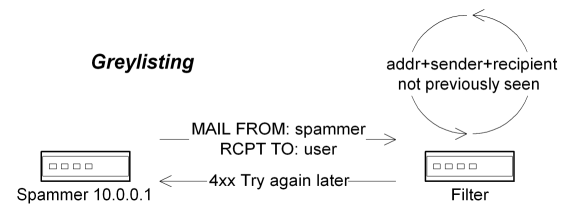
Another popular mechanism is "greylisting," which makes use of simple delivery deferrals in order to ensure that the sending SMTP client is not a bulk-spam agent. In this model, the first email from an particular sender is rejected with a temporary failure, but any subsequent emails from that same sender and SMTP client are allowed to pass through, on the assumption that a legitimate mail server will retry delivery but a bulk-spam agent will not. However, it is important to note that these systems do not actually validate the message sender, nor do they prevent undesirable content from entering the network, but instead only verify that the sending client is conformant with the SMTP specifications. Furthermore, not all legitimate mail passes through systems that are conformant with the specifications, meaning that this approach can introduce a fair number of false positives. Also note that greylisting only works if you are able to defer the initial transfer (meaning that this filter must be used at the edge of the network), but several organizations also prefer to only use this tool with mail that has a probability of being spam (thereby avoiding problems with broken SMTP clients). Cumulatively, this can mean that the filter has be called after the edge-based probability scoring, but before the transfer has been acknowledged, which can be difficult to implement.
As a relatively new trend, some SMTP servers are also starting to deploy "callback" systems which attempt to verify the message sender's email address through a back-channel connection to the sending SMTP domain. For example, if a message arrives from the unknown sender "user@example.net," the SMTP server might attempt to open a connection with one of the mail servers for the example.net domain and see if it will accept email for the "user" account. If the callback procedure shows that the original sender's address is valid, then the account is added to the whitelist. There are numerous potential problems with this approach which can significantly limit its usefulness, however. For one, the selected target server may not have a list of all the email addresses within its domain (this is a common problem with secondary mail servers), and may therefore verify all email addresses, including invalid ones. Meanwhile, in those cases where a junk mailer is using a harvested address as the sender address, these tests will only verify that the account is valid, and not that it is being used for legitimate purposes. As such, the usefulness of these tests is limited to eliminating obvious spam rather than automatic whitelisting.
Validity Tests
Another fairly recent trend in the fight against junk mail is the increasing use of protocol validity tests, which attempt to determine if a particular sender or message conforms to well-known practices. These tests can be extremely effective in keeping spam off your network entirely, but because of their dependence on letter-of-the-law conformance, they can also generate a tremendous number of false-positives, and must therefore be deployed judiciously and prudently. In the general case, they are best used for determining probabilities rather than flatly rejecting incoming mail.
A simple example of these tests can be found with mail servers which require that the forward and reverse DNS domain names of an SMTP client match up exactly. In this kind of usage scenario, the IP address of an incoming connection is queried in DNS to see if a domain name is associated with the IN-ADDR.ARPA entry for that address, and a subsequent lookup for the resulting domain name is also issued to verify that the target domain name is associated with the original IP address. If this verification process fails, these servers will refuse to establish the SMTP session. Along these same lines, some systems will refuse to accept mail if the hostname provided in the HELO greeting command is different from the hostname of the connecting node. There are also systems which will only accept mail from a host that is in the same domain as the originating user.
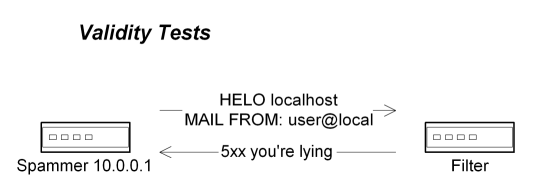
The basic principle with these tests is that well-managed systems should have all their ducks in a row, and if basic operational errors are detected then it is somewhat likely that the sender probably has other problems, and that it's just not worth the risk to accept mail from these systems. However, this kind of brutal enforcement can trigger a tremendous number of false positives, largely because there is no direct correlation between management of the domain name space and management of the email infrastructure, nor any correlation between the quality of the content and the quality of the software that is used to transfer the content. Many organizations have divisions with their own mail domains but which relay outbound mail through a central corporate server, or will send outbound mail through an ISP which may not be under the control of the sending party whatsoever. Meanwhile, many of the professional marketing organizations follow all these rules, and those messages will therefore fail to trip these filters.
On the other hand, it is entirely reasonable for servers to check if the specified domain name exists at all, and to refuse the mail if it doesn't, since no replies can be returned to the originator. Similarly, some mail servers will refuse to accept mail from hosts that try to pass themselves off as being on the same network as the recipient (many spammers often use "localhost" or the target server's hostname in the HELO greeting), or will use a "local" user's email address that has not been authenticated. Some large-scale web-mail providers are also frequently used in forgeries, and mail from those domains can generally be presumed to have originated on servers within those domains, and that the hosts on that network will have the right domain name. These kinds of tests are entirely valid, and can be extremely effective at a minimum of effort, but they are best used as probability filters due to the potential for legitimate exceptions.
Content Analysis
Most of the testing mechanisms described above are intended to be used while an incoming message transfer is being negotiated. However, there are a whole class of filtering mechanisms that can also be used to inspect and validate the contents of the message itself. Note that these tests can only be performed after the message has been transferred, although some high-end SMTP servers can keep the connection open while these tests are being performed.
At the simplest level, most SMTP servers allow message headers to be analyzed for basic indicators that the remainder of the message is likely to be spam. For example, most SMTP servers can be told to look for specific header fields and to refuse email that appears to contain foreign characters, or messages that only contain a single HTML body part, or messages that are missing critical header fields such as Date or Message-ID. However, these mechanisms can have numerous problems, such as failing to match on character sets that include several different languages, or triggering on legitimate messages which have been submitted by authorized clients (many legitimate mailing lists can send HTML-only messages, for example), and as such these kinds of tests should only be used as probabilistic filters and not used for absolute rejections.
Along the same lines, most SMTP servers also support basic filters for prohibited strings in the message body itself, such as looking for telltale markers of Nigerian scams, investment services, health products and the like. However, these offerings are frequently camouflaged through the use of noise text, or by misspelling key words, and as such you really need to use probabilistic tools that look for these markers in conjunction with the original hot-word filters. This is the area where SpamAssassin shines the most, since it is provided with hundreds of such tests, and with dozens more being freely available from third-party contributors. Through the judicial use of these basic word-association filters, it is possible to catch high-probability spam at the edge of the network, and with relatively low levels of computational overhead in comparison to the high reward.
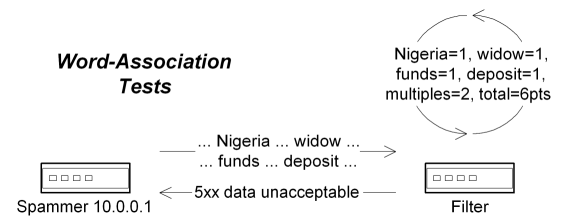
A relatively new set of these enhanced filters go so far as to look for spam-related URLs in the message body, and then check with clearinghouse servers to see if the URLs are associated with well-known spammers. If the message also trips other high-probability filters (such as originating at a high-scoring SMTP client), then it's usually safe to simply reject the mail outright, but keep in mind that this same confluence of events could occur through legitimate activity.
Bayes Filters
The current king of text-analysis tools is Bayes filtering, which uses probabilistic algorithms to determine whether or not the text in a message is likely to be spam or not. Essentially, these tools look at the words in a message (and sometimes look at phrases and other associations) to see if the text most often occurs in spam or "ham" messages.
However, it's important to recognize that these databases are very user-specific, since each end-user probably deals with their own professional language, and as such the databases of textual patterns have to be maintained on a per-user basis. In order for these tools to be effective, they must be trained according to each user's specific usage patterns.
The usual way to train these kinds of engines is to provide automated learning processes which periodically analyze mail that is specially marked, and which attempt to train themselves based on the inputs. This kind of feedback processing can be handled on a nightly basis through automated scripts which pull new messages from the user's inbox and a special "Spam" folder, and then having all of the returned messages fed into the Bayes engine for classification. If the engine ends up making a subsequent error, the user only has to move the confusing message to the appropriate folder, and the message will be relearned on the next run. Some standalone systems make use of "quarantine" folders or digests for the same basic purpose, with all suspicious mail being stored in a special folder for human examination. Any messages which are either abandoned or retrieved from the quarantine are then piped into the auto-learning process for reinforcement purposes.
Checksum Tools
Going beyond the text-analysis options, there are also tools like the Distributed Checksum Clearinghouse (DCC) and Vipul's Razor which use message checksums and distributed databases to look for bulk transfers. If an incoming message has already been seen by numerous other servers, then the message can be assumed to be spam, although this process must be handled with care.
In particular, DCC generates a variety of checksums from different parts of incoming messages, and the local DCC client submits the set of checksums to a DCC server which returns values that indicate how often each of the checksums have been seen. Messages which have been seen by many participating systems return increasingly high values, which can then be incorporated into probability scores. However, DCC only looks at the frequency of a message's occurrence, and will therefore trigger against legitimate bulk mail such as mailing lists and newsletters, and not just spam. In order to preclude legitimate bulk mail from being aggressively scored, the senders must be whitelisted, which tends to dictate that DCC clients operate close to the end-user who can manage their own whitelists.
Vipul's Razor is slightly different from DCC, in that it also uses message checksums within a distributed network, but also has additional mechanisms that allow accredited participants to signify whether or not a message is spam. The credibility weights of each participant are keyed to the number of coinciding reports, so the assertions of frequent valid reporters have more weight than one-time reports. Because of this capability, Vipul's Razor can be used at the edge of the network with some success, although the distributed nature of the tool necessarily means that each message will incur more per-process latency, which may make it impractical for some networks.
Another consideration with these kinds of tools in general is that they work best when several reports have been filed, and if you are getting spam from relatively small spam lists or if you are at the beginning of spam runs (perhaps you are unfortunate enough to have the email address of aardvark@a1.net), then you may end up getting spam before enough people have had a chance to report it. So while these tools are generally very effective, they are no panacea in isolation.
Other Tools
One of the most useful but underused tools in the spam-fighter arsenal are spam-trap addresses, which are designed to serve as magnets for known spam. By publishing a particular email address in several conspicuous places - such as making frequent posts to out-of-the-way newsgroups, signing up for known-hostile mailing lists, and otherwise making the email address widely available across the Internet - you can encourage spammers to send their junk to a heat-sink that simply rejects or discards any email which includes that address in the recipient list.
Looking towards the future, there are also a handful of sender-authorization technologies under development which are designed to tell a receiver system that a particular message was authorized to have been sent by the sending party. While these technologies do not say if a message is spam or not, they do allow a recipient to reject forged mail, which promises to cut down on spam as a natural by-product. One such effort is the Sender Policy Framework specification, which allows domain owners to itemize the hosts and networks that are authorized to send mail on its behalf. Meanwhile, the DomainKeys proposal uses public-key technology so that legitimate email can be signed by the sender or an authorized relay, and recipients can validate the signature with a relatively lightweight lookup. There are a dozen or so of these kinds of proposals under development, and some of them are being developed within the IETF as possible future standards, although it's far too early to say which of these approaches will be embraced.
There is also an IETF effort underway to make Whois data available via XML, which will theoretically allow for improved parsing of delegation data. Once the tools become available to take advantage of this data, network operators will be able to do things like determine if an embedded URL points to a network which is known to be spam-friendly (without having to query a separate list of fast-changing URLs), and to reject or weight the message accordingly.
Perhaps the most important tool in any arsenal these days is a virus checker which can scan all incoming email messages and discard infected messages immediately. Given the high number of infected and exposed systems on the Internet today, the need for these systems has become absolutely critical towards safe operation. Furthermore, these filters should absolutely be used at the edge of the network, given that most of the worms today are sent via email, and use forged addresses.
While the above list may appear to be somewhat large and unwieldy, this is unfortunately a reflection of the current reality: spammers and the associated malware developers are constantly pushing the envelope, looking for new ways to circumvent the filters that already exist, and new technologies have to be developed to fill the gaps that they find. On the plus side, however, the existing set of tools can be extremely effective at fighting spam if an appropriate amount of computing and administrative resources are dedicated to the problem. As empirical proof towards this point, one of our small test domains currently rejects hundreds of attempted spam and worm messages on a daily basis, with only a handful of such messages getting through every week, and that domain only uses a small subset of the tests described here.
Planning for Throughput
The biggest issue with comprehensive filtering systems is processor utilization and overall task latency. Simply put, the more tests that you perform, the longer the filtering processes will need to run.
The amount of processing capacity needed is a function of the number of messages you currently receive, the time available to process each message, the number of tests that you are going to perform, and the number of processes available. Unfortunately, time is not variable, and you do not have much control over the number of messages that other sites will try to send, meaning that the only two variables that you have control over are the number of tests that you will run and the number of processes that you can dedicate to these tests. Furthermore, if you want to perform more tests against a fixed number of messages, but you don't want to increase your message backlog, then your only real option is to increase the number of processes available.
For example, a series of static blacklist tests against incoming messages may only require a second or less to process (this figure does not include any subsequent processing, such as delivery handling). There are 86,400 seconds in a day, so the same number of messages could theoretically be processed with a single system at that rate. However, if you add multiple remote lookups to your filtering system which introduces an additional nine seconds of task latency, then the overall throughput will drop to just 8,640 messages per day. If you needed to get back to 86,400 messages per day, you would need to add another nine processes, with all of these systems running in parallel.
That may seem like a lot of systems, but the numbers usually come in somewhat lower if you are able to use multithreading or multiprocessing systems. Furthermore, if you call your static filters before the probabilistic lookups, you can eliminate a significant number of the messages that have to go through the expensive lookups. In the end, a couple of high-powered systems may be sufficient to handle such a load, and may only represent a marginal cost increase.

Copyright © 2010-2017 Eric A. Hall.
Portions copyright © 2004 CMP Media, Inc. Used with permission.