
Network Performance Planning
No enterprise is immune to the occasional system or network failure. The best protection is to prepare for the worst, using performance-planning and network-management tools to monitor and maintain all systems—from the application endpoints to the hosts and the network connections.
With a little foresight and performance planning, you can avoid unnecessary system failures by analyzing and managing your application's performance requirements. Ultimately, this practice can speed the time-to-market for your organization's products and services.
Analyze This
Performance planning is a basic pre-emptive strike, but it can be time-consuming and even expensive for complex infrastructures. Still, ensuring ample resources for your networked applications is crucial to preventing outages and staying in business. If your applications don't have sufficient hardware and software resources and consequently are plagued with performance problems, your company can lose money in productivity losses. Not only does your IT group's image suffer, but you risk losing your organization's customers or clients—not to mention your job.
Predicting demand for your application load, network traffic, and disk or any other system resources is the toughest part of performance planning. Not only do you need to know the intimate details of the underlying technologies, you need to be familiar with the inner workings of your organization's business and to understand how those aspects affect demand.
In your performance analysis, first examine how application logic is distributed across your endpoints and determine the minimum bandwidth and latency requirements for each user session, as well as the expected peak-processing load, for instance. Because these factors vary from application to application, you'll need to scrutinize them on a case-by-case basis. With Web applications, for example, the processing load typically falls on the server, and processing time is more important than network latency. VoIP (voice over IP), meanwhile, relies heavily on the network, since the technology usually is implemented as a peer-to-peer system.
You can learn a lot from tracking your system's usage patterns. Short-term usage patterns, for instance, affect the demands on your system's resources: When a user fires up his or her application, there's usually a flurry of initial traffic as the client authenticates to the system and navigates to its destination. Traffic dies down after login, as does the demand on system resources. You can take advantage of this ebb and flow by off-loading certain tasks. For example, you can run authentication on a dedicated server rather than cramming everything onto one server.
Another trend you can glean from your usage data is peak traffic. With business applications, production workloads usually peak midmorning and midafternoon, while staff-related traffic, such as data entry, typically remains steady around the clock. Of course, if your users are spread across the nation or the world, working hours will vary by time zone. You should design your servers and network to accommodate spikes in usage before and during busy seasons—for example, at holiday time if you're a retailer, or in April if you're an accounting firm.
Beware of changes in usage patterns after an upgrade. If your new, enhanced e-mail server supports remote folders better than your old one did, for instance, look out for more demand on the system as your users begin filing away their e-mail messages on the server rather than locally on their own machines.
Bottom line: Don't just guess at your usage patterns and trends; study them closely and regularly, and make adjustments as necessary. The more accurate your usage information, the better your performance planning.
Planning for growth, however, is tricky because it varies by application. While demand for a task-specific application, such as an online expense tool, grows incrementally with the number of employees, the resource demands on e-mail can grow exponentially with the influx of spam, for instance. And when you add spam filters to clean up the unwanted mail traffic, your server-processing overhead increases, too.
Another factor that can increase traffic volume is the so-called flash-crowd effect: A sharp increase in the number of users trying to access a Web site or intranet server at the same time because of a change in your company's ranking in a search engine or a news flash in a corporate newsletter. How do you plan for potential growth? The best practice is to design for 300 percent to 500 percent extra capacity on external-facing hosts, such as your Web server, and about 50 percent extra overhead for your internal server. That includes overbuilding your network capacity as well.
Once you've identified variables like these that can affect your system, it helps to use the Monte Carlo simulation model against your projections. It will give you a series of outcome scenarios: Rather than planning on a likelihood of a fixed number of simultaneous users, for instance, you can determine the possible ranges of users, which will make your growth projections more comprehensive. Then use the results of this simulation to estimate your traffic patterns. Although the Monte Carlo simulation is typically used for testing purposes, you can use its range of growth numbers to build a solid model for both the planning and testing phases.
Build It
When you've completed the analysis phase, it's time to build or rebuild your application or system. The requirements you identified in your original performance analysis will dictate your design, so it may entail building a storage system, for instance, that focuses on high throughput or fast seek times. The application's latency and bandwidth requirements, too, may determine whether the servers or application are distributed or centralized. Off-loading authentication and logging functions onto separate systems, for example, lets you better scale the architecture. That's easier and cheaper than trying to fix capacity problems in one monolithic system.
Similarly, distributing a system geographically can be less expensive than trying to build a massive system at a central location. Groupware applications, for instance, usually are cheaper to operate if they're distributed geographically because traffic is then contained within a region. Scheduling in groupware typically occurs within a department or workgroup, so it's not necessary to have all the traffic go to a central server. Distributing these systems also lets you offer more bandwidth-sensitive features like remote e-mail folders because there aren't any bandwidth constraints. This architecture is not for all applications, though. Web messaging environments, in contrast, work best with centralized servers.
With an overall distributed architecture, it's best to sign up with multiple WAN service providers. If your system will be accessed by the general public, for instance, you should buy connectivity from multiple providers to ensure you're creating the shortest and cleanest path to the largest number of end users. This tactic also limits your exposure to ISP outages because you won't have all your users in one basket—as long as you build in redundancy, that is.
Keep your service providers and their partners informed about the changing demands of your system. Remember that they have a supplier chain of their own: If you need an additional circuit, for instance, your ISP may have to go through the phone company, which in turn needs to upgrade some infrastructure equipment, and so on. Maintaining close ties to your service provider will prevent you from having to scramble for additional resources when there's a spike in your system's usage.
Change management is another key element in the buildout phase. Make sure all the related components of your system are running the same software versions and configuration settings and that you can upgrade them in sync. Testing might reveal some software version discrepancies, but it's easier to take care of these details from the beginning using change-management and replication tools.
And keep in mind that latency is cumulative, and too much segmentation can increase latency on the overall system. Say your system is split into 10 different components with each requiring 500 milliseconds to set up, process and tear down connections. That's five seconds of overall latency. You can reduce that latency time significantly with a centralized or less distributed architecture, but at the expense of scalability and, in some cases, efficiency.
Regardless of your initial design criteria, you'll probably end up rebuilding the system at least once. Testing—which we tackle in the next section—will almost certainly reveal flaws in your specifications, and deployment will uncover weaknesses in your testing methodology. So be prepared to adjust your design and build your secondary systems for the unexpected, with items like graphics-free Web pages for those spikes in traffic and resources. If a Web page with SSL (Secure Sockets Layer) has heavy graphic files that each require a new connection, performance can suffer miserably. Instead of forcing users to turn off image loading in their browsers to get around this kludge, build alternate pages without GIF images. That way, you can support more users during peak usage times.
Testing 1-2-3
Ironically, testing is the most error-prone part of the performance-planning process. Each component is analyzed for utilization, and the entire system is stress-tested. Trouble is, you have to test against your assumptions and biases, which are likely to be at least partially wrong. To catch these kinds of errors, make sure each of the discrete and holistic tests represents the actual usage patterns you expect. You should also test separately for the possibility of higher loads because of long-term growth, marketing promotions or seasonal demands. This will ensure that you are prepared for these projected changes, and that preparation may even provide you with alternative buildout scenarios. Short-term, off-site support systems may be adequate for spikes in growth in some cases, for instance.
For the routine usage tests, follow the behavioral patterns you pinpointed in your performance planning analysis. If an application exhibits a flurry of login activity followed by a leisurely pace of queries, mimic that in your tests. That real traffic pattern is more likely to expose the problems you'll encounter than staged frequent bursts of short-lived sessions.
Conduct your tests from both ends of the connection simultaneously so you can get a full picture of problems in your design. Testing must be performed from a user's location, using his or her equipment and network connections. If you want to roll out a system that uses handheld devices on a cellular network, test performance using the same handhelds and network rather than relying on a PC-based simulator attached to the server's local Ethernet LAN segment.
You should also monitor the performance of the server and its local network segment during these same tests, though—this will reveal the source of any performance problems. The handheld devices may be doing too much query preprocessing, or perhaps the cellular network is dropping too many packets. Or maybe the server's back-end database is causing trouble. The point is you can better identify these problems with holistic testing practices that mirror real-world usage as much as possible.
Run your tests for relatively long periods before taking any initial measurements—at least a few hours for a simple application or several weeks for a complex database. And don't introduce anomalies or increased volume until the simple stuff in the initial tests is working. Test static Web page fetches before CGI scripts, for instance, and test open connections before searches in an e-mail server. Once your tests are running smoothly, add these extra elements and simultaneously ramp up the volume. Then you'll be running a fully loaded test bed that represents all the diverse scenarios you predicted in your initial analysis. Adding layers to your tests makes isolating problems simpler: If your static Web pages operated smoothly but a new layer of tests of the CGI database searches shows sudden delays, you can see where the problem lies.
Be on the lookout for unusual resource utilization during the testing phase. Say you add a set of test clients and the test shows an unexpected flatlining of processor use. That may mean that a limitation in the network's bandwidth or frame rate, or in one of the back-end components, is preventing the server from processing the additional requests efficiently.
The rule of thumb is that no subsystem should operate at more than 75 percent of its capacity for a sustained time period. (Add more resources if any piece of your system is operating at that level of contention or higher.) Just the 75 percent rate may be too high if there is any significant contention for a particular resource, like the network. TCP, for example, has built-in congestion-avoidance algorithms that kick in whenever a single packet is dropped. That can generate excessive retransmissions at extremely low levels of utilization. The solution is to monitor your network and make the necessary tweaks until the retransmissions are eliminated, and then add at least another 25 percent capacity to allow for spikes. Proper testing will reveal the appropriate thresholds for your system.
Meantime, don't be surprised by short-term spikes in utilization. Applications typically make full use of the available CPU time or network resources. Your main concern instead should be any sustained utilization. Temporary spikes are a problem only if they become common or expose weaknesses in your overall system design, like when your network temporarily jumps to 100 percent usage and starves your other applications.
Finally, make sure you conduct simple validation tests of things like software versions. Two servers from the same manufacturer may be running different software or firmware on an embedded component, which means they can each exhibit very different performance or utilization rates. It's best to have configuration and change-management tools in place that detect these differences so you can avoid running resource-hungry validation tests.
Be Prepared, and Consider the Usual Suspects
Ensuring that your applications, servers and network perform optimally depends primarily on how well you stay on top of your resources. That entails performing a comprehensive audit of your existing systems that takes into consideration future use. After your performance analysis and subsequent buildout come the comprehensive testing and management of the system. Performance planning, including getting to know the underlying technology and business your applications support, can help you avoid major system failures and outages. It pays to be prepared.
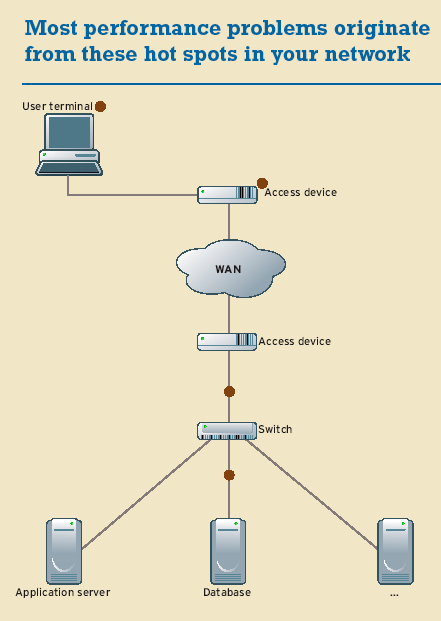
When the inevitable happens, getting to the source of your system-performance problems sometimes takes a little investigative work. Start monitoring the usual suspects on the client and server sides during testing.
If you experience any dips in performance when you go operational, check these hot spots:
- User-side applications: Your performance woes may be caused by an underpowered client conducting complex algorithms before the user even queries the application. Or the client may be generating complex response data after the query: A client receiving XML data in response to a query, for example, parses it and uses the data for generating secondary requests. Bottom line, you can't just monitor the application query. Another problem area may be the client application. If the client application performs multiple transactions, such as DNS lookups and follow-up queries, the rest of the application can suffer from blocking delays. Run tests using typical end-user equipment to expose these problems before you roll out your app.
- User-access segment: If the client isn't on the same segment as the application servers, the user network connection will likely cause trouble. In particular, traffic from a high-speed LAN to a slow WAN link typically gets congested by excessive retransmissions as the fat LAN pipe tries to squeeze data through the thin WAN pipe. An emerging problem is retransmission with inline VPNs. When the host-generated packets are too large for the encrypted channel, the host has to retransmit the original data using smaller packets. Increasing bandwidth and frame-rate demands exacerbate both of these access problems. The only fix is to change the characteristics of the network—by throwing more bandwidth at the problem, for instance—or the application, by using a lighter-weight encoding algorithm with lower frame-rate utilization or one that uses less bandwidth. Either way, the trade-off is a decrease in the quality of your voice and video traffic.
-
Network-access equipment on the server segment: Although user-side devices are likely to drop some traffic at the WAN boundary, network-access equipment on the server side can drop a lot more if the network isn't tightly managed. For example, a VPN or SSL concentrator on the server side of the network usually exhibits performance problems long before the end user's equipment starts to hiccup, while a router handling transmission flows for a few thousand remote users has major queue-management demands and can get clogged with traffic (unless you increase your available WAN bandwidth).
- Server performance: That's where most IT pros look first when performance degrades. Many server functions—excessive task switching, database performance, disk contention and disk swapping—can cause problems.
Serving It Up
There are two main rules of deployment. First, your original system-development team should be an integral part of the initial support team. That way, the hands-on experts are available to quickly address problems that crop up. It's almost always cheaper and faster to have the original development group fix problems than it is to hire hot-shot repair specialists who have to learn the entire system. Also, with the original experts performing initial monitoring and analysis, you can often detect problems before they occur.
Second, schedule your deployments for slow times, but avoid doing installations immediately before or during holidays. That may seem obvious, but unfortunately the practice is alive and well in some organizations. Your IT group would surely not appreciate being dragged away from Thanksgiving dinner to fix a problem that could have been caught the week before or after.
And perform the same type of monitoring in deployment that you performed during testing, scrutinizing resource utilization and contention levels. In some cases, it might expose a critical weakness in the system that went undetected during testing. You may need to roll back to the previous software release of your server or network device to fix any bugs or performance flaws you find during deployment. Be prepared to yank the rollout and retrench if things start to go south.
Designing for Performance
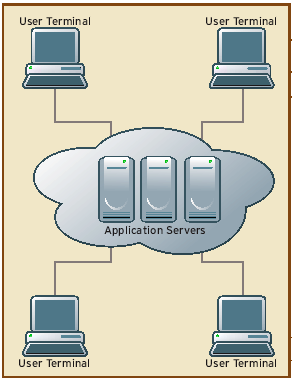
Centralized
Pros: Server-to-server traffic can take advantage of high-bandwidth, low-latency local connections. Application logic and other components can be segmented, and system maintenance and management can be simplified. This approach can use clusters and load balancing as well.
Cons: Application performance is susceptible to hiccups, and traffic management can be costly and difficult.
Best For: Organizationwide hosted applications and integrated applications.
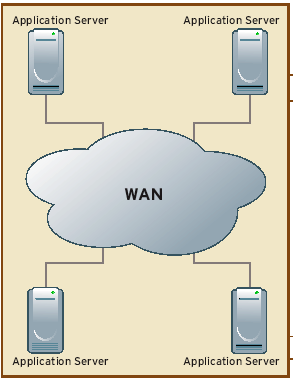
Distributed
Pros: Local traffic has high-bandwidth, low-latency access. Server-to-server traffic can be limited to only mandatory data, which lowers WAN costs.
Cons: All application data has to be either partitioned or replicated across sites, which isn't always feasible. System outages in this architecture can be killers.
Best For: Latency- or bandwidth-sensitive applications in which data has local relevance, such as groupware, configuration management and departmental applications.
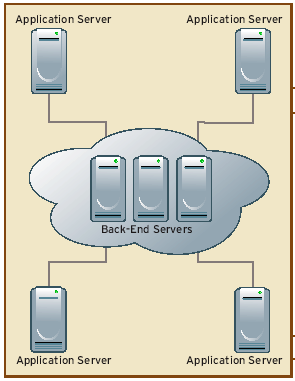
Hybrid
Pros: Enterprisewide or infrequently used data is centrally managed, and application- or site-specific traffic stays local.
Cons: Highly susceptible to network outages, so it requires redundant WAN links or data replication schemes.
Best For: Applications that use replication as an integral design feature, such as daily batch transfers; applications that rely heavily on computational power; and graphics, distributed directories and batch-oriented applications.

Copyright © 2010-2017 Eric A. Hall.
Portions copyright © 2003 CMP Media, Inc. Used with permission.