
Windows Services for UNIX v2.0
For as long as there have been LANs, there have been cross-platform integration problems, with the users connected to one set of resources needing access to data residing on other platforms. And for almost as long, various vendors have offered various products meant to ease some of these problems—with varying levels of success.
For users of Microsoft Windows NT, this vendor support has been a mixed bag. Although Microsoft has always provided at least some support for Apple Computer AppleTalk and Novell NetWare connectivity with NT Server, the company has not offered much in the way of integrating Unix-based systems into NT networks—at least until last year's release of Windows NT Services for Unix version 1.0. That product was a good first effort in that it provided core services, such as NFS (Network File System) and telnet terminal access, though it also lacked some necessary components, such as an NIS (Network Information Services) server, and had some spotty quality issues, both of which made wide-scale deployment challenging.
With Windows Services for Unix version 2.0, Microsoft has filled in some of those holes and has improved the operational quality of the software. However, a variety of new problems has been introduced, and not all of the old problems have been eliminated. In addition, some of the new features are dependent upon the product being deployed on Windows 2000 servers, which is not an option for everyone who wants this functionality. This last point is particularly true for the complex, large-scale environments that feel the cross-platform integration pain most acutely, since the inherent complexity of those networks dictates that enterprisewide infrastructure changes are evolutionary rather than revolutionary.
Shows Improvement
In the end, all these factors add up to give Windows Services for Unix 2.0 a grade of "better" when compared with Windows NT Services for Unix 1.0, but it does not yet qualify as the "best" solution for administrators looking to integrate their Windows and Unix network services. Users of version 1.0 should upgrade, but many administrators will be better off keeping Unix-based integration solutions, such as Samba, in place, while other sites will be most well-served with NFS-NIS integration tools on their Windows clients. Everybody should try version 2.0, however, because it does offer some compelling features, regardless of the holes.
Administrators can pick and choose which of the numerous components that comprise Services for Unix 2.0 they wish to install. For our tests, we focused on the NIS server (which is limited to Windows 2000), the NFS server and gateway—the latter of which lets an NT server publish external NFS mounts as local SMB (Server Message Block) shares—and the telnet server. Other components include an NFS client, a PC-NFSD (NFS daemon) server, an RSH (remote shell) server, ActiveState's Perl interpreter and a multitude of Unix-centric utilities.
Consolidated User Management
The most compelling aspect of Windows Services for Unix 2.0 is the promised ability to consolidate Windows and Unix user accounts via the provided NIS and PC-NFSD servers. This is an extremely tantalizing feature because the Holy Grail for most integration quests is the ability to define and manage user accounts in a single location, while also letting users authenticate and access network resources from multiple platforms. Depending on your environment and flexibility, this objective may be obtainable for some but is not entirely within everyone's reach. Nor does it always work well.
At the core of Windows Services for Unix 2.0 is the User Name Mapping service, which maps Unix user and group accounts to their Windows equivalents, and which is used by the NFS server and gateway components for file-system ACL (access-control list) mapping.
The User Name Mapping service is flexible in that it can pull Unix user and group IDs from an NIS server or from a locally defined pair of "passwd" and "group" files. These accounts then can be mapped dynamically to Windows NT or Windows 2000 domain accounts (for example, where the "ehall" Unix account matches the "ehall" NT account), or can be defined explicitly on a one-to-many basis (where the Unix accounts of "ehall" and "eric_hall" are both matched against the NT "ehall" account).
Once the User Name Mapping data has been defined, any Windows Services for Unix host can use the information (for example, a remote NFS server can use the local server's User Name Mapping service with its ACL maps), so you need to define this mapping only once if your account data is consistent across platform lines.
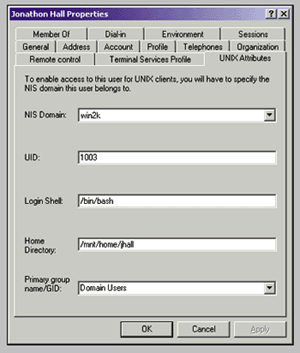
Windows 2000 servers with Active Directory also have the option of running an NIS server locally. When this feature is enabled, the Active Directory schema is extended to include Unix-centric user and group data such as UID (user ID) and GID (group ID) numbers, home directory, preferred shell and so forth. This data can then be read by the User Name Mapping service described above, by pointing the mapping agent's NIS client to the local NIS server. In essence, this allows Active Directory users and groups to be recursively mapped.
In our tests, we encountered problems with each of these mechanisms. On our NT 4.0 Advanced Server system, we copied a password and group file from a local Caldera Systems OpenLinux 2.3 server and used it for dynamic and static mappings. User accounts that were mapped dynamically were unable to access the NFS shares on that server fully, with the NT permissions sporadically rejecting access requests to the dynamically mapped user accounts. Once the users were explicitly mapped, the problem disappeared. However, sometimes the static mapping database would vanish, requiring us to rebuild the maps manually whenever we made a change to the database. This particular bug got old quickly, though Microsoft support indicated that a fix would be forthcoming.
On our local Windows 2000 Advanced Server, we installed the NIS server component and defined the user- and group-specific Unix attributes, such as the UID, GID and so forth. However, the NIS server does not publish all the data completely, nor does it allow for detailed modification. For example, issuing ypcat passwd requests from remote NIS clients returned all the user data except a person's full name, with the GECOS data always being returned as an empty field. In addition, there is no provision to change the advertised Unix name of a user or group, meaning that we couldn't publish the "Domain Users" group as the "users" group expected by our Unix hosts. According to Microsoft, the only way to publish an alternative name is to change the name as it appears in Active Directory.
There are some security risks here: NIS propagates user-name and password data in a relatively insecure form, for example. If you decide to put an NIS server on top of your Active Directory user-account database, you should be aware that anybody with the ability to ypcat passwd will be able to decrypt your user accounts easily. This is a problem with all NIS implementations but is still worth noting.
Another issue we encountered with the NIS server is that it prohibits users and groups from being assigned UID or GID values less than 100, meaning you cannot use the NIS Active Directory snap-in to publish system-level accounts. Although this is probably an intelligent default security measure, it knee-capped our integration efforts since we like having "httpd" and some other system-level service accounts stored in NIS. Moreover, the static mapping service has none of these restrictions, fully letting us map the "root" user with UID 0 to the NT "Administrator" user, and the "system" group with GID 0 to the "Domain Admins" group. Although it is possible to change the UID and GID values manually by editing the values stored in Active Directory, this is not something we want to do regularly.
When all this is added up, the NIS server component—while conceptually more attractive because of its integrated nature—is substantially less functional than the static mapping service and introduces some potential security risks.
However, if you do use the file-mapping service, you will need to define explicit mappings between the various accounts in order for the NT security permissions on NFS shares to function properly, as we encountered random ACL problems with the dynamic mapping service.
Note that the software's bundled PC-NFSD server does not use the User Name Mapping server to authenticate connection requests from NFS clients but instead requires that administrators manage an additional database for this purpose. Because this doubles the administrative duties and introduces additional password-synchronization problems, it severely limits the suite's potential as a consolidated account-management platform.
NFS Sharing
The real meat of Windows Services for Unix 2.0 is the included NFS server component, which lets Windows NT and 2000 servers publish their FAT, CD-ROM and NTFS file systems as NFS shares. In fact, it does this well, though system managers will need to watch out for some particular issues.
Sharing file systems with NFS is relatively straightforward, requiring at a minimum that you point the NFS server's MMC (Microsoft Management Console) snap-in to a User Name Mapping server so that it knows which Windows NT or Windows 2000 user and group accounts to map NFS accounts to.
In addition, the snap-in allows for enabling system logging (to a text file only, but not to the Event Log), time to hold file locks open, and configuration of "client groups," which are the machine groups used to control broad access to NFS shares (more on this in a moment). Once these settings are configured, NFS shares easily can easily be created from the Windows Explorer file manager.
When sharing a folder via NFS, you assign it a share name, and you also define the NFS client group permissions for that share, with the client group ACLs defining broad-level access that supersets over the native file-system ACLs. The All Machines client group is the default, and has default permissions of read/write. Additional client groups can have definitions that limit NFS access to read-only or that open the share to root access from other specific systems, letting administrators define specific access levels for specific systems.
Unfortunately, this can get tedious, since each NFS server has its own separate client groups, each of which has an array of machines that must be maintained separately. For example, if you want to let some systems access four separate NFS servers as "root," you have to edit the client groups on each of those four servers and assign the root access permissions to each group for each share on each host explicitly. If these clients are added using their host-name entries, then the IP addresses in use at the time the host name was added will become the restrictive identifier; if the hosts get new IP addresses from DHCP, they will no longer have access to those shares.
We expected tighter integration with name-based permissions, given Microsoft's embracement of Dynamic DNS. We also would have liked to see these client groups stored in Active Directory (when possible), rather than being maintained in system-specific databases, particularly since much of this host-specific data may be in the directory already.
Once the client-group ACLs are sorted out, user- and group-specific ACLs will be read from the file system, with the incoming UID-GID pairs being correlated to the underlying Windows NT or 2000 accounts according to the User Name Mapping service. For example, if a user requests access to an NTFS (NT File System) directory or a file—and if the NFS server allows that system the requested level of access—the NTFS permissions will determine the specific access that is granted to the user. This is a functional design, particularly because the consolidated ACLs keep file-system administration simple. Anybody who has had to manage multiple ACL sets for a single tree will immediately appreciate this strategy.
We also ran into a problem in that users were able to block themselves from working with files they had created from NFS. Students of NT will remember that when permissions are cumulative (that is, where the user-specific permissions are different from the group-specific permissions that also apply to that user), the least restrictive security is applied to the access request unless one of those permissions is No Access, which overrides everything else.
With the NFS server, if a user creates a file with no group permissions, that will be interpreted as No Access permissions for the user's primary group on NT (similarly, no "world" permissions will result in the NT group Everybody having No Access). Any subsequent attempts to read the file will result in the No Access ACL overriding all other permissions, with the request being denied.
Because many Unix systems and/or applications will create files that have "rwxr-x—-" permissions, this issue comes up often. The fix is a simple registry hack that tells the NFS server not to interpret these permissions as No Access.
Once these registry changes are made, the server is rebooted and the NTFS ACLs are reset, the problem goes away. All new files created will still have the explicit owner and group permissions defined but will not have the No Access ACL set whenever explicit permissions are not defined.
Interestingly, having to tweak the registry to make these settings explicitly is somewhat of a step backward from Windows Services for Unix 1.0—that version had lots of knobs and buttons for setting these types of controls explicitly. With version 2.0, however, none of these controls exists, and any tweaking that is desired must be implemented with manual registry hacks. Worse, no documentation exists on what registry changes must be made, meaning that users essentially have to pay Microsoft customer support for instructions on how to make the product function properly.
We encountered other issues that are much more troubling in that they represent fundamental security risks. For one, user accounts that are marked as "disabled" by Windows NT or 2000 still have access to files on the NFS server. Because all access control is based on file-system ACLs, only the access is checked, and no authentication is performed. If you disable a specific user account, that user account still has complete access via the NFS server as long as the underlying file-system permissions allow it. This is a disturbing hole, and we hope Microsoft will patch it soon.
Second, if the NFS server is used to share a FAT (or CD-ROM) file system, there's no real access control, because there aren't any underlying permissions to restrict. In this regard, anybody can access and use any file in those trees as long as he or she can access the mount point on the client. For example, if the root account mounts a share on system start-up, any user with access to the mount point has unrestricted access to the share. Although this is of concern, most users won't be sharing FAT file systems with the NFS server, so the risk is small in practice, though it's still a legitimate consideration because it gives much greater access than the same FAT file system shared via SMB.
Another potential problem is that any user who is able to edit the UID and GID that he or she sent in the access requests can have essentially unrestricted access to the server. For example, a user could install Linux on his or her PC and assign a local account that matches with the UID of an NT power user. Because there is no authentication control (only access control) with Services for Unix 2.0's NFS server, gaining high-level access would not be much of a challenge. We would like to see future versions of this product support Kerberos NFS authentication control.
NFS Gateway Services
A promising element of the Services for Unix product is the NFS gateway, which acts as an NFS client, with the additional ability to republish remote NFS mount points as SMB shares for Windows users to access. In our tests, this component worked well with NFS version 3 shares but didn't particularly shine with NFS version 2 shares.
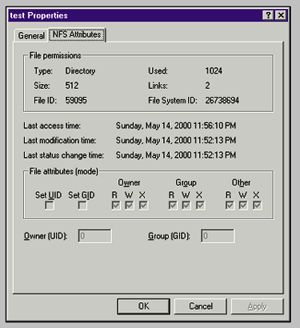
When testing with NFS 3 shares from a Solaris 7 host, we were able to create and edit files easily from a Windows NT 4.0 workstation using the SMB protocol, though we couldn't define any file-system permissions (the SMB client sees the share as a DOS volume and does not provide an ACL control). Because the NFS gateway also uses the User Name Mapping service to correlate Windows users and groups to Unix UIDs and GIDs, most of the time the default permissions were adequate, with the Windows user being assigned as the Unix "owner," and with the user's primary Windows group (along with the world group) getting read-execute permissions on the Unix host.
However, if any changes to these permissions are required, users will have to telnet into the host or NFS mount the share directly to change them.
With NFS 2 shares from a Caldera OpenLinux 2.3 host, we couldn't even get this level of functionality. No matter what we tried, we simply could not convince the NFS gateway to let any users create any files in any directories, being informed on every attempt that the "media" was read-only.
Another unfavorable aspect of the NFS gateway component is that it is cumbersome to configure, requiring that separate elements be configured in separate places. The MMC snap-in is used to configure the preferred User Name Mapping server, but servers are managed via a context menu in the Network Neighborhood, while specific NFS shares are managed via an external GUI utility. It took a good bit of reading just to figure out how to get everything going. Once we did, however, the gateway worked well with NFS 3 shares.
Telnet and Other Stuff
As stated earlier, Windows Services for Unix is a comprehensive suite of integration tools. Some of the tools, such as the chown program that lets you define the explicit owner of a file from the command line, are handy for every Windows administrator. Because there is no other way to do this with Windows NT, this is an extremely useful tool in its own right.
Another interesting component is the bundled telnet server, which provides remote command-line access to a Windows NT server. Unfortunately, this component is not well-designed, nor is it useful given the GUI-intensive nature of Windows, though it has saved our bacon on more than one occasion when we needed to net stop and net start a service from a remote site.
The most annoying aspect of this service is that it does not support the Interrupt Process or Abort Output telnet control characters properly, even though these control characters are defined as mandatory by the relevant RFCs. If you're using a terminal emulation that the telnet server does not fully understand (of which there are many), there's no way to break out of a directory listing (or a chown -r), and you'll have to let it run to completion before you can do anything else (or fix your mistake). It's also important to note that the only secure authentication mechanism supported by the telnet server is the Microsoft-proprietary NTLM authentication. We had at least hoped that Microsoft's newfound Kerberos religion would allow for Kerberized access.
Taken as a whole, the suite brings a high level of Unix integration for Windows NT and 2000 servers, though there certainly are many areas with room for improvement. We hope Microsoft will fill in these rough spots with the next release of this package. In the meantime, however, this is a viable option for network administrators to explore, though it's not the only one. Other solutions still offer better integration in specific areas (in particular, products such as Samba provide much better SMB-sharing functionality than the NFS gateway component), though those products could also likely be used in conjunction with this package effectively.

Copyright © 2010-2017 Eric A. Hall.
Portions copyright © 2000 CMP Media, Inc. Used with permission.