
Meet Win2000's Naming Service
Microsoft Windows 2000 represents a fairly clean departure from previous Microsoft OS releases. Rather than trying to patch and tweak the legacy technologies that have struggled to keep up, Microsoft has introduced a substantial number of new technologies that provide the same kinds of services in a whole new way.
These changes range from the mundane low-level services, like storage management, to esoteric services, such as the hierarchical and distributed Active Directory, which replaces the creaking LAN Manager domain model. For network designers and administrators, perhaps the most important of these technology swaps is in network naming services, with the long-reviled NetBIOS mostly being eliminated in favor of the Internet-centric DNS.
This is good news, because NetBIOS has long been a bane of administrators trying to implement Microsoft networking solutions on heterogeneous, multiplatform and multisegment networks. It's true that NetBIOS' simple design is functional for small-scale networks; features such as autonomous name-registration and broadcast-based lookups let small networks build dynamic naming tables without requiring any real administration. However, NetBIOS has never worked well in complex environments. Ask any organization with more than three distinct sites and you'll get an idea of the difficulties involved.
These shortcomings are eliminated with Windows 2000, however, because systems can now use DNS to register and locate each other on an IP network. This feature provides several benefits to network administrators. The main advantage comes from the fact that DNS is a proven, scalable and multivendor technology, while NetBIOS is none of these things. With DNS, a single network naming service can be used for different services, including Internet technologies, such as Web and mail.
DNS Is Not Enough
Before discussing how Windows 2000 uses DNS for name registration and lookup services, it's important to point out that NetBIOS names are still used by Windows 2000's core networking services. They are used as the primary identifier for a host (you can't override them with the DHCP host-name option), and as such they continue to show up in network browse lists and similar places.
What has changed is the way Windows 2000 system names and some services (Active Directory in particular) are registered and located on the network. Windows 2000 uses Dynamic DNS (as described in RFC 2136) to add and delete resource records in DNS on the fly, letting Windows 2000 systems (or a DHCP server) modify host-name-to-address mappings dynamically without using NetBIOS queries. In addition, Active Directory systems use the DNS SRV (service-location) resource record (which is described in RFC 2782) for registering and locating the special-purpose servers, such as the PDC (primary domain controller) or the catalog server.
This means that the dynamic and autonomous name-registration features that made NetBIOS useful on small networks have not been lost. Although DNS has required a significant amount of manual oversight and administration, Dynamic DNS and SRV resource records make this a nonissue. Simple networks with nothing but Windows 2000 hosts can register and locate each other dynamically without using NetBIOS, while large-scale networks of "pure" DNS systems can continue to operate smoothly.
Supporting older Microsoft OSes or NetBIOS-specific services, such as SNA gateways or backup servers, will still require a NetBIOS-over-TCP/IP naming service of some kind—broadcasts, static LMHOSTS files or WINS (Windows Internet Name Service). This means that most shops will have to run NetBIOS naming services to support their mixed-mode networks, severely limiting the functional benefits of this design. Because many applications likely will continue to support NetBIOS as a lowest-common-denominator naming service for years, it's unlikely you'll escape the need to manage and operate multiple naming services any time soon.
Name Registration and Lookups
Microsoft's networking products have always used NetBIOS queries to register and resolve host-name-to-address mappings for their LAN Manager-based services. For example, if you wanted to access Server-A, your client would use NetBIOS queries to find the IP address associated with the one system named \\Server-A. Now a Windows 2000 client attempting to connect to a Windows 2000 server will use DNS for this service. Because these lookups use "regular" DNS queries, you can now do "NET VIEW server-a. nwc.com." without having to seed the remote server's NetBIOS-to-IP mapping on the local system.
On the surface, this feature isn't terribly meaningful, but on a "pure" Windows 2000 network, it means you can get away with using only DNS, and you no longer need to use WINS or LMHOSTS to manage NetBIOS-to-IP address mappings. Organizations also can share their resources more easily with trusted outside parties because external users can connect to internal resources by using hierarchical DNS names instead of trying to replicate flat NetBIOS naming tables across organizational lines. Users in the accounting domain can access the servers in the personnel domain, and neither group has to worry about replicating WINS databases, manually editing LMHOSTS files or bridging broadcasts across its WAN.
To facilitate this feature, Windows 2000 systems use Dynamic DNS for on-the-fly name registration, thereby providing a mechanism for the Windows 2000 systems to continuously keep the DNS zone tables up to date. In that model, a system that wants to register an entry in the DNS zone will query for the SOA (start of authority) resource record for its zone (or the parent domain, if no authoritative servers are found). The system then will send a DNS update message to the primary server listed in that record. Depending on how the Windows 2000 installation is configured, these update messages can come from the clients themselves or from a DHCP server.
By default, Windows 2000 will try to update both the A (address) and the reverse PTR (pointer) resource records if the system is configured with a static IP address. If the system is configured to use DHCP, however, the default behavior is for Windows 2000's DHCP client to negotiate with the DHCP server over which system will perform each of these operations. The typical negotiation will result in the client's performing the A record updates while the server performs the PTR updates, as per the latest IETF draft.
Although many NOSes and third-party DNS/DHCP servers have supported server-based Dynamic DNS for some time, Windows 2000 is the first widely deployed OS to perform this work at the client level. On networks that use local addressing or nonintegrated DHCP servers, this design allows for automated DNS updates if nobody else is doing them. For example, if you need to change the locally assigned static IP address of a well-known system (such as a busy file server or mail server), the client-side integration ensures that this change will get propagated to the DNS servers.
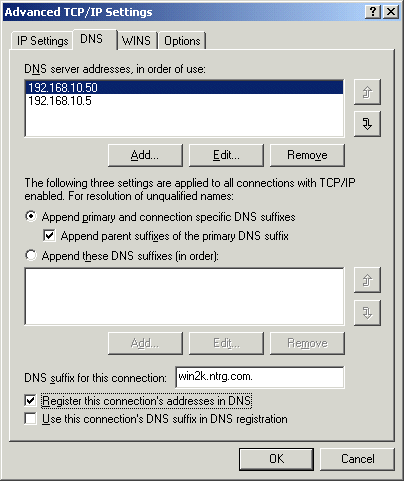
Making each individual client the focal point for this synchronization, however, is not necessarily the best approach, and many organizations prefer their DHCP servers to perform these operations. In that case, client-side updates can be explicitly disabled by navigating to Start / Settings / Network and Dial-Up Connections / Internet Protocol (TCP/IP) / Properties / Advanced / DNS and deselecting the "Register this connection's addresses in DNS" option or by editing the system policies for that host.
Service Registration
Although most NetBIOS query traffic has been used for registering and locating LAN Manager servers on a Windows network, it has also been used to register "services" as well. For example, previous Microsoft networking products used NetBIOS names to register and locate the domain controllers for a LAN Manager domain, while add-on products, such as Computer Associates' ArcServeIT, register and query for NetBIOS service names specific to their products.
Unfortunately, DNS has not historically provided a mechanism explicitly designed to store service names in the domain hierarchy but instead has relied on the use of crude aliases (such as "www") or external programs (such as the Service Location Protocol) for this purpose. This has changed with the introduction of the SRV resource record, which is specifically designed as a generic schema for storing location data about particular network services. Moreover, when SRV resource records are used with Dynamic DNS, they let systems register specific network services with DNS, modify the resource records on demand and delete the records when the relevant services are no longer available.
Windows 2000's Active Directory makes extensive use of SRV resource records in this way, with the domain controllers, catalog servers and other resources dynamically adding and deleting themselves from the DNS name space. Meanwhile, Active Directory clients use standard DNS queries to locate these services on the network, instead of relying on NetBIOS calls as other Microsoft networking clients have done.
Although Active Directory is beyond the scope of this article, the usage of SRV records bears further discussion, because these records often are not used in traditional DNS installations. With SRV records, each DNS domain can be broken into a hierarchical tree of transport- and application-specific entries that refer to specific services on specific hosts. For example, the "nwc.com." domain would have two immediate subordinate domains that are responsible for the transport protocol families (such as "_tcp. nwc.com." and "_udp.nwc. com."). Each of these transport-specific subdomains contains application-specific SRV records for each of the application protocols that need to be registered with a domain name object—such as "_ldap._tcp.nwc.com." or "_kpasswd._udp.nwc.com." This model could also be repeated for the "sm.nwc.com." and "wi.nwc.com." domains, if needed.
Because Active Directory domains are built around DNS domains, this structure is also used by Active Directory servers and clients. But in addition to the transport- and application-specific subdomain branches that are defined by the relevant RFCs, Active Directory also creates its own application-specific branches. In our case, "_msdcs.nwc. com." is used to store SRV records that point to the PDC, the global catalog server and other servers for a specific Active Directory domain. Meanwhile, "_sites.nwc.com." stores information about the Active Directory "forest" (Microsoft's term for a collection of independent Active Directory domains).
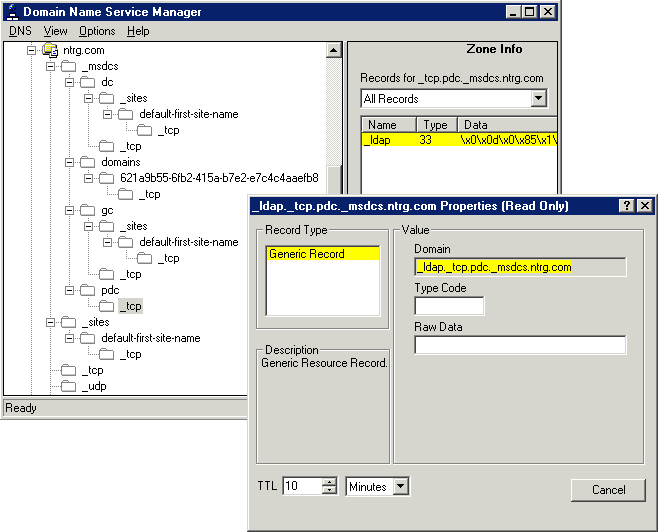
Whenever an Active Directory domain controller joins a domain, it will issue a DNS update message to register its IP address. A variety of DNS update messages that specify the relevant SRV resource records for the domain controller's role in the domain will also be issued. For example, the PDC for the "nwc.com." domain will issue an update request for the "_ldap._tcp.<domain_id> domains._msdcs.nwc.com." SRV record, pointing to its own fully qualified domain name. Active Directory clients that need to locate the PDC for the "nwc.com." Active Directory domain will simply issue a query for the relevant SRV resource records associated with the "nwc.com." DNS domain and use the resulting data to go about their business.
Interoperability and Other Hazards
In our testing, BIND (Berkeley Internet Name Domain) 8.2.2p4 worked well as the primary DNS server for a Windows 2000 Active Directory domain and for registering Windows 2000 clients via Dynamic DNS updates. It should be noted, however, that BIND does not support the secure update mechanism used by Windows 2000. Users running BIND servers in support of a Windows 2000 installation must define explicit ACLs (access-control lists) for the dynamic update operations to occur.
In addition, the DNS server found in Windows NT 4.0 also works well as a secondary DNS server as long as Service Pack 4 or greater is installed, because that patch added back-end support for SRV resource records and incremental transfers. However, NT 4.0's DNS server will not work as a primary server for a domain serving Windows 2000 clients or Active Directory servers, because it does not support Dynamic DNS nor does it support the manual administration of SRV records.
Another issue that has come up lately with the aggressive use of DNS for Windows 2000's Dynamic DNS implementation in particular is that many of the public DNS servers have been getting hit with a substantial number of dynamic update queries from improperly configured Windows 2000 systems. Unfortunately, this is an easy series of events to trigger.
Under the current design, if a Windows 2000 system is configured for a domain that does not actually exist (that is, where there are no authoritative servers for the specified zone), the Windows 2000 Dynamic DNS agent will attempt to contact the parent domain's authoritative servers and then will try to add its registration data to that zone. For example, if an organization configures its systems to be in the "win2k.nwc.com." domain but there aren't any authoritative servers for that domain, then the clients will try to register themselves into the "nwc.com." domain. Unfortunately, if there aren't any servers listed as authoritative for that domain, the clients would then try to register themselves with the "com." domain's authoritative servers.
For organizations that like to make up domain names on the fly, this can cause a significant number of problems, not only for their local operations, but also for the servers that are running the parent domains. If you tell your clients that they are in the "mytemporarywin2k.com." domain but don't bother to set up a DNS server that is authoritative for that zone (and point your clients to it), you'll send all your update requests to the "com." domain's servers. Similarly, if you point your clients to a server that sees an external DNS server as being authoritative for your zone (such as a shadowed server running at your ISP), you'll send all the update requests to that server instead of the local master.
This can be especially problematic with reverse lookup registrations among clients who are using address blocks that are managed by external entities (such as an ISP) and who are attempting to register their reverse lookup PTR records with the ISP's servers. Because Windows 2000's Dynamic DNS agent does not support classless reverse lookups (as documented in RFC 2317), if your organization is using a subnetted address pool for a specific LAN, those clients will attempt to update the primary server for the class-based zone that the address appears to inhabit, rather than updating the CNAME and the PTR records for your delegated address block. Another kicker here is that the Active Directory setup wizard does not automatically create reverse lookup zones, meaning the default installation practically ensures that PTR registration requests will be forwarded to the next-higher zone in the "in-addr.arpa." hierarchy, even when you do have a class-based block of addresses.
Unfortunately, these are not entirely rare events and are continuing to become more of a problem as organizations roll out a greater number of misconfigured Windows 2000 systems. The only way to minimize these kinds of problems is to plan and monitor the deployments with diligence and to ensure that whatever domains you create for your Windows 2000 nodes and Active Directory reside within a domain hierarchy that you control. Disabling the default of client-side automatic registration on your systems will also go a long way toward preventing these problems.
Assuming you don't get bitten by these problems, you can take advantage of these services to eliminate a significant portion of the NetBIOS design problems from your network and reap some of the benefits of a consolidated network naming service. It's important to remember that NetBIOS has not been removed from this design completely, but instead a significant portion of the problems with managing NetBIOS traffic has been eliminated. However, the elimination of NetBIOS name registration and query traffic for the core services is a huge leap forward.

Copyright © 2010-2017 Eric A. Hall.
Portions copyright © 2000 CMP Media, Inc. Used with permission.