
Advanced TCP Options
Considering its importance to the Internet, TCP has experienced surprisingly little change over the years. It has shown itself sufficiently able to ensure that data reaches its destination intact and error-free, and has done a good job of providing flow-control and circuit-management services.
Yet TCP has been woefully inadequate in many situations, particularly on modern networks that were unimaginable when TCP was designed. TCP's designers knew they couldn't predict the future, so they wisely allowed for modifications and enhancements that don't break the fundamental interoperability that drives Internet growth.
These enhancements are incorporated as "options" within the TCP header and allow new fields to be added, preserving backward-compatibility with older systems. Many new TCP options have been developed and deployed, with a few proving to be extremely useful. These options have been introduced on a wide variety of systems, though typically they're found on high-end Unix systems.
On the Bandwagon
However, with the release of Windows98, Microsoft Corp. is bringing these
options to the masses, once they are enabled. To do so, add a string value
called "Tcp1323opts" to the HKEY_LOCAL_MACHINE\System\CurrentControlSet\Services\Vxd\MSTCP registry
branch, with one of the following values:
- 0 - No Window Scale or Timestamp (default)
- 1 - Window Scale but no Timestamp
- 3 - Window Scale and Timestamp
Note that the use of Selective Acknowledgments are enabled by default.
It's important to note that Windows98 won't be the last OS to support these options. While none of the options are provided in any shipping version of Novell NetWare, Microsoft Windows NT or Linux, the latter two support the options in releases under development. Even many high-end Unix systems don't support all of them: SunSoft's Solaris 7 is the first major release to incorporate them all, while Hewlett-Packard Co.'s HP-UX and Silicon Graphics' Irix support only a couple.
As products that support these options are developed and deployed, it will become increasingly important for network managers to understand how these options work and how they will impact corporate networks; to that end, we present an explanation of these options below. To help convey this information, we'll study a typical exchange of data between a Windows98 client and a Solaris 7 server.
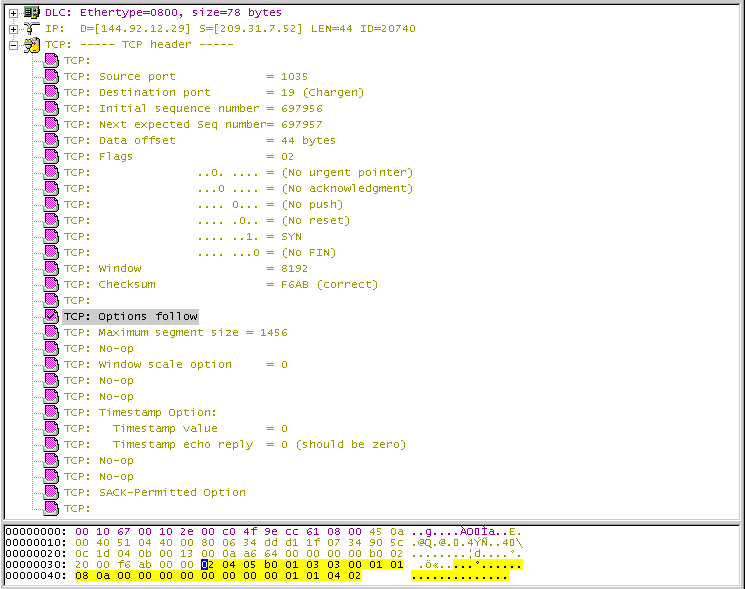
In the screen capture shown at right, you can see the first TCP segment sent from the Windows98 client. The first TCP option shown is the Maximum Segment Size (MSS); this well-known and widely used option is used for publishing the Maximum Transfer Unit (MTU) size of the local network (minus IP and TCP header data). Also scattered throughout the option space are No-Operation options, which are used to internally pad the option space. Neither the MSS or No-Op option are new—both appear in virtually every networked device on the planet. However, the remaining options are new to Windows98.
Window Scale
RFC 793, the document that defines TCP, mandates use of a "Window" field in the TCP header of every packet sent across a TCP connection. The Window field provides a 16-bit integer that advertises the number of bytes available in a recipient's receive buffer. This information is used by the sending system's flow-control service to slow down and speed up the amount of data being transferred according to the recipient's capabilities.
Technically, the Window field defines the maximum number of bytes that can be sent without requiring the sender to stop transmitting and wait for an acknowledgment. But because most corporate networks use low-latency topologies, such as Ethernet and token ring, the Window field's flow-control mechanism rarely comes into play on the LAN. Data is received and acknowledged quickly, allowing the sender to transmit more data. Thus, the Window field's maximum amount is never reached, and data flows smoothly across the network.
However, on high-latency, high-bandwidth WAN links, a limited Window size can cause severe performance problems. The Window field is only 16 bits long, so the maximum amount of buffer space that can be advertised is just 64 KB. That's plenty of space for high-speed local networks, but it's not always enough on slow WANs.
Assume that a 64 KB-per-second satellite link is being used between the two end points. It is possible for one system to transmit all 64 KB of data long before the first byte has arrived. As such, it would have to stop transmitting data, and wait for an acknowledgment from the destination system. Once an acknowledgment arrived, the sender could resume transmitting, only to have to stop again a moment later.
For this reason, RFC 1072 defined a TCP option called Window Scale, which lets a system advertise 30-bit Window values, with a maximum buffer size of 1 GB. This option has been clarified and redefined in RFC 1323, which is the spec that all implementations employ.
The Window Scale option provides a 14-bit "left-shift" value in the option's data field. This value defines the number of bit places that the 16-bit value advertised in the Window field should be moved to the left, letting the receiver advertise up to 30 bits. For example, the "Window Scale" figure (below) shows a 16-bit Window advertisement of 64 KB, but with a two-bit shift being proposed in the Window Scale option. These two new bits are appended to the right edge of the 16 bits provided in the Window field, resulting in 18 bits total (or 256 KB of buffer space).
Using a 256-KB buffer would allow the 64-KB-per-second link described previously to exchange data smoothly—the sender would get through the first 128 KB and then receive an acknowledgment for the first few bytes, allowing the sender to continue forwarding data at a constant and smooth rate.
To use this option, however, both systems must provide the Window Scale option in the TCP "synchronize" segments they exchange during circuit setup. If the Window Scale option is not provided—or if the Window Scale option is provided but a value of zero is advertised—the Window field must be taken at face value.
The shift value is "0," which means that the Windows98 stack understands the Window Scale option, and will implement it if a shift value is provided by the remote Solaris 7 system. However, the "0" also indicates that the Windows98 stack is not actually suggesting a shift value for itself, so the remote endpoint has to use the provided Window value for any data it sends back to the Windows98 system.
Timestamp
Another aspect of TCP's flow-control and reliability services is the round-trip delivery times that a virtual circuit is experiencing. In particular, the round-trip delivery time will determine how long TCP will wait before attempting to retransmit a segment that has not been acknowledged.
Because every network has unique latency characteristics, TCP has to understand these characteristics in order to set accurate acknowledgment timer threshold values. LANs typically have very low latency times, and as such TCP can use low values for the acknowledgment timers. If a segment is not acknowledged quickly, a sender can retransmit the questionable data quickly, thereby minimizing any lost bandwidth. However, using a low threshold value on a WAN is sure to cause problems because the acknowledgment timers likely will expire before the original data ever reaches the destination.
Therefore, in order for TCP to accurately set the timer threshold value for a virtual circuit, it has to measure the round-trip delivery times for various segments. Furthermore, it has to monitor additional segments throughout the connection's lifetime to keep up with changes in the network.
Although the use of these two algorithms is mandated in RFC 1122 (an update to the IP and TCP specifications), the implementation details for these algorithms were never standardized. These features are now provided by RFC 1323, however, which offers a timestamp option that can be used by the two end points to exchange stop-watch markers inside the existing TCP data segments.
It's important to note that the data provided in the timestamp field is only used by the system that wrote the data into the field in the first place. The Timestamp option is not meant to provide any form of time synchronization. Rather, it is meant to act as a simple stopwatch for each system, allowing them to measure the amount of time required to send and receive a segment across a particular network.
The Windows98 client setting the Timestamp field of the first segment's Timestamp option to zero; the Timestamp Reply field is set to zero as well. This is the very first segment sent across this virtual circuit; no data echoes back from the remote endpoint, so the reply field should be set to zero.
However, the Timestamp field used for Windows98's round-trip calculations probably shouldn't be set to zero, but rather should reflect the local system's actual clock. It is unclear why Microsoft has chosen to seed the initial timestamp field with zero, rather than using the local system clock for this purpose as specified in RFC 1323.
Although both systems must send the Timestamp option during the initial handshake sequence to enable its use, this option can also be used (and should be used) with any subsequent segment that is sent during the lifetime of the connection. The screen at right shows the Timestamp option being repeated, with the Windows98 system putting another (higher) value in the Timestamp field, and returning the value it received from the Solaris 7 host's Timestamp option in the Timestamp Reply field.
Selective Acknowledgments
One of the more common complaints about TCP is that it uses a cumulatively implicit acknowledgment scheme (as opposed to an explicit one), suggesting that all data up to the sequence number specified in the Acknowledgment Identifier field has been received. Once a sender has received an acknowledgment, it can assume that all data sent to that point has been received successfully. Conversely, if a sender receives multiple acknowledgments for the same byte of data, then it must assume that any data sent after that point has been lost.
Although this works very well when data is flowing smoothly, the lack of a detailed acknowledgment scheme prevents quick recovery when one segment from a batch is lost in transit. There are no mechanisms for a receiver to state "I'm still waiting for bytes N through P, but have received bytes Q through Z." If segments arrive out of order and there's a hole in the receiver's queue, the only thing it can do is keep saying "I got everything up to N." The sender has to recognize that the presence of multiple duplicate acknowledgments indicates a problem, and then resume transmitting data from that point.
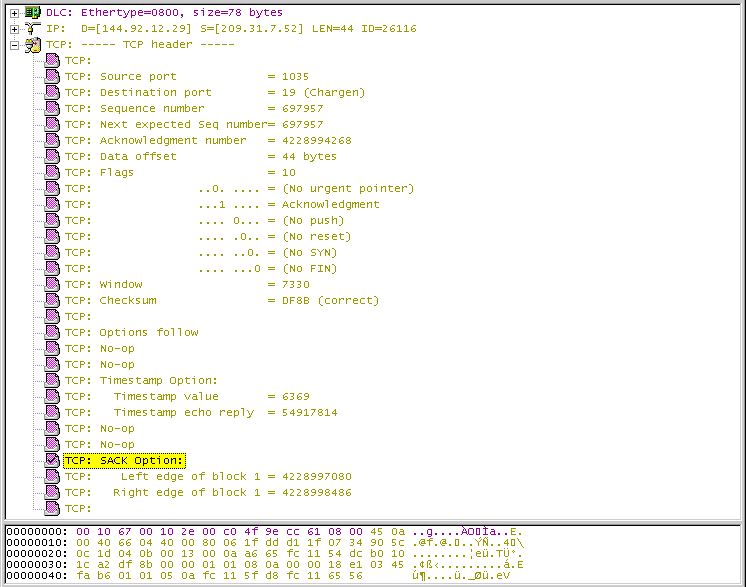
To provide for more robust recovery services, RFC 1072 specified a selective acknowledgment mechanism. This work was expanded upon and enhanced in RFC 2018, which is the specification used by Windows98 and other implementations. The two options defined in RFC 2018 are Selective Acknowledgments Permitted, which is used in the Synchronize segments sent during the handshake sequence, and the Selective Acknowledgment option, which is sent whenever a selective acknowledgment is required, as shown on at right.
The Selective Acknowledgment option is used to supplement the existing Acknowledgment Identifier field that is present in every TCP header. If a recipient has a hole in the data it has received, it issues a segment with the Acknowledgment Identifier field pointing to the last cumulative byte of data received, while the Selective Acknowledgment option points to any additional blocks of data that it has also received after the missing data.
The original sender of the data can then examine the Acknowledgment Identifier field and the Selective Acknowledgment option, determine which block of data was lost in transit and then send only that segment, resuming transfer from the high watermark specified by the Selective Acknowledgment option.
For example, in the screen below, you can see that the Windows98 client is still waiting for byte 4,228,994,268. But the Selective Acknowledgment option shows that the Windows98 client has also received bytes 4,228,997,080 through 4,228,998,486. Therefore, it is missing bytes 4,228,994,268 through 4,228,997,079, so the Solaris 7 host should only resend the missing 2,810 bytes, rather than restarting the entire transfer at byte number 4,228,994,268.
When lost data is a problem (due to congestion or link failure), the use of the Selective Acknowledgment option can help quickly recover the data transfer. And, when combined with the Timestamp and Window Scale options, TCP virtual circuits can perform substantially better than they could in the past, particularly when used with slow and problematic links.

Copyright © 2010-2017 Eric A. Hall.
Portions copyright © 1999 CMP Media, Inc. Used with permission.