
Selsius Systems' VoIP Solution
There's no shortage of H.323 point-solution products for network managers to consider, from end-user telephony products, such as Microsoft NetMeeting, to hardware-based gateways, such as Ascend Communications' MAX. However, only Selsius Systems offers a full product suite providing end-to-end connectivity services; the sum of the parts is a fully functional virtual PBX on your existing LAN.
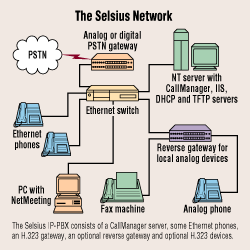
The Selsius line is quite broad. Its best-known components are its Ethernet telephones, which use firmware-based codecs (coder/decoders) to bring high-quality VoIP (voice over IP) all the way to the desktop. Selsius also offers a line of H.323 gateways with analog, T1 and PRI interfaces, letting you connect Ethernet phones to the outside world, as well as a reverse gateway that provides H.323 interfaces to fax machines and other traditional telephony gear. Rounding out the suite is a software-based call-management system that provides extension management, call setup and routing, and more, combining all the products into a distributed, virtual PBX.
We tested a handful of Selsius Systems' 12-button speaker- phones and software-based virtual phones, a dual-line analog gateway and call-management software. After using it as our main business telephony gear for two months, we found the solution to be more than adequate, though it has some annoying idiosyncracies.
Advanced Features
We were most impressed by the Selsius solution's support for business-class telephony services such as hold, transfer, distinctive rings, Caller ID and call forwarding. These features clearly separate Selsius from the rest of the herd; no competing vendor offers these services in an H.323-compliant form. In fact, no other vendor offers an H.323-compliant end-to-end solution, much less one that offers advanced services. And of those vendors that offer point solutions, none has products that feature anywhere near the depth of the functions Selsius provides.
Taken together, Selsius' range of products and comprehensive features make deploying VoIP on your network not just feasible, but desirable. Although some rough edges must be smoothed out, the Selsius products live up to the promise of IP-centric telecommunications. In particular, they provide a good solution for small-to-medium-sized networks where network utilization is not a great concern and where a fully featured PBX does not already exist.
Selsius is a division of Intecom, a well-known PBX vendor, so support for advanced telephony features is not surprising; that the products' support for native IP services is equally well-designed is more of an eye-opener. All system configuration is handled through a Web browser; the phones and gateways use DHCP to determine their IP addresses and TFTP to download their specific configurations, rather than requiring each unit to be programmed by hand.
The products also make extensive use of the IP ToS (type of service) byte, providing built-in prioritization and ToS services. By default, the phones and gateways set a precedence of "3" and enable the "low-latency" ToS flag on all RTP/UDP (Real-time Transport Protocol/User Datagram Protocol) traffic, allowing network managers to implement ToS-based routing for the units. Currently, there are no mechanisms for overriding these values, though this should not be an issue for most networks. (For more information on ToS, see Implementing Prioritization on IP Networks). Many networking companies don't even provide such services in their offerings, so support for these features is a pleasant surprise.
Apart from supporting basic IP services, Selsius also does a good job of managing bandwidth usage, incorporating noise-suppression technology in its phones and gateways. While this keeps background noise from generating unnecessary traffic, the feature can also work against you. Some people speak too softly, and their low decibel levels result in parts of the conversation being lost as the noise suppression kicks in. Having to ask the other party to speak up gets annoying quickly, though to be fair, this only happens on rare occasions. In addition, the Selsius gear doesn't generate background "comfort sounds," so whenever the noise suppression kicks in there is a dead silence that we found somewhat awkward.
Selsius is also on top of codec support, with strong G.711 and G.723 implementations. Most noticeably absent is support for G.729, a low-bandwidth codec favored by many of the other H.323 gateways on the market. This is perhaps the biggest hurdle for integrating the Selsius gear into a mixed-vendor environment, though this shortcoming should be addressed by the end of this year, according to the vendor. Selsius' frame-generation rate was also pretty good, with utilization ranging between 20 and 130 packets per second, depending on the speaker's volume and steadiness, and other environmental factors.
Overall, this is a technically sound solution, though it could stand some minor improvements. It is not ready for enterprisewide deployment, but it is certainly suitable for trial usage in small or medium installations. In particular, users of modern PBX equipment will not be impressed with the Selsius solution's feature set, which is very much a work in progress. Nor do we believe that most of the data networks in use in large corporations can handle the traffic of widespread VoIP deployment. But small-to-medium-sized companies that do not face these issues can deploy it comfortably, as can organizations with small branch offices or isolated networks.
The CallManager
The heart of the Selsius IP-PBX suite is the NT-based CallManager software. In particular, the CallManager acts as the central management console for Selsius devices, and is used for configuring a phone's extension numbers and function buttons, routing plans for the gateways and other system features. It also provides call-management services for all Selsius devices on the network, and lets you integrate H.323 products into the virtual PBX setup.
The CallManager's interface is a collection of Active Server Pages (ASP) running on Microsoft's Internet Information Server (IIS), with management tasks handled through a Web browser on the user side, and configuration data stored in a Microsoft Access file on the server's drive. Overall, the configuration process is fairly straightforward and easy-to-understand, though we did encounter various ASP script errors on a server that had many other services running on it.
In our case, we found that the tight integration with IIS was a problem, since we could not run the software on the system of our choice (due to the ASP errors), and were unable to use another Web server (such as Netscape's FastTrack) for the configuration services. Indeed, almost all of Selsius' advanced features are tightly linked to a Microsoft service in one form or another. Even the free voicemail server that comes with the CallManager uses MAPI profiles on the host NT Server to route voicemail messages to different e-mail accounts (rather than just using SMTP).
Once these issues were resolved, we found the configuration services quite clear and easy to use. We were able to define extension numbers for each of the Selsius Ethernet phones, as well as for the various H.323 software in use on our network. We were also able to design call-routing plans easily, incorporating wild cards and dialing-string management strategies. Using this setup, all of our local devices were assigned four-digit extensions, while the dialing pattern of "9@" was established as a routing plan for the analog gateway. Users could dial any four-digit extension, or could place outbound calls simply by dialing "9" and any telephone number.
Besides the configuration services, the CallManager also provides basic connectivity and call-routing services to the devices on the network, acting as a proxy among these devices, including both the Selsius equipment and H.323 nodes. Whenever a call between two devices is placed, the call setup is negotiated through the CallManager. Calling systems pass dial strings and commands to the CallManager, which locates the destination and then passes along the request(s). Once the call has been negotiated with both end points, all subsequent voice traffic passes directly between the two systems, though subsequent command traffic is passed through the CallManager.
This proxy design works quite well, and adds to the overall functionality of the system. For example, if an H.323 client (such as Microsoft's NetMeeting) wants to call a user with a Selsius phone, it passes the destination system's extension number to the CallManager, which then attempts to contact the destination on behalf of the calling system. If the destination device is busy, the CallManager could return a "busy" signal, or could forward the call to the voicemail inbox associated with the destination, depending on how the destination device is configured. Without this middleman service, none of these advanced features would work.
However, not everything is rosy, mostly because of problems with the state of most H.323 implementations. For example, while a Selsius phone can issue a "hold" request to the gateway, which will then forward the request to the destination system, the end node may not understand the request and will likely drop the call. This was typical of the interoperability issues that we found in our tests, with NetMeeting clients and Cisco gateways dropping calls whenever any sort of advanced functionality was attempted. Although we were able to integrate the H.323 devices into the CallManager's extension pools and routing plans, with non-Selsius products we were unable to do much beyond placing calls, as any greater level of interoperability between H.323 systems is virtually nonexistent.
The Phones
Perhaps the most interesting part of the Selsius IP-PBX suite is the phones. These units have the same look and feel as regular multiline handsets, but have 10BASE-T Ethernet ports instead of RJ-11 phone jacks. A variety of units is available, ranging from a 30-button console to a plain 12-button handset. Selsius also has a software-based phone that can be used in lieu of NetMeeting (or in conjunction with it) for tight integration at the desktop. Button assignments include features such as "hold" and "transfer," as well as programmable speed-dial entries, message checking and other typical business-class telephony services.
Each of the hardware-based phones has a full-blown IP stack, a dedicated processor and on-board codecs, which provides exceptional voice quality, very low latency and high reliability. However, these features come at a fairly steep price, ranging from $550 for the 30-button console to $375 for the base 12-button unit. Although these prices are in line with the digital multiline feature phones we've seen ship with most PBX systems, they are considerably higher than the analog handsets you can get for $20 at a flea market.
Also, there are some issues that arise if you put an Ethernet phone on every desk, requiring multiple Ethernet drops to each office. If you do not have two sets of CAT-5 wiring running into every office, you will need to do some planning. Although the phones come with two Ethernet ports—providing the ability to downstream a PC's Ethernet connection off the back of the handset—those ports are fixed at 10 Mbps, meaning you'll need a separate Ethernet run if your desktop PCs have 100-Mbps adapters. Furthermore, the phones do not support 802.1Q VLAN tagging and prioritization services, restricting their ability to provide these services to downstream Ethernet devices.
Our experience indicates that these phones should be used on a separate LAN infrastructure from the PCs, as large amounts of traffic from either camp can cause problems for the other. If the PC user begins a large download, it is very likely that the RTP voice traffic will be bumped or delayed, or that the TCP-based client/server application will time out from excessive collisions and retries caused by the RTP traffic. In the best design, you'd want to dedicate ports and queues on your switching infrastructure for the phones and PCs, keeping the traffic separate from end-to-end across your network.
Hanging Up
Overall, our experience with the Selsius IP-PBX suite of products left us with very little to complain about. The only significant technical issues that arose during our tests—loss of signal from the overzealous noise-suppression and lack of support for G.729 codecs—should be addressed and resolved within the next few months.
That leaves the cost issues. The phones are not cheap, and neither are the gateways (an eight-port analog gateway costs $4,795). Separate licensing costs for the CallManager software ($25,000 for a 100-user installation) makes the solution more expensive.
The complete cost for a 100-user installation, including licenses, gateways and phones, runs close to $70,000. Although this compares favorably with a PBX system of similar scale, we could expect to get much more functionality from a true PBX.
In the end, though, having the ability to manage our telephony equipment using the same tools and services that we use to manage our PCs makes the extra up-front cost negligible. All in all, we found these units to be more than useful. Anybody interested in deploying first-generation VoIP technology will likely find this to be an excellent choice.

Copyright © 2010-2017 Eric A. Hall.
Portions copyright © 1998 CMP Media, Inc. Used with permission.