
WebTrends Enterprise Suite 2.0
WebTrends' (formerly e.g. Software) new WebTrends Enterprise Suite 2.0 would handily win in a feature-for-feature comparison with other Web server management tools. It has got the functionality of several products, neatly rolled into a single easy-to-use package. However, when you look at each of the individual components, WebTrends' capabilities fall short of those offered by dedicated tools for network monitoring, traffic analysis, and Web site link analysis.
At the heart of WebTrends Enterprise Suite is its log file analyzer. Although this component still lacks some basic capabilities (such as drill-down queries, the capability to apply filters to reports after they have been generated, and graphs and reports that cross-tabulate multiple variables), a variety of enhancements have been made in this release, such as an improved filter wizard and the capability to integrate user information from other sources (such as a customer database) into traffic reports.
WebTrends also includes a proxy-server analysis tool, and a link analysis/site management module, both of which were included in WebTrends Professional 1.0. New to WebTrends 2.0 is a module for monitoring network equipment and services. The "Alerting and Monitoring Cartridge" can issue Ping requests to devices, and can open connections to a variety of Internet services. The module can also monitor ODBC availability, and can also track disk space.
Improved filters
The biggest problem with WebTrends Professional 1.0 was the clumsy interface for defining filters for the log file analysis cartridge. With the latest release, WebTrends now offers a relatively intuitive set of dialog boxes for building whatever filters you want. If you want to exclude files and directories, you simply check those two check-boxes and enter your filtering criteria.
There are still some limitations with the exclusion process. For example, excluding AltaVista and other search engines keeps its Web-crawling robots from showing up in the top-10 visitor list, but also excludes it from the top-10 search engine list as well—not the desired result.
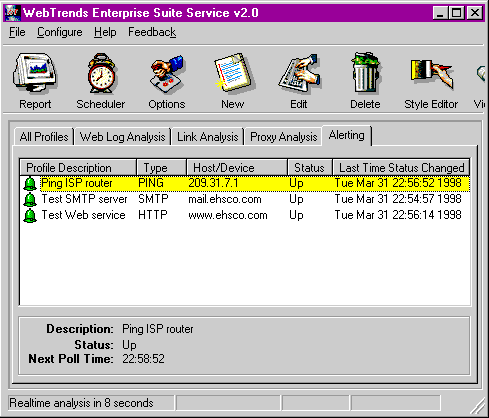
Network monitoring
The most compelling addition to WebTrends 2.0 is the new network monitor cartridge. This module allows you to automate a set of network tests, verifying that Web, mail, domain name service, and other servers are up and running. You can then define a set of actions to take based on a service's availability, such as sending a page or e-mail message.
Although handy, this feature isn't nearly as powerful as some competitive offerings, such as Caravelle's IPnetWatcher. With IPnetWatcher, you can group tests into a single set of events, but with WebTrends, each test is a separate entity unto itself.
This means that if you have several servers to monitor, you could easily end up with scores of individual tests. If you need to change the recipient for pager messages—even if it's just for the weekend—you'll have to individually change each report.
Beyond this fundamental limitation, the service works pretty well. I was able to configure multiple alerts for my mail, Web, and other services, and have them send alerts to my cell phone's integrated paging service over SMTP.
Enhanced ODBC support
WebTrends Enterprise Suite 2.0 includes two new ODBC features that are not available in the lower-end Professional Suite.
The first is support for storing WebTrends summary data in any ODBC database. This feature is of limited value, since WebTrends doesn't convert log file entries to database records, but instead only stores summary information.
Furthermore, in my tests, using a local Microsoft Access database file caused the performance to suffer considerably. The second, more powerful feature is DBTrends, which gives you the capability to integrate external user profiles stored in any ODBC database into the Web-log analysis reports generated by WebTrends.
For example, if you have user information in a customer database, and can match this data with cookies or IP address data in the Web logs, then you can present the user's information in the top-10 users section of the WebTrends report.
Jack of all trades
These new enhancements make WebTrends 2.0 more than a log analysis tool — it's really a set of general-purpose site management services.
But if it's a jack of all trades, WebTrends is a master of none. It's a poor choice for those seeking industrial-strength management services. For example, if you really need to know exactly what each user is doing on your site, you'd be better off dumping the Web-server logs into a SQL database and analyzing them using a query tool, such as Seagate Software's Crystal Reports.
Also, if you're looking for robust network monitoring, then tools such as Caravelle's IPnetWatcher or Hewlett-Packard's OpenView offer greater flexibility and ease of use.
But for the price, WebTrends is a solid offering. It is an essential upgrade for current WebTrends customers, and it's a good entry-level product for new administrators.
The latest version of this traffic analysis software provides a few much-needed improvements, making the upgrade a no-brainer for existing users. But the new features, although attractive, probably aren't enough to get people to switch from competing products. .

Copyright © 2010-2017 Eric A. Hall.
Portions copyright © 1998 InfoWorld Media Group, Inc. Used with permission.