
Steel-Belted RADIUS 1.3
Remote access can be a pain, especially when your site requires authentication and access control. Typically, remote-access devices such as dial-up routers or terminal servers have relied on locally defined lists of users and passwords to perform this service. That means administrators have to add and edit user accounts on multiple systems, and users have to keep track of these separate accounts and passwords. It's a clumsy setup and is time consuming to manage. Funk Software's Steel-Belted Remote Authentication Dial-In User Service (Radius) 1.3 reduces that administration burden and makes life easier for users at the same time.
Generally, sites requiring authentication services for remote users solve the problem in this way. Remote-access software is run directly on a network server, providing integrated authentication to the users of that server. Unfortunately, server-based software such as Microsoft's Remote Access Service and Novell's Novell Connect Services don't scale well beyond a few modems. Also, if you wish to use external remote-access systems or service providers, you can't effectively distribute the user-account information outward.
Many remote-access vendors have begun to support the RADIUS protocol, allowing the remote-access devices to forward authentication requests onto a master authentication device, such as a Unix host. But these solutions are not integrated into the network security services, requiring administrators to manage accounts and passwords.
Steel-Belted Radius employs a better method. Remote-access devices pass the authentication requests directly to the network servers, thereby cutting the administrative burden, as well as improving the end-user's remote-access experience. Steel-Belted RADIUS has offered this functionality for the NetWare market for some time, providing RADIUS-authentication services against user accounts stored in the Novell Directory Services tree, or accounts in the NetWare bindery. Now Funk brings this same level of integration to users of Microsoft's Windows NT operating system.
Steel-Belted RADIUS comes in two flavors, one for NetWare and another for Windows NT. A Unix version in the works as well. The products share many of the same features, with the noticeable difference being that the underlying authentication databases are different.
NT authentication
Steel-Belted Radius for Windows NT provides RADIUS authentication against NT domains, workgroups, or host-specific user account databases, conveniently allowing remote-access users to use the same user name and password on the dial-up network as they do on the local network.
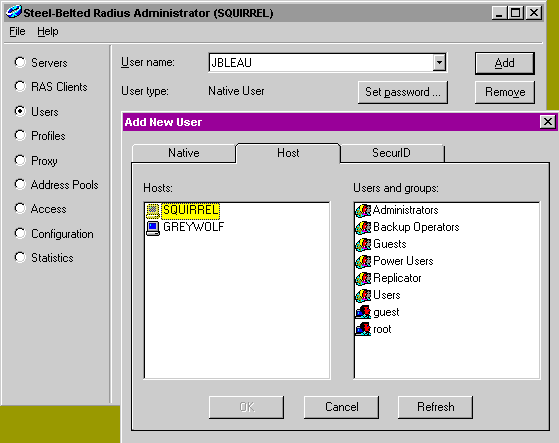
During the Point to Point Protocol (PPP) negotiation process, passwords supplied using the Password Authentication Protocol (PAP) the or Challenge Handshake Authentication Protocol (CHAP) are passed to the Steel-Belted RADIUS server, which authenticates the information against the specified Windows NT security system. The system can authenticate different users and groups against different hosts and domains, providing as much flexibility as you could want.
Once the user account information has been passed to Steel-Belted RADIUS, it either grants or denies access based on the account information provided. Administrators can configure Steel-Belted RADIUS to allow connections for specific users, NT groups, or any combination of the two. The product can also authenticate against non-NT user accounts through the use of a local database.
Steel-Belted RADIUS also provides a database import utility that allows administrators to import into the local database existing RADIUS databases from existing Unix- or hardware-based RADIUS servers on the network.
Steel-Belted RADIUS also supports remote access using Security Dynamics' SecureID tokens, providing increased security over PAP and CHAP. Although Steel-Belted RADIUS does not directly provide the SecureID authentication, you can configure it to pass the authentication requests on to an Ace/Server on the network.
Flexible configuration options
Three basic components comprise the authentication process: users and groups, devices, and session details. Steel-Belted RADIUS excels in all three of these areas.
For example, as described above, the system can authenticate user connections against local databases, NT hosts, NT domains, or SecureID systems. The user accounts can reside in a local domain or a remote domain, or both. Likewise, the product can verify them against a specific NT host, or a combination of NT hosts and domains.

Steel-belted RADIUS also supports proxy authentication, as either a client or server. Client-side proxy capabilities allow incoming authentication requests to be passed to other RADIUS servers for authentication, and server proxy allows a system to respond to requests from remote RADIUS servers.
The product's client proxy capabilities are quite strong, allowing remote-access pools to provide centralized log-ins to a single RADIUS server, regardless of whether or not the user has an account on the local system. By logging in as user@site, Steel-Belted RADIUS can forward the user authentication request to a predefined remote system. In addition, you can configure Steel-Belted RADIUS to authenticate specific users against a predefined target host or NT domain, if the administrator wishes to set this up.
In terms of supported equipment, Steel-Belted RADIUS has a very large set of "dictionaries" that are specific to a variety of different remote-access servers.
Once you have defined the users and the equipment, you can further define session-specific details such as the protocols to use (mandating PPP, for example). In addition, you can pass session information such as IP address, subnet mask, or even IPX information back to the client. This lets you store all of your remote-access configuration details inside of Steel-Belted RADIUS, providing a single point of administration to almost all remote-access systems on the network.
One of Steel-Belted RADIUS' new features is support for address pooling. Rather than allocate individual addresses to each individual user, you can assign a user or group to an address pool appropriate to its function.
Enhanced administration
Another key feature is support for the RADIUS Accounting protocol, an administrative service separate from the RADIUS authentication protocol. Enhancements to the accounting service make it more flexible and secure. In addition, Steel-Belted RADIUS provides integrated support for the Windows NT Performance Monitor.
All of Steel-Belted RADIUS' administration is handled through a stand-alone, 32-bit Windows application. The administration tool allows you to manage multiple Steel-Belted RADIUS servers independently from a single application. You can also import and export definitions across multiple servers from within the administrative application.
I was disappointed that I could not manage the NetWare and NT products from the same administrative tool. Because they use separate services for communicating with the underlying NOSes, they are incompatible and cannot share information.
I was also somewhat disheartened to see Steel-Belted RADIUS does not completely support some of the Microsoft-specific remote-access protocols. For example, Microsoft's Point to Point Tunneling Protocol promises that it will use RADIUS for authenticating tunnel users, although Microsoft is extending the RADIUS specification for this purpose. As a result, no vendors are offering RADIUS servers that fully support Microsoft's extensions. Although Funk is not at fault in this situation, I still found it mildly irritating.
I missed the capability to use the same administrative tool to manage the NetWare and NT products, and I wish that Steel-Belted RADIUS fully supported Microsoft-specific remote-access protocols, but I found the product highly effective.
Steel-Belted RADIUS provides remote-access authentication services that are directly linked to users in the underlying NOS.

Copyright © 2010-2017 Eric A. Hall.
Portions copyright © 1997 InfoWorld Media Group, Inc. Used with permission.