
Choosing an E-Mail System
Wiring topologies change, protocols go in and out of favor, computers get upgraded, but e-mail systems never die. Better than almost anything else, they define the term "legacy system," at least on the departmental level. Your e-mail system is the common denominator of your messaging, groupware, and intranet initiatives. That doesn't mean you have to get rid of it. But given the critical role it plays in daily business operations, replacing or upgrading it results in a major upheaval for your organization - in terms of time, people resources, and politics.
But in reality, since very few of the e-mail products sold just a few years ago are still being enhanced - or even offered - by their original vendors, adding support for newer internet standards or enhanced workgroup functions means you almost have to tear out the existing products and start all over again.
Choosing a new e-mail topology or one for consolidating your numerous messaging systems is not easy. Back in the days of Microsoft Mail versus cc:Mail the choice wasn't easy, but at least you could look at the product functions and make a cold-hearted decision based on features. Now you have to analyze products based on the market segment they strategically occupy, since this dictates future enhancements and is typically more telling than the specific features they offer now.
For example, no vendor embraces internet standards like Netscape. Yet if what you need is seamless integration with your network operating system or client platforms, then Novell's GroupWise or Microsoft's Exchange may be a better choice. Or, if you are pining for a full-blown application development environment that happens to offer an embedded messaging system, then Lotus's Domino may be your best choice. If you need simple messaging and you are a small to midsized company, then SoftArc's FirstClass may be the winning solution.
For some organizations, a product choice represents a new beginning. For others, it represents a migration path to open standards. While each of our featured suites offers the same basic set of functions, they differ dramatically in their strategic positioning. This positioning determines tomorrow's product features and the manner in which they will be implemented. We focus on the leading enterprise messaging product suites in the context of strategic enterprise messaging capabilities: internet standards support, the ability to access legacy systems, groupware and workflow capabilities, and directory services. Understanding product positioning along these dimensions will help you align a vendor's strategy with yours and, thus, facilitate a long and satisfactory relationship.

Gun-Point Standards
The biggest factor driving the need for revitalized messaging infrastructures is undoubtedly the Internet (or more specifically, the intranet) and the associated raft of related standards. All of the products we looked at offer internet standards support to varying degrees, although most of them offer it as secondary to their home-grown proprietary services.
"Native standards support" means different things to different vendors. Many products "extend" internet standards to make them more robust - thus making them less "open." Netscape, however, fully endorses internet standards and does not offer "nonstandard" versions of its products. If you want mail and groupware from Netscape, you must use internet standards to do it. But messaging architectures such as Netscape's depend on the presence of a TCP/IP infrastructure that you may not have, such as fully functional IP stacks, and POP3 and SMTP mailers, running on every client and server across the enterprise. This isn't cheap to build or manage, but you have no choice if you want to use Netscape's products.
You may not want these standards as your primary platform. There are many enhanced features and benefits that get lost in the lowest-common-denominator approach that standards demand. For instance, if you were to only use a POP3 client, then you'd lose most of the functionality found in a contemporary message system, such as server-based folders, or integrated group conferencing and directory access. While other standards can alleviate these limitations (which were designed into POP3), it will be a while before the vendors shake out the interoperability issues among themselves, making the "standard" less useful for at least a year, maybe two. We aren't kidding - it took longer than that before WinSock worked across vendor lines reliably.
Bottom line - for many companies, switching to "pure" internet standards means taking a big step backward from their current level of service.
Head for a Standard Solution
Internet standards are a place to set your sights, however. By providing vendor-neutral interoperability guidelines, standards are lowering access costs and giving users more flexibility. There is truth to Netscape's message that customers do not have to use their products. Netscape uses 100% internet-based standards on both client and server, meaning Netscape's customers do not have to use Netscape's e-mail client in order to use their server. In fact, people don't have to use any Netscape technology at all and can still have a Netscape-compliant network. Or, they can choose to go 100% Netscape without much concern for interoperability later down the road. In contrast, every other vendor requires that you use its messaging products at the back end.
It is absolutely critical that mail systems provide unadulterated support for internet standard mail protocols so that you can choose to use any vendor's standard messaging client. You may not get what you need from the back-end provider's solution in all cases, so being able to use a standards-based front-end mail client allows you to pick and choose as needed. Your users should be able to use a POP3 or an IMAP4 client to retrieve their mail, just as they should be able to use a Macintosh client to do so. For example, Outlook, Notes 4.6, and GroupWise 5.2 clients (all recent releases) support IMAP, POP, and LDAP, thus allowing interoperability. Broader access to your mail system is a big plus, so additional support for internet standard protocols should be a primary checklist item as you shop for client software.
There are benefits to aligning with vendors that rely on proprietary protocols, formats, or other "rich" attributes yet support internet standards. They allow you to use your existing infrastructure until you migrate users to IP. Lotus Domino, Microsoft Exchange, and SoftArc FirstClass all support client-to-server communication across IPX. Even when you are IP enabled, you may not want to use POP3 or IMAP4 for IP-based messaging services, but instead implement the vendor-specific IP-based protocols. This allows you to expand your network without sacrificing the value-adds that come from the proprietary mail systems.
With the exception of Netscape, all of the products listed here offer a proprietary client-to-server mail protocol that runs over IP. These protocols provide stronger security; better access to message stores; integrated access to mail, discussion groups, and directories; and some other benefits over POP3, IMAP4, SMTP, and LDAP.
Standards by themselves are like medicine: best taken in manageable quantities and not without understanding the side effects.
GroupWise, Domino, and FirstClass provide POP3 interfaces to their mail servers, as well as, to a limited extent, IMAP4 and LDAP interfaces. Yet, none of these vendors offer support for POP3 in their proprietary client packages. This means that you can't use the GroupWise client to access a POP3 server - even if it is a GroupWise POP3 server. The same goes for Domino and FirstClass. Microsoft and Netscape both offer support for POP3, IMAP4, and LDAP within the client.
If you already have a purely IP or mostly IP network, then you should leverage it the best you can. But if you don't have a big IP installation, or if you want to preserve the value-added benefits found in your existing network services, then you can consider internet standards support as an ancillary benefit, and not the driving decision factor. Depending on the state of your current network, the cost to TCP/IP enable it can range from $30 to $300 per seat.
Accessing Legacy Messaging Systems
The ability to migrate smoothly to a new messaging system - this almost goes without saying - is crucial to the success of your overhaul effort. If you can't get your users' mail from the legacy system to the new one smoothly, then you'll experience a palace revolt the likes of which you've never seen.
There are two unique aspects to supporting legacy mail installations.
- SMTP gateways provide simple message transport and directory exchange services between the primary message service and any secondary systems (whether local or on remote networks), allowing users on the new system to exchange mail with users on the old. Understand that this means users can only send ASCII text messages, as gateways frequently strip added features and attachments from e-mail messages.
- If you need more than simple transport service, look for a vendor who offers the ability to totally migrate user accounts and message stores to your new platform, allowing users to have access to old mail messages while switching over to the new platform.
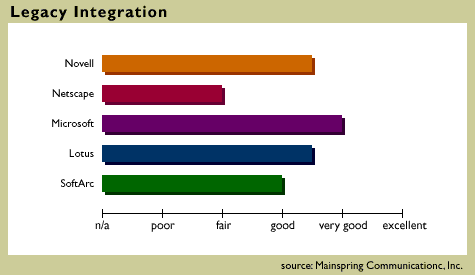
Most vendors do offer a substantial number of SMTP gateway products - the two most notable are Microsoft and Novell. While their server platforms offer a wide variety of gateways to other e-mail systems, they are most appropriate for small to midsized companies. Be aware that most gateways on the market are provided by third parties.
Microsoft wins out in sheer numbers due to its recent acquisition of LinkAge Software, a hitherto independent provider of gateway products. Using LinkAge's Messaging Exchange product, you can integrate many different messaging systems by simply adding the specific connector modules you need. For example, there is an Exchange-Notes Connector that uses each system's native interfaces to provide direct linkage and attachment support. LinkAge's products are tightly coupled with Microsoft's NT and Exchange servers.
Lotus also does fairly well in that they offer a handful of mail gateways for Domino and Notes. Lotus's SoftSwitch is a high-end solution for large companies looking to have numerous messaging systems coexist, from IBM PROFS to Lotus Notes, while system consolidation is carried out. While it is expensive and complex to install, it runs very effectively and provides high performance. Lotus is also developing robust hooks into IBM legacy databases - a nice advantage for organizations looking to integrate their intranet and messaging strategy and have much of their data residing in IBM repositories.
Netscape doesn't provide any gateway products whatsoever because their mail server only supports internet standards. So you are expected to use an SMTP gateway on the legacy system (i.e., an SMTP gateway for an existing Microsoft Mail post office) if you need to exchange mail between the two.
Making the Trek
Migration tool offerings are scattered across the map. Microsoft, Lotus, and Novell all offer migration tool kits that bring legacy Microsoft Mail and cc:Mail installations into the fold.
- Lotus excels at PROFS migration.
- Microsoft's tools for cc:Mail and Microsoft Mail are easier to use.
- Novell bundles a migration tool from Simware, Inc. with its IntraNetware server to make the transition from NetWare 3.x easier and less expensive.
- Netscape offers a migration tool kit for converting cc:Mail and Eudora installations into Netscape Mail Server users.
These products all have shortcomings. Some don't migrate everything (Domino's tool for migrating Microsoft Mail users, for example, translates the client-based files but not server-based files), while others don't allow for bidirectional access to the different mail systems. If users of both systems can't access shared folders and user accounts, then they will have to maintain two separate accounts on the different mail systems until the migration effort is completed. Not only is this a pain for users, but it can also cause performance problems.
Regardless of the tool you use, you are at an advantage if you are migrating from cc:Mail to another system, as it has the broadest base of migration tool kits available.
Groupware and Workflow Applications
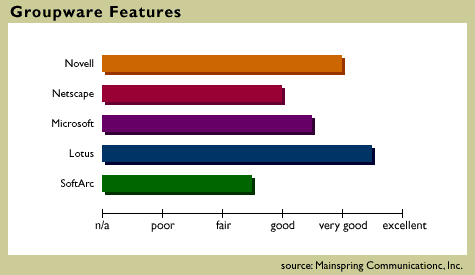
Beyond the issues around accessing e-mail, our featured suites (and many products today) also offer at least a modicum of groupware functionality. At the lower end, SoftArc provides a simple but powerful group-conferencing system with FirstClass - it is essentially a discussion group technology similar to shared folders or NNTP news. While Netscape offers this too (as do the other vendors in some form or another), Netscape also provides multiuser, web-based application development tools that are more akin to Domino than to shared folders. At the higher end, Lotus's Domino provides a full-service application development environment.
Studying each vendor's strategic direction provides the most benefit here. First, by observing how Domino is marketed, you can see that it was primarily designed as a collaborative application platform and has the subsequent features one would expect. If you want to build a new set of client/server applications that include integrated messaging, then Domino is your best choice hands down. And you can use the integrated object-based message store as a groupware development platform. Domino, as opposed to the Notes client, is also fully functional and competitively priced as a basic mail system - Lotus plans to release an e-mail-only version of Domino instead of a cc:Mail Release 9, in the hopes of finally integrating its messaging and groupware products under one infrastructure (allowing customers to upgrade clients and servers separately).
However, like Netscape's tight embrace of internet standards, building a groupware system around an application development platform is not always a good thing. If you don't want to build new enterprise-wide workflow applications, then you may do well to avoid Domino because of the administrative overhead it demands.
At the other extreme, Netscape's groupware functions are closely tied to and constrained by internet standards, meaning that you can use NNTP for your group conferencing needs while using web-based protocols such as HTML, Java, and JavaScript to build groupware applications. Taking this approach, you can use a regular NNTP client as a front end to the group conferencing discussions, and a web browser as a front end to your intranet applications. Each of the featured vendors supports NNTP and browser-based access to forms and applications in one form or another; they just don't leverage it as much as Netscape does. The clear downside is that Netscape's capabilities are dependent upon the rate at which internet standards mature.
Betwixt and Between
In the middle ground, Microsoft, Novell, and SoftArc all provide APIs and development tools that leverage their mail transports and group discussion services to varying degrees. Microsoft exposes Exchange and Outlook using C, Visual Basic, and VB Script APIs, along with direct hooks to IIS and Internet Explorer through proprietary extensions. Novell's GroupWise offers a superior set of calendaring and scheduling applications, yet its APIs are not as strong. Novell does leverage its InForms product - among other more traditional interfaces - to provide forms-based transaction and groupware services. Meanwhile, SoftArc provides a set of APIs that can be called up using any C compiler.
The best way to decide which of these approaches works best for you is to focus on the direction in which you want to move your development group, not on the tools provided. If you must build a new application development platform or are already a Notes shop, then by all means look at Domino as the most powerful groupware development platform of the lot. If you're planning to build web-based applications, then still look at Domino, but also look at Netscape's and Microsoft's server products.
If you want tight integration with Microsoft Office and are happy with writing applications using Visual Basic or Microsoft C, then perhaps Exchange and Outlook is the most appropriate combination. If you want simple form-processing and automation controls, then look at GroupWise and InForms. SoftArc's C APIs also provide strong development services, but require that you use C to write your custom groupware applications.
Directory Services
All of the issues described above focus on accessing the mail and groupware systems' message stores. However, a separate set of issues lies in how user accounts and groups of people interact with each other and the mail system. Leveraging the existing directory gives administrators a single point of access for managing user and group accounts - thus saving time.
Directory services can also play an integral role in a products' ability to scale - and scalability is critical to many organizations' messaging strategies. Thus, before you purchase a product, you must interview potential vendors about the cost of developing their product within your specific environment.
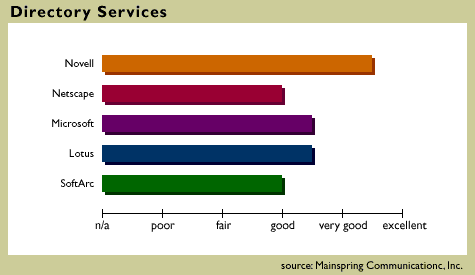
Novell's GroupWise and Microsoft's Exchange stand out, as they both provide tight integration to the underlying operating system and account management tools. All of the other products use isolated directories for managing user accounts. Of course, there are advantages and disadvantages to each approach.
Using GroupWise you gain the advantage of having user accounts actually stored in the NDS directory tree. This means that by leveraging NDS, you can manage all aspects of a user account from within NWADMIN, changing passwords, home directories, and message store locations in a single administrative session. There is no directory "synchronization" or other offline processes as demanded by other products. The downside is that you must have an NDS server (translated: NetWare 4.x) somewhere on the network. If you're not already an NDS shop with NDS systems administrators, this may not excite you. However, look for NDS availability on NT and other platforms in the near future as Novell tries to expand NDS usability.
Microsoft Exchange also leverages its operating system security model, although it is not as tightly linked as GroupWise is with NDS. Instead of storing user account information in the NT domain database, Exchange maintains a separate mail user directory that is programmatically linked to the NT domain database. Adding and deleting users from Exchange or NT causes a synchronization process to ensue. While this eliminates much of the account administration duplication, it does require that you use NT servers throughout your organization. Considering the inherent weaknesses of NT's domain security model in complex organizations, it is less adaptable and robust than NDS or Domino. Also, since Exchange is closely integrated with Microsoft's NT operating system you must have deep knowledge of NT in order to run it smoothly.
While Domino's directory services are inferior to Exchange, Domino is linked to the NT domain server with user account and password synchronization.
Netscape's Messenger Server and SoftArc's FirstClass maintain isolated directories. This means that they are not fully integrated with the existing operating system directories, and as such, you must duplicate administration tasks. For example, each time you add a user, change a password, or delete a user, you must do so twice, thus doubling management costs. Each product does, however, allow you to easily import and export user information.
Netscape's native internet standards support means that - in theory - you can use any LDAP server that allows for read/write access to store account information. This means that you can theoretically store Netscape user accounts in Novell's NDS by way of Novell's LDAP server for NDS. However, these standards are still quite rough, so this level of seamless integration is wishful thinking for now. For directory synchronization, there are still substantial functional advantages to using messaging switches over LDAP3 (the latest version of which is not yet fully formed). If you really want to get the most from Netscape mail and web servers (as with most vendors' products), you should also use their specific directory server.
Domino and SoftArc have never offered much in the way of leveraging existing operating system account management controls, although both are promising tighter integration in the future.

Copyright © 2010-2017 Eric A. Hall.
Portions copyright © 1997 Mainspring Communications, Inc. Used with permission.