
Novell Distributed Print Services (beta)
Just like Novell Directory Services (NDS) dramatically altered the landscape of NetWare security, Novell Distributed Print Services (NDPS) promises to have the same impact on network printing. And like NDS, the new NDPS technology achieves its admirable goals but also faces the same uphill battles.
The technology is both comprehensive and complicated, making early deployment efforts justifiable only to those sites with large initial paybacks. However, once vendors and users jump on the bandwagon, the technology will become sufficiently pervasive and deliver full benefits.
Next-generation architecture
The beta version of Novell Distributed Print Services is a radical departure from Novell's legacy printing architecture, turning what used to be a local function into an enterprisewide service. Rather than manage server-based printers and definitions, NDPS implements a network-centric printing model that is somewhat independent of the underlying servers.
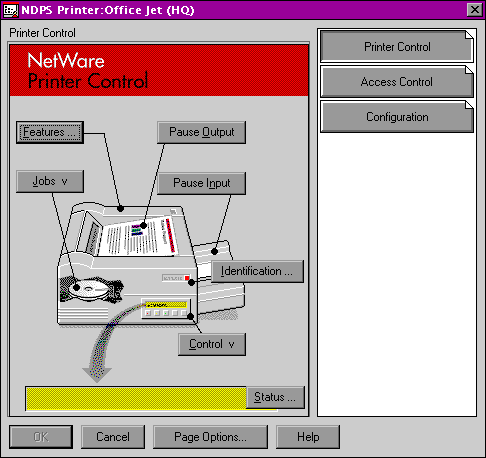
Although there are still some server-specific functions, these only apply to printers that are attached directly to the server in question. Network-based printers are independent of the servers, whereas attributes such as forms and banners are not server-based at all and are available to all printers and users defined on the network.
This next-generation printing model fully leverages NDS and eliminates some of the more tedious aspects of managing NetWare printing. Currently, NetWare utilizes a four-part matrix of printer resources. These resources include printer definitions (such as forms), print servers, print queues, and the printers themselves. If you wish to create a network printer capable of supporting multiple fonts and paper formats, then you have to create all of these objects and link them together.
NDPS is implemented in much the same way, except that the components are not discrete entities but rather they are network objects that can be reused by each of the other objects. For example, you do not have to create explicit forms for each printer, but can instead create forms that any printer can use. Also, this forms-creation task has been made much simpler through the use of snap-ins that can be accessed through Novell's NWAdmin management utility, eliminating much of the drudgery associated with using PRINTDEF and PCONSOLE on a per-printer, per-server basis.
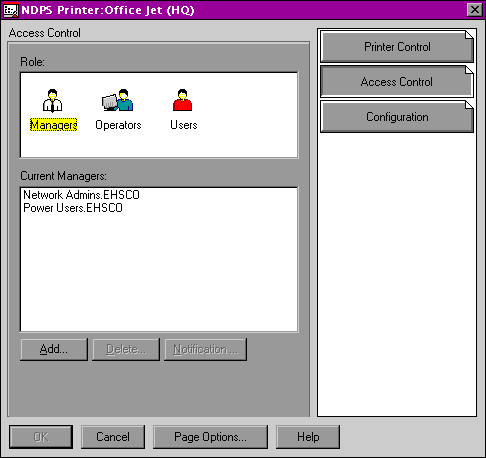
By tying these objects to the NDS directory, NDPS offers an extremely powerful networkwide print management capability. You can define global and printer- and user-specific attributes, and deploy and upgrade printers and printing services across the network. Additional reusable attributes include printer drivers, fonts, forms, default notifications, form-change schedules, and queue service algorithms.
Objects in action
When a client wants to access a network printer, he or she can browse the list of available resources or search for printers that offer specific services, such as color or tabloid-size paper. Because the network-based printer object contains driver information, once the user selects a printer the appropriate printer driver is automatically downloaded and installed to the client, as are all of the attributes associated with that printer's configuration.
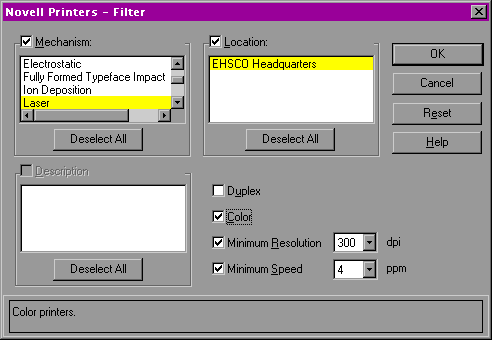
If you have any measurable number of clients that use shared printers, then this model allows you to deploy and configure network printers across every workstation on your network within just a few minutes. This eliminates the majority of the costs incurred from managing network printers.
The downside to this radically different architecture is that it will require a tremendous investment in personnel resources to build the framework for this level of simplified management. Also, the lack of third-party ISV support makes it somewhat difficult to implement NDPS on even mildly diverse networks. Although NDPS was developed in conjunction with Hewlett-Packard and Xerox, there are other vendors offering support for NetWare printing that do not yet fully leverage NDPS.
Because NDPS will service NetWare print queues, you can maintain two separate printing architectures while you migrate from one to the other. This effort will not be easy or cheap, although the rewards for large shops that can truly benefit from NDPS' compelling advantages should offset these expenses.
New core services
Like the current NetWare printing model, NDPS uses three core services to define and support network printing. However, these three core services are completely different. Three new objects control most of the printing process: the printer agent controls the printer and the queue servicing; the printer manager controls any printer agents running on a NetWare server; and a broker controls the distribution of resources across the printer agents found on the network.
The printer agent consolidates the functions performed by the printer queue, server, and printer objects found in the legacy NetWare printing environment into a single entity.
The printer agent represents a physical printer and its attributes, such as the transport mechanisms; the forms, fonts, and paper supported; access restrictions; and other attributes. It also manages the physical printing tasks, servicing the print queue, enforcing security, and providing event notification services to NDPS clients.

You simply use NWAdmin to create a new printer object in the selected container. Once you have defined the printer's attributes, users can access it and print to it immediately, communicating directly with the printer agent.
If you purchase an NDPS-aware printer, then you can simply plug it in to the network and it will automatically create a printer agent on your network.
Users can see these printers automatically, and if the appropriate drivers are already available on the network, they can begin to use them immediately as well. Then administrators can integrate these public-access printers into the NDS tree.
Gateway component
The second core component of NDPS is the print service manager, which manages any printer agents running on a NetWare server. The print service manager will publish and support printers attached to the server's parallel or serial ports —functions that the printers themselves cannot provide. Likewise, if you have a legacy network printer that uses RPRINTER or PSERVER to service a NetWare queue, the server-based print service manager can integrate that device into the NDPS landscape.
In NDPS lingua, the print service manager is known as a gateway, bridging the gap between non-NDPS printers and the NDPS print environment. Other vendors can develop their own gateways, and a gateway for HP's network print servers ships with NDPS, allowing the non-NDPS printers that are serviced by HP's JetDirect print servers to be integrated into the NDPS environment.
The final component of this triad is the NDPS broker, which provides three services to the NDPS network. The service registry publishes information about the available public-access printers, eliminating the need for Service Advertising Protocol broadcasts for printers or print servers on the network.
Another service provides notification to users and groups, such as administrators, operators, and job owners. Additionally, the alerts can be sent to different parties using various transports, such as broadcast messages, Message Handling System, GroupWise, and others. The notification service uses NDS to store the transport and user profiles for the network.
Finally, the broker also provides the resource management service that publishes printer resources such as fonts, forms, banners, printer drivers, and the like. These resources are also stored in NDS and are reusable by any printer object on the network.
Cautious migration
It is important to realize that there are two separate network entities at work here: NDS manages access control to the printer objects and acts as a repository for the various configurations and profiles, whereas NDPS objects, such as the printer agents and the broker, manage the actual printing and notification processes. These services are independent of NDS in their operation, although they rely on NDS for the information that allows them to function.
This architecture is somewhat simplified; there are many other components that perform discrete tasks. However, implementation is not going to be simplistic. Almost all of the costs are up-front, and all of the rewards come from using it on a daily basis afterward.
In a lot of ways, this is similar to NDS. The initial effort spent in developing and deploying the architecture is easily countered by the ease of administration and end-user access gained from its use. Getting there is the hard part.
As vendors begin to support NDPS in their printers and print servers directly, the case for migrating will get stronger and eventually become unavoidable. Until then, it is best to deploy NDPS in small homogenous environments that can make use of it immediately.
Novell Distributed Print Services makes network-centric printing a reality by providing scalable and distributed printing services to all printers and users on the network—with support for centralized drivers and configurations. This next-generation architecture is a must-have for large networks.

Copyright © 2010-2017 Eric A. Hall.
Portions copyright © 1997 InfoWorld Media Group, Inc. Used with permission.