
Arcserve 6.1
Running Computer Associates' Arcserve 6.1 for NetWare is like trying to build an 18-wheeler. It takes a while to put together and you'll definitely need skilled labor, but once it's up and running, it'll go forever providing a level of reliability not found in lesser-bred solutions.
Despite the fact that Arcserve 6.1 for NetWare gave me more than its fair share of headaches during installation and configuration, the end result is a "forget-about-it" backup solution that is there when you need it.
Arcserve 6.1 boasts a new virus-scanning engine and a group of patches to the previous product. These additions, along with a slew of add-on options, makes this release a definite buy for NetWare shops.
The new virus-scanning engine is a unique feature in this market space. It scans the files being backed up for any infections in real time, providing administrators with the ability to keep infected files off their backup tapes. Any viruses that are detected will trigger a set of user-definable events, such as moving the infected files to a holding area, deleting them, or disinfecting them if a compatible virus-disinfectant product is also installed on the server.
Using Arcserve 6.1, I was able to back up and restore Windows 95 and Macintosh clients and an IntranetWare server, along with its Novell Directory Services (NDS) tree. These capabilities aren't new to Version 6.1, but they're still impressive.
Although I encountered several issues trying to get everything to work just right, in the end I was able to achieve an extraordinarily reliable backup solution.
Cover your assets
Perhaps the most impressive aspect of Arcserve 6.1 is the tremendous breadth and variety of add-on options, allowing administrators to implement exactly the right solution for their network. For example, I found the Macintosh Agent Option and the Changer Option to be useful for me as add-ons. Other optional products provide services such as RAID tape arrays (striping backup data across multiple tape drives), disaster recovery, remote server "push" agents that allow for fast backups of multiple servers, and client options for almost every platform imaginable.
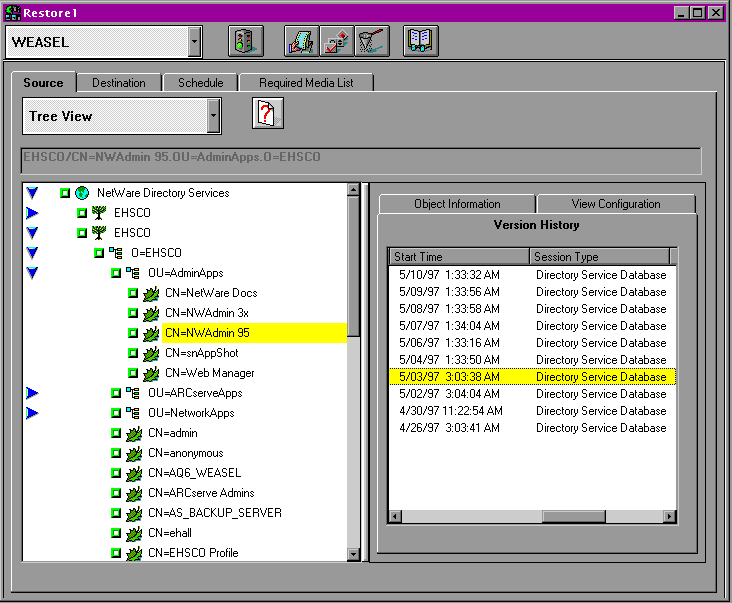
From a NetWare-specific perspective, one of the nicest aspects of Arcserve 6.1 for NetWare is the tight integration with NDS. For example, during the Arcserve installation process, the NDS schema was extended to include Arcserve's new backup-queue object class. These schema extensions provide NDS-based job queues instead of the file-based queue system that non-NDS servers use.
Besides using NDS for the job queues, Arcserve 6.1 also lets you back up and restore the complete NDS tree, including all schema extensions and attributes. In my tests, this capability worked well, and I was able to restore the schema easily without having to reinstall any of the add-on products. The importance of this feature in large NetWare environments cannot be understated.
Testing uncovers quirks
In my tests, I found that the many features and options provided me with a reliable backup solution. But getting everything to work just right was somewhat of a bear.
A larger set of problems arose with the NDS backup queues. During the first few weeks of my testing, these queues became corrupted several times—forcing me to either manually recreate the queues or to reinstall the product from scratch.
After some routine maintenance on the NDS tree—something I should have been doing anyway—the problems disappeared.
Not all of the clients and backup agents can work with these job queues yet, by the way.
For example, the Macintosh agent still relies on the presence of the old Arcserve 5.x bindery queues in order to submit backup or restore jobs to the server from the Macintosh client. Because I was running the NDS queues, I could not submit jobs from the Macintosh. Instead, I was required to submit them from the Windows-based administration tools.
Although I could see and select the data to be restored to the Macintosh client, the operation consistently failed, resulting in a cryptic error message.
I then tried to restore the files to a NetWare volume on the local server, but the software would not permit this either. I finally called CA's technical support. They suggested I restore the data to an explicit path on the Macintosh client, which worked just fine.
CA acknowledged that there was a problem and got right to work on a fix. The company is promising that by the time you read this review, a patch will be up on its Web site.
Successful Win95 restore
During the course of testing, I was lucky enough to have Windows 95 get corrupted on my laptop, so I took the opportunity to try out Arcserve's Windows 95 restore options. I had been backing up the laptop on a nightly basis for a few weeks, so restoring the data should have been no problem. Indeed, it went fairly smoothly. There were a few minor hassles, but nothing that prevented me from being able to fully restore my system.
My only complaint is that I had to reinstall Windows 95 on the computer, which involved running Fdisk, reformatting the drive, and reinstalling Windows 95 (from floppy), the PC Card, and network drivers. I also had to reinstall Microsoft's Plus Pack in order to enable DriveSpace 3 compression on my hard disk, because there was too much data to restore prior to compressing the disk.
Another problem arose with the Windows 95 Registry. Because Arcserve's Win95 agent does not back up open files, the Windows 95 Registry does not get included in backup jobs. However, because Windows 95 makes a backup copy of the Registry every time it is started, I was able to restore Windows 95's backup of the registry, then simply rename them from the DOS prompt.
In the end, highly reliable
Although these difficulties may seem like a lot of trouble, they did not prevent me from conducting backup and restore jobs across my entire IntranetWare LAN. I simply had to work through some system-specific issues that are now taken for granted. Now that I know what I have to do to restore data on all my systems, I don't worry about the backups at all. I have complete faith that my data will get backed up and that I'll be able to restore it.
Recently I've had to do one-off restores and backups using Arcserve 6.1 for NetWare, and the overall process works extremely well. There have been no problems with corruption or lost data, nor have there been any real usability problems other than the ones described here. The problems I did encounter are minor when it comes to getting backups restored. What's really important is whether or not it works, and this setup works extremely well.
Arcserve 6.1 offers a lot of reliability and features that make it extremely attractive to NetWare administrators. The strong support for Novell Directory Services alone makes it a buy, but when you also factor in the options, performance, and reliability, it becomes a compelling package.

Copyright © 2010-2017 Eric A. Hall.
Portions copyright © 1997 InfoWorld Media Group, Inc. Used with permission.