
Hide & Seek With Gateways & Translators
Let us tell you what you already know: TCP/IP is rapidly becoming the protocol of choice for networks everywhere. All of the major NOS vendors are backing it in one form or another, the Internet requires it, and users want it now.
Although self-contained networks can use any IP addresses they wish, sites looking to connect to the Internet or other remote networks must use Internet-legal addresses for applications to function properly. While you'll be able to send packets from a system with an illegal address, the destination will not be able to return packets if the address you used points to another network on the Internet.
Whether or not you're able to deploy Internet-legal IP addresses across your network is another issue altogether. Maybe you have too many systems, making it difficult (or even impossible) to get enough legal IP address blocks to support all of your devices. Or perhaps you have legacy installations or applications that use invented IP addresses, requiring that you re-visit entire departments before you can implement "real" addresses across your network.
There lies the dilemma: Sites that use their own addressing schemes must use externally accessible addresses to access remote systems, but not all network administrators have the luxury of being able to use fully compliant, Internet-legal addresses. IP gateways provide a solution by hiding the IP addresses of the internal devices, making internally generated packets appear as though they are coming from another device that does have an Internet-legal address. The IP gateway provides external connectivity without requiring that Internet-legal addresses be deployed across the internal networks.
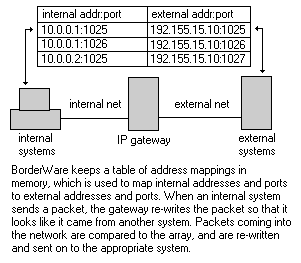
IP gateways come in two basic form-factors: hardware-based firewalls/routers and IP-over-IPX protocol converters. For example, Secure Computing Corp.'s BorderWare firewall uses application proxies at the core of its architecture, providing IP gateway services to internal clients that connect to external resources. To the internal systems, the firewall looks like a router that sits between the internal and external networks. Clients send outbound packets to the gateway, rather than simply forwarding the packets like a "normal" router would, so they appear to be originating from the gateway itself. Packets returning to the gateway then are redirected to the appropriate internal systems.
Another commonly found implementation is in WINSOCK.DLL replacements, typically used in IP-over-IPX protocol conversion products such as the Novell Internet Access Server (NIAS) bundled with IntranetWare. Internal devices do not have "real" IP stacks, but instead use a WINSOCK.DLL that provides IP transport services over IPX. The clients share the NetWare server's IP stack directly and use the server's port management services for their applications. In essence, the IPX-based client IP stacks become extensions of the server's IP stack.
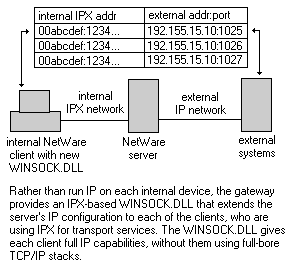
Rather than build maps of internal and external IP addresses and ports, NIAS assembles an address map that correlates internal IPX addresses to external IP addresses and port numbers. The clients use an IPX-based WINSOCK.DLL for local TCP and UDP applications, creating virtual IP connections on behalf of the server. IPX is used to deliver the virtual IP packets to the server, which in turn uses its local IP stack to deliver the packets to their destinations.
Architecturally, this is similar to Systems Network Architecture (SNA) gateways of yore, which also used a central system for providing SNA transport services over IPX and other protocols. The same sorts of limitations that SNA gateways have historically faced also apply here. First among these is the devices themselves are not full-fledged IP clients. Since the systems do not have their own specific IP addresses, they cannot have individual IP identities, even on the local network. Clients can't even ping each other, because the Internet Control Message Protocol (ICMP) packets will end up pointing to the NetWare server hosting the IP stack.
Low Maintenance Vs. High Functionality
The architectural differences between these two implementations generate a variety of management implications. For example, because NIAS uses a single IP stack for services, client applications only need to allocate a port on the server's stack to run IP applications. The server simply creates an entry in its map that points the allocated port number back to the IPX client that requested it. It does not have to rewrite address headers or anything else; it only has to redirect packets to the proper destination, whether internal via IPX or external via IP.
Conversely, BorderWare introduces high levels of packet management overhead by having to completely rewrite every IP packet that is transmitted. Not only does the firewall have to rewrite the IP addresses of the packets that it tracks, but it also has to rewrite the IP packet's checksum and TCP and UDP checksums, addresses found inside of packets and TCP sequencing numbers whenever the application addresses are changed.
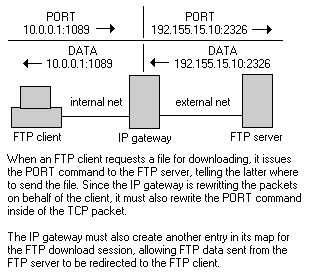
NIAS avoids this issue entirely, since the clients simply allocate ports from the NetWare server's IP stack directly. Whenever an NIAS-based FTP client wants to download a file, it simply allocates the next available socket (using normal WINSOCK.DLL calls) and issues the PORT command referencing the allocated socket. The NIAS server sees the allocation request and begins to redirect incoming data to the requesting client.
If this scenario were limited only to FTP, it wouldn't be that big an issue. However, there are several applications that embed client addresses and port numbers in their packets. Most of the ICMP services (used for ping and traceroute, for example) also store client information directly in the packet, as do most of the popular client/server database agents. Unless the IP gateway is explicitly aware of these services—and knows how to adjust the packets accordingly—then these applications will not work outside of the local network.
Also, rewriting the application-specific data isn't always enough. If the "size" of the addresses being replaced are not identical, then the entire packet's sequencing will need to be spoofed. TCP uses special fields to inform end-systems of the number of bytes transmitted- and received-to-date, providing the connection services that TCP-specific applications depend on. If the gateway replaces the client's address of "10.0.0.1" with "192.155.15.10" in an FTP PORT command, then the physical size of the packet will increase by five bytes. This in turn will require the gateway to increment the external TCP counter for that session by five. Not only must the gateway track this information for the external portion of the connection, it must also track it for the internal connection, providing the client with appropriate byte-counter acknowledgments.
Secure Computing has done an admirable job of providing application-sensitive proxy services for BorderWare, and continues to develop new ones as needed. Indeed, the entire firewall architecture is built around the concept of "smart" proxies that provide these services on an application-specific basis. Conversely, NIAS does not conduct any address rewrites, meaning all applications work without special requirements.
Virtual Firewalls And Application Servers
Not only are there client-side application considerations, but server-side issues as well. To most users, having the ability to run application servers on the internal network for external systems to access is probably just as important as the client-side connectivity support. Products such as BorderWare that are firewalls by design offer much more functionality than the IP-over-IPX gateways such as NIAS.
Client applications typically use port numbers above 1024, while servers typically use port numbers below 1024. For example, when you open a telnet session to a remote system, your telnet client will allocate a random port number above 1024 and connect to the well-known Port 23 on the remote system. For these products, the port number allocated for the external connection is essentially irrelevant, since the external servers don't care which port number the request is coming from.
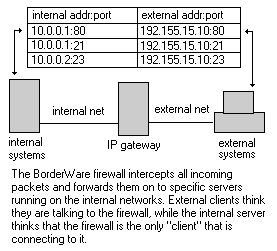
However, internal servers do care which port numbers they are listening on. Since servers work by listening to well-known ports (like TCP Port 23 for telnet servers), they cannot be changed to random numbers. For external clients to connect to your internal servers, the IP gateways must forward inbound requests to these ports on to specific systems inside your network.
BorderWare lets you define destination systems for server ports, allowing you to have systems dedicated to FTP, HTTP or other services on your internal network. Also, these inward connections are processed through the same IP gateway services as the outward client connections. This provides some protection against outside hackers, since external systems do not connect to the internal servers directly; instead, they connect to the firewall's proxy servers, which rewrite the packets before sending them on to the internal system.
NIAS offers this same basic service, although using a completely different implementation. Since the IPX-based clients are essentially extensions of the server's IP stack, they can allocate any port number they wish, including server-specific ones. If, for example, users load an HTTP server on their PC, then their WINSOCK.DLL will explicitly request that TCP Port 80 be placed in a "listen" state. The NetWare server will oblige if it is able to (it will not be able to if another PC has already allocated Port 80 for another Web server). This allows any internal system to load any server service they choose, although to the outside world, it appears that the server is running on the NetWare server, and not on the client.
This can be considered a fairly severe security hole. Allowing users to run any server application they wish is a dangerous way to run a network. You can get around this by using the native IP filtering NetWare Loadable Modules (NLMs) that ship with IntranetWare, thereby blocking access to these ports from outside networks—although this is not a complete firewall solution either. Users could load the Web server on Port 8000 if they wanted, thereby exposing your network again. In larger installations, a true firewall that blocks the entire network is needed for complete protection.
Other Considerations
Apart from the technical aspects, there are managerial issues that will affect your implementation decisions. Most of these result from the implications that arise from the two distinct product architectures.
For example, while NIAS offers easy deployment across a network of PCs, it is limited only to PCs. Most IP-over-IPX WINSOCK.DLL replacement products only provide dynamic linked libraries (DLLs) for the Windows 3.x and Windows95 desktop markets, and do not provide similar services to Macintosh, OS/2, Unix, Windows NT or other operating systems.
There are also quite a few compatibility problems with many of the WINSOCK.DLL-based implementations. For example, Microsoft's native network services rely on the Transport Driver Interface (TDI) layer to provide transport-independent file and print services. Few products—including NIAS—support TDI in their implementations, meaning that users cannot take advantage of these services when using these products. Additionally, the WinSock 1.x specification does not provide support for ICMP, meaning that users cannot use Microsoft's ping or traceroute, requiring the gateway provider to bundle these utilities with their product.
The primary advantage to these implementations is their low cost of ownership; you don't have to manage TCP/IP stacks on every system, and can implement a single shared WINSOCK.DLL on a file server that the Windows clients on your network can access as needed. You don't have to mess with managing Domain Name System (DNS) or Dynamic Host Configuration Protocol (DHCP) entries for the clients on your network, or track address conflicts, or do any of the other management tasks incurred from running full-bore IP stacks on every desktop. This makes these kinds of products a perennial favorite, especially in sites that don't rely on Microsoft's networking service.
Meanwhile, BorderWare offers better protection against outside intrusion, simply because it provides the IP gateway services as part of its overall firewall design. Since no system has direct access to any systems on the other side of the firewall, this type of product brings high levels of security and control to demanding environments. However, there is also a high cost of ownership associated with this type of solution, since it assumes that IP is installed on all internal systems.
In reality, there is no reason why you could not use both products simultaneously. If you have a large group of NetWare users, but cannot obtain enough addresses for them to use, then look to the IP-over-IPX gateways to provide you with connectivity between them and the rest of the organization. But, rather than use Internet-legal addresses on the NetWare servers that provide this gateway, use products like BorderWare to provide the address translation services between your internal and external network. In theory, you could support several thousand NetWare users with this combination, while only using a handful of IP addresses, whether legal or not.
Whichever mechanism you choose, remember that having legal addresses is the best route of all, since you are least likely to have duplicate addressing problems. If you cannot obtain enough addresses for all of your systems, then at least try to implement addresses from the "private" pools set aside in RFC 1918. Legacy issues preventing their use is one of the only acceptable excuses for not using legal IP addressing. While using an illegal address may seem like an option, be prepared for the inevitable denial-of-service when you try connecting to the site that "owns" the addresses you are using.

Copyright © 2010-2017 Eric A. Hall.
Portions copyright © 1997 InfoWorld Media Group, Inc. Used with permission.