
Separating Internal & External DNS Servers
Domain Name Service (DNS) servers can provide a wealth of information about your network. They can show the number of nodes you have, the type of hardware and the operating system, the people responsible for those nodes and more. The information can be extraordinarily helpful to your internal systems management personnel. However, it also can be helpful to outsiders who shouldn't be privy to this information.
One of the tips we explored in an earlier article on DNS was implementing separate DNS servers for internal and external name lookups. In this workshop, we'll go a bit further into this topic, providing additional details on how to implement dual-server DNS services.
The first thing an outsider hacking into your network would want is a map, which DNS provides nicely. However, hackers aren't your only concern: Vendors' sales representatives want to know what platforms are in use and who manages them. This information lets them target their pitches to the most appropriate person. Outsiders who do business with your organization can use this information to get a leg up on negotiations or other interactions. The DNS services give them all the information they need.
This doesn't mean that you should avoid DNS. On the contrary, you should maximize the benefits that an open, scalable, proven name service provides. However, you also need to protect this information so that it doesn't fall into the hands of unscrupulous or overzealous outside agents. The best way to do that is to limit access to the internal information, while offering a limited version of the information to the outside world.
Internal vs. External DNS Clients
When designing a dual-server implementation, the most important thing to remember is that internal and external DNS clients take different paths in resolving DNS queries. The internal clients likely will be members of your internal domain and will use a local DNS server for name-resolution tasks. External DNS clients likely will be in a different domain and will use the Internet's DNS servers to obtain information about your network. If the client is local, the request will be resolved locally; if the client is remote, the request will be resolved according to the root name servers.
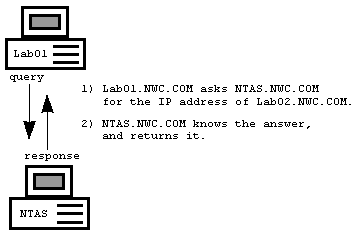
Regardless of whether the client is local or remote, however, the DNS clients will use the same mechanism for locating the destination name server. For all address-resolution requests, DNS clients use the DNS servers that have been defined in their local resolv.conf file or through another mechanism.
When a client issues a DNS lookup, it sends a query to a DNS server. If the server knows the answer, it returns the answer to the client immediately.
Root Name Servers
If the request is for a device in a non-local domain, the DNS server issues the request to the Internet's root name servers on behalf of the client. The root name servers provide the local DNS server with the name and address of the DNS server responsible for the domain being queried. With this information in hand, the local DNS server re-issues the request, this time asking the "responsible" server for the answer. Once a result has been found, the local DNS server returns the information to the client.
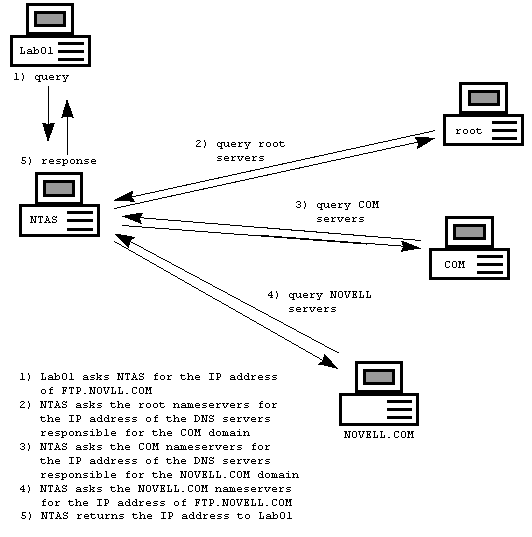
As these illustrations show, there are two independent places for DNS server advertisement: the local client configuration, where the TCP/IP stack looks for name-resolution services, and the Internet, where outsiders go for name-resolution services about the domains under your control. Since your DNS servers are published in two different locations, you can set up different servers in each of these locations, providing two distinct views of your network.
For example, you can configure your internal clients so that they reference the internal DNS server. They would have complete, unrestrained access to the data in your local domains. If they want to query an outside node, the internal DNS server would issue the lookups on their behalf, and all would work as expected.
Simultaneously, you could create a second DNS server that offered only a very limited view of your network. This server would be published as the external name server for outside agents' use. This server might contain only address entries for a few hosts, such as your public Web and e-mail servers. There would be no need to publish addresses for any non-publicly accessible host in the publicly accessible DNS server.
External Server Configuration Issues
When you first registered your domain with the InterNIC, you were required to provide IP addresses for at least two name servers for that domain. Once you are ready to establish an external DNS server, all you need to do is to inform InterNIC of the new external servers. You can do this online at http://rs.internic.net/cgi-bin/itts. However, you should wait until you have your new DNS servers operational before updating the InterNIC database, since the changes are adopted almost immediately. Once you have updated the InterNIC database, external queries sent to your domains now will be served by the new servers.
The types of information that you will need to make available to external sources are fairly limited. For example, you will only need to provide IP addresses of any publicly accessible systems, such as Web and FTP servers. You also will need to publish the IP addresses of any relevant mail servers, including the appropriate Mail Exchange (MX) records for your various domains.
You also will have to publish pointer (PTR) and reverse lookup entries for each IN-ADDR.ARPA domains. Failing to do this can result in a slew of problems, ranging from FTP servers refusing connections to systems reporting false security alerts.
The level of detail you will need to provide will be determined by how your network clients access the Internet. If each individual system accesses the Internet directly, you'll need to publish PTR records for each. If, instead, your clients use proxy servers or protocol conversion gateways, then you will need to publish PTR records only for the hosts that have direct access. This will cause remote systems to see all of your clients as this access point.
What this boils down to is that the number and size of your external DNS databases are generally only a fraction of the size of your internal servers, and they are easy to maintain once they are configured.
Also, since there likely will be less traffic, you won't need to use a very large server for the external resolution services. In fact, you likely will not even need to host this database yourself, and can use your Internet service provider's (ISP) name server. This way, you don't have to buy additional hardware or server software.
Internal Server Configuration Issues
As long as all of your internal DNS clients continue to use your existing DNS servers, then there are no new DNS configuration issues with the clients or the servers.
If you are not using an internal DNS server, you need to establish one and then update your DNS clients so that they reference it.
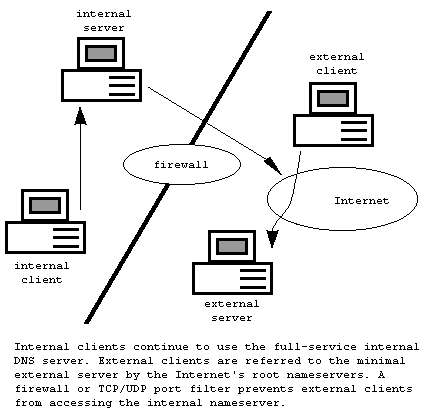
However, there are additional issues surrounding the use of private DNS servers. For example, you probably will want to block external access to the private DNS server. Otherwise, smart hackers and sales representatives will be able to locate and identify your resources simply by explicitly pointing to your internal DNS server, bypassing the external one. To prevent this, you need to install a firewall or TCP/UDP filtering on your Internet connection.
Configuring your firewall so that it correctly deals with DNS queries can be difficult. You want to block incoming queries from reaching the internal DNS servers, but at the same time, you need to allow DNS responses to pass through.
Because the internal DNS server will be issuing DNS lookups on behalf of the internal clients, it will need to receive the responses from all of the name servers with which it will be communicating. Each firewall implements different solutions for these services and there are too many options to review here. You should make sure that you understand your firewall's specific implementation before you begin.

Copyright © 2010-2017 Eric A. Hall.
Portions copyright © 1996 CMP Media, Inc. Used with permission.