
Cisco Cures Your DNS Management Headaches
Managing large Domain Name Service (DNS) servers is a difficult and time-consuming task. Simply trying to manage the flat text files that make up your DNS databases can be a tremendous headache. Not only do you have to add or modify nodes in the main file, you also have to add the related reverse-lookup pointer (PTR) records in other files, increment the serial numbers and restart the service. All this effort can go to waste if you make a simple typo.
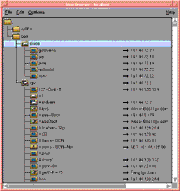
Cisco Systems' DNS/DHCP Manager seeks to avoid these pitfalls by providing a graphical menu system that handles most of these tasks. To add or modify an entry, you simply update the domain using a graphical tool. It automatically makes the related PTR entries and increments the serial numbers. It also puts comments and extended attributes, such as host information records, in the proper syntactical format, fixing improper entries prior to their being published.
Take Two
The Cisco DNS/DHCP Manager incorporates two distinct pieces of software: an integrated set of basic TCP/IP servers, called the Cisco Server Suite 1000, and the graphical DNS management tool, called the Domain Name Manager (DNM) browser. Both come bundled in the Cisco DNS/DHCP Manager.
The Cisco Server Suite 1000 includes servers for DNS, Dynamic Host Configuration Protocol (DHCP)/BOOTP, Network Time Protocol (NTP), Trivial FTP (TFTP) and SYSLOG, each of which is configurable via the graphical Service Configuration Manager (SCM). We installed the Solaris version of an early beta on a SPARC 10 in our San Mateo, Calif., labs, and configured the DNS server to act as a secondary for the NWC.COM domain and the IN-ADDR.ARPA domains for which we have authority. Once we restarted the DNS server, it performed a zone transfer of the data and created local copies of the domains on the SPARC 10.
The integrated DHCP server ties into the DNS server, providing an integrated address management tool. Whenever a new DHCP lease is assigned, the DHCP server automatically updates the local DNS server with the relevant IP addresses and host names. Once we verified that the services worked correctly, we also tested the DNM browser's zone management capabilities. By pointing the DNM browser to the local domain files, we were able to view, add, change and delete devices easily. More important, these changes were automatically formatted and verified, the relevant changes were made to the appropriate IN-ADDR.ARPA domain files and new version numbers were generated. We exported the zones to text files, copied them to the primary DNS server and restarted it. Even though it was on a separate machine that was not running the Cisco Server Suite 1000, the DNM browser proved to be a viable tool for managing raw DNS database files.
Although this is an early beta, there are some areas that we'd like to see strengthened. The DHCP node management interface is not as strong as the DNM browser. We would like to be able to add DHCP devices to the server via the DNM browser, providing a single point of management for devices on the network. Cisco says this support will likely be in a subsequent release.

Copyright © 2010-2017 Eric A. Hall.
Portions copyright © 1996 CMP Media, Inc. Used with permission.