
A Comparison of DHCP Servers
While DHCP offers relief from having to manually configure the TCP/IP setup on each of your PCs, it only shifts the management tasks onto a DHCP server. You still have to manage all of the addresses (or at least the address pools), and if the server isn't up to snuff, you'll find that it doesn't help you solve address management problems. While you may have had a hard-to-manage-but-efficient network, choosing the wrong DHCP server could land you in an easy-to-manage, mediocre mush.
Previously, we tested the clients (see Product Review: DHCP Clients). This month we tested the more important, server side of the equation. Some systems offered extraordinary flexibility, but lacked basic functionality. Others offered the raw capabilities needed to dole out DHCP addresses, but lacked the essential management functions required for efficiency.
We tested a product or two for each server platform, focusing on management features instead of interoperability. All of the servers worked with almost all of the clients, and where there were problems, they tended to be client specific. Our testing consisted of three possible scenarios, each representing a likely address management event in a mildly complex environment. The first test focused on simple management tasks, like adding, modifying and deleting addresses and pools. Then we checked for interoperability with the DHCP clients on hand, measuring how well the servers worked with the wide variety of clients we had. Finally, we tested the ability to extend the DHCP server beyond the default set of DHCP options provided in the box.
Other functionality beyond what shows up in these tests is also significant. For example, not all of the servers support BOOTP clients, even though this functionality is clearly specified in RFC 1531. Furthermore, not all the servers worked with all of the extended functions that some clients offered, although the problems exhibited tended to be isolated to specific client stacks. The importance of these problems depends on your environment, so we've summarized our findings in the table "DHCP Server Functions" (page 121).
IBM OS/2 Warp Server 3.0
The DHCP server in IBM's OS/2 Warp Server was much more than we expected, especially considering that this was its first effort. While the configuration management tools and interfaces are lacking, the underlying power of the environment is truly a thing of beauty.
Not only did Warp's DHCP server ace almost all of our criteria, it excelled in areas beyond what we considered adequate. For example, it leverages vendor-specific profiles beyond its own. Stock profiles come for Microsoft, FTP Software and Sun clients, among others. Although the Sun profile lacked some basic information (like NIS servers and domain information), most of the others were dead-on.
The product came preconfigured to support every current DHCP option as defined by the IANA, including NIS, NBT, NetWare/IP and even Banyan VINES extensions. IBM also liberally leverages the use of private DHCP options (including vendor- and site-specific options) to enhance its own Warp clients, letting users set default HTTPD and LPD servers (among others), and to auto-mount NFS file systems. The Warp DHCP client will read these assignments and modify the appropriate application INI files, letting you update services without having to revisit every node. While this wasn't unique, the level of "openness" was; everything is clearly documented, and implemented through REXX scripts, which are easy to extend and modify using the provided REXX IP extensions.
Warp Server also supports dynamic DNS updates. This lets users always keep the same hostname, regardless of their IP address. If laptop users like to roam around your network, this lets them always be accessible, no matter where they are. The DHCP server will update the DNS server using RSA public key encryption, preventing unauthorized personnel or systems to change the entries.
The only complaint we had was its extraordinary complexity. The system uses a nonstandard text file to control the entries, although a graphical (and equally complex) administrative tool is also provided. The power of IBM's proprietary structure is great, but we get the same thing from BOOTP TAB files, and would have preferred to retain that format if forced to use text files.
SunSoft SolarNet PC-Admin 1.5
SunSoft's SolarNet PC-Admin for Solaris is much more than just a DHCP server. It's more of a full-blown "environment" manager that you can use for your SunSoft PC-NFS clients. Sure, the DHCP server works fine with other clients, but you'll miss out on lots of the features (and pay way too much for the features you can't use) if your desktops don't run PC-NFS.
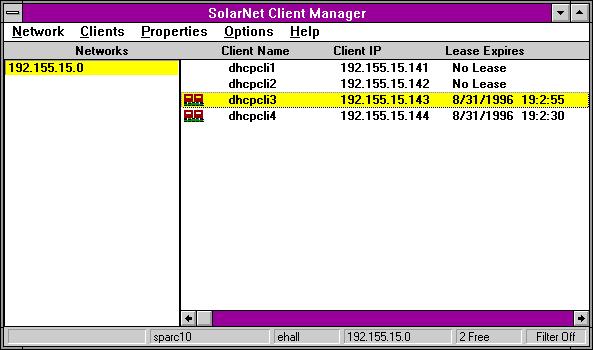
The product is extensively configurable and has a heavily layered approach to configuring client services. Not only are there "pools" of addresses in the normal sense, but there are also fully functional "classes" you can include in a pool's definition. You can combine multiple classes together under a pool definition, letting you mix and match your specific configuration requirements almost infinitely. Unfortunately, this level of power is matched by equally phenomenal complexity. Visual tools are available to assist you in your configuration, but they are just as complex as the underlying mechanisms.
The server integrates into NIS or static host tables. Our first efforts to use NIS failed; we corrupted the services trying to figure out the tools, and could not get PC-Admin working with NIS again. We ended up having to switch to the text files to straighten things out.
Microsoft Windows NT Server 3.51
Microsoft has also integrated DHCP services into its proprietary network environment, and has moved DHCP beyond a simple address management system. Windows for Workgroups, Windows95 and Windows NT clients can all use DHCP for basic workstation IP configuration management, including the ability to obtain WINS server addresses, NetBIOS scope name and the like.
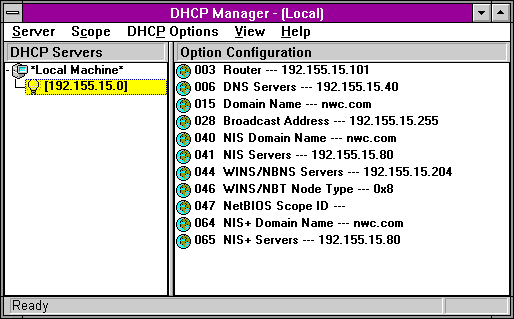
NT's DHCP server is easy to use. The ability to add new DHCP options was very easy, and the address management tasks were straightforward. You can add ranges of addresses, and it also lets you exclude specific address blocks. You can also manage multiple NT-based DHCP servers from a single console, which can be a blessing in a highly distributed environment. The ability to assign nonexpiring leases is also handy.
We found a couple small problems we couldn't work around. It was easy enough to add a block of addresses within a single subnet, but we couldn't add multiple blocks of addresses to the same subnet. Instead, we had to create single, unique entries for each of the nodes in the blocks. We could extend the blocks by one or two, but couldn't shrink a block. You can extend the address ranges by one, but you can only decrease them by 32. The only workaround was to delete the entire block and add it again, which ruined any leases we had going already.
Also, NT won't let you make node-specific modifications unless you define a "reservation" or a node-specific lease, including unique identifier, name and so on. It was also annoying that we couldn't see the host name of systems that had open leases, but if the clients were using Microsoft's TCP/IP stack, we would see the NetBIOS host name. And, the product doesn't provide any BOOTP services-making it useless as a centralized global address allocation platform.
Novell NetWare/IP 2.2 DHCP Server
Novell is also on the path to integrating its proprietary network services with DHCP, but is off to a slow, albeit confident start. NetWare/IP 2.2 includes a DHCP server NLM that runs on any NetWare 3.x or 4.x server (although NetWare/IP 2.2 is limited to NetWare 4.1 servers only). This may change in the future, as NDS services are added on.
In fact, the lack of integration with anything was one of the more annoying aspects of the product. We could not manage it from NDS or from UNICON, or anywhere except the standalone DHCPCFG.NLM program. While this tool offers a fairly good interface, it is a long way from complete. For example, we couldn't add any new DHCP options to the configuration, and we were limited to the options presented. This made it impossible to add elements such as NIS domains and servers, or to edit any of the normal advanced options, such as NTP server.
To its credit, however, Novell has made managing the available options pretty simple. The list includes the NetWare/IP options (NetWare/IP domain name, default server and so on), DNS options and even NetBIOS options (such as scope name and node type), making the server easy to use in Microsoft networking-centric shops.
We were also disappointed that all of the address pools were managed individually, making it difficult to change the defaults on a global basis. If we wanted to change the lease time, we had to do it for every pool. Speaking of which, the product doesn't support nonexpiring leases, which means there will always be renewal negotiations, even when they're unneeded.
There are no per-host management capabilities, unless you assign specific leases to specific nodes. You can't define the host name string or other options unless you create a machine-specific entry, based on the client's MAC address. Additionally, you cannot have multiple pools on a single subnet, unless you create multiple unique entries for each node you expect to support.
One of the nicer aspects of the product is that it supports static and dynamic BOOTP allocation, letting you support all of your systems from a single management station. If a BOOTP client issues a request for an address, then the server will provide one, whether or not the client has a fixed entry in the database. Another shining feature is the product's ability to specifically reject requests from certain nodes, thereby letting you disable BOOTP or DHCP address assignment on a per-node basis.
ON Technology IPTrack 1.0
Before Novell released NetWare/IP 2.2, the only choice that NetWare shops had was ON Technology's IPTrack 1.0. Provided as a set of NLMs, IPTrack runs on any NetWare 3.x (and higher) system.
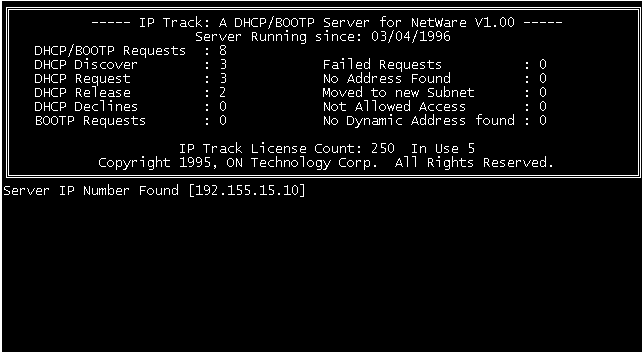
In terms of address management, IPTrack is about on par with NetWare/IP, lagging in some areas, while excelling in others. The biggest complaint that we have with this product is the outrageous price of $2,000 for a 250-user version. When comparing to NetWare/IP 2.2, which is free and downloadable via FTP from Novell's site, IPTrack seems an unlikely choice, especially since there are no compelling reasons to choose this over Novell's offering. The product has absolutely no online help and extraordinarily weak documentation.
FTP Software OnNet Server 2.0
Since we have looked at high-end systems for Sun, NT, OS/2 and NetWare servers, we should also include the low-end of the scale. FTP's OnNet Server is a 16-bit general-purpose IP server that runs on Windows 3.x or Windows95. The services offered in the suite include more than just a DHCP server. Currently, however, the software runs only on Microsoft's or FTP's TCP/IP stacks.
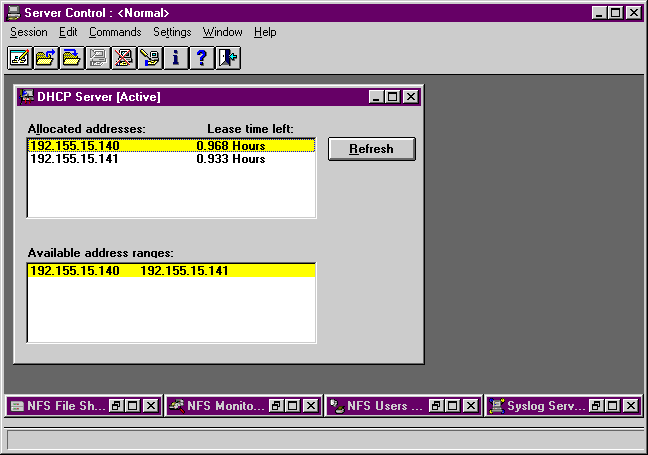
The product is definitely "low end" and you should only consider it as a last resort. The DHCP server component will let you add a pool of addresses, and will also let you add single addresses, but it will not let you modify or delete any addresses from the pool! Instead, you must load the database into an editor and delete the entries manually.
There were a couple of things we liked about it and would like to see copied by other vendors. Most notably, OnNet assigns the IP address of the client as the host name if no host name is defined for that specific client. All of the other systems simply returned no host name at all if no host name was defined, but this behavior can cause problems for some client applications that require a host name to operate successfully. By returning the IP address as the host name, clients are guaranteed a unique name.
Also, OnNet can serve out serial numbers and license keys to FTP clients, so you can provide centralized license management to your systems as well. If you only need part-time IP for your systems, you can only purchase as many client licenses as you need, and they will be assigned and returned to the central pool as the clients require.

Copyright © 2010-2017 Eric A. Hall.
Portions copyright © 1996 CMP Media, Inc. Used with permission.