
NetWare/IP Virtualizes IPX/SPX For Your WAN
WAN managers will tell you that their number one problem is managing NetWare traffic. Those damn RIP and SAP packets flying around are killing their bandwidth, and no simple solution is in sight. Filtering them out on a one-by-one basis is an administrative nightmare, as there are always new services coming online that bring new SAPs with them. Trying to implement NLSP and Packet Burst technology has proven to be more effort than most people are willing to spend sufficient time implementing. The result: Most managers just turn off all the NetWare services on their WAN and call it a cheap victory.
Turning them off altogether, however, is rarely a real "win." The whole idea of having a WAN in the first place is to increase communications between geographically disparate sites. Being able to utilize those remote high-speed printers for your weekly reports would be great and might save on fax, postal and courier charges as well. There's also the sharing of files and applications across the network. While not always feasible with limited bandwidth, it certainly would be possible if you could tame your NetWare traffic.
NetWare/IP directly addresses these issues by completely avoiding them. You don't have to worry about filtering your SAPs and RIPs, or about implementing fancy IPX-specific technologies. Instead you utilize unicast IP datagrams to distribute your SAP and RIP packets only as needed. This can eliminate the majority of the SAP and RIP broadcasts on your WAN, dramatically improving performance.
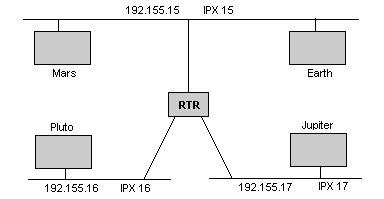
To illustrate the points made throughout this article, we'll use a simple network comprised of three segments, each connected by a WAN link and a pair of routers. To make it interesting, we'll throw in four NetWare servers, named Pluto, Mars, Earth and Jupiter.
Assuming you have a functional IP network already in place, then it's a fairly straightforward matter to install and configure NetWare/IP. If you don't have a functional IP network in place, it becomes more difficult, as you have to implement IP addresses, IP routing and DNS services before you can begin to utilize NetWare/IP. Fortunately, most networks already have IP addressing and routing in place. For those sites that do not yet run DNS, Novell provides a sufficiently usable DNS server in the NetWare/IP box.
NetWare/IP's Virtual IPX Networks
NetWare/IP allows implementation of IPX-over-IP, but not in a manner similar to the conventional methods of tunneling. Instead, a virtual IPX network is distributed across your IP network, providing a path for your IPX services (and the RIP and SAP broadcasts incurred by running them) to travel. This allows you to build a completely distributed IPX network without running IPX at all, if you so choose.
This virtual IPX network is used for all the NetWare/IP nodes in the network. However, it is not mapped to a single IP network, but is instead mapped to a NetWare/IP domain. A NetWare/IP domain is nothing more than a DNS subdomain, underneath a real DNS domain. For example, we could create a virtual IPX network numbered FFFF and map it to a DNS domain called NWIP.PLANETS.COM. All NetWare/IP nodes in the NWIP.PLANETS.COM NetWare/IP domain would then use the FFFF virtual IPX network to communicate with each other.
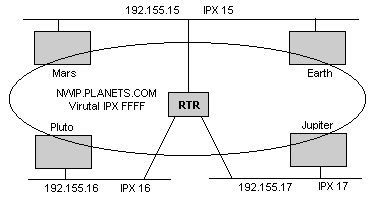
A couple of points need to be made here. First of all, the new IPX network is seen and routed just like any other IPX network. That means that IPX nodes on network 17 will see FFFF in the RIP broadcasts, and will see that FFFF provides IPX routes to networks 15 and 16 as well. For this reason, you would want to turn off the IPX routing on the WAN routers (if you haven't already), and let NetWare/IP convert IPX into IP for you. The IP packets containing the IPX packets will be routed according to the IP network rules.
Second, the NetWare/IP domain NWIP.PLANETS.COM is only used as a reference by NetWare/IP. The NetWare/IP nodes and servers do not have to be located in this domain. For example, the nodes in our figures can still be PLUTO.PLANETS.COM, MARS.PLANETS.COM and so on.
For all nodes to know about SAP and RIP traffic on remote segments, they must be told. This is true with NetWare/IP just as it is true with IPX. However, NetWare/IP utilizes dynamic databases to store information about the IPX network, rather than using broadcasts as IPX does. The servers holding these databases are called Domain SAP/RIP Services (DSS) servers. Any server can be a DSS server, regardless of whether or not it runs the NetWare/IP protocol conversion software.
Multiple DSS servers can be scattered about the NetWare/IP network. However, one of them must be designated as a Primary DSS server, and the others must be designated as Secondary DSS servers. Secondary DSS servers synchronize their databases based on the information available on the Primary DSS server. At predefined intervals, the Secondary servers will contact the Primary, compare database version numbers, and if required, synchronize their databases according to the information on the Primary.
In fact, Secondary DSS servers aren't necessary and can be ommited from your domain if you don't want them. A single Primary DSS server may be capable of handling your entire network's IPX database. However, all the NetWare/IP nodes looking for IPX resources will query their nearest DSS server. By distributing them, you minimize the WAN queries considerably.
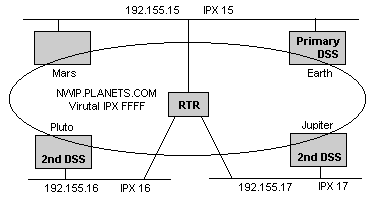
In our example, Earth is assigned as the Primary DSS server, and Pluto and Jupiter are Secondary DSS servers. This configuration provides local access to each network, and a modicum of redundancy to the network.
NetWare/IP Service
As we've stated, the NetWare/IP service does not provide DSS database functions. Instead, it provides the protocol conversion function, mapping IPX into IP and vice versa. All that is needed to configure a NetWare/IP server is the name of the NetWare/IP network that it is in and the IP address of a DNS server. You may need to fine tune the installation beyond this, but this is all you have to know to get started.
The NetWare/IP service looks at the NetWare/IP domain name and issues a DNS lookup for the name servers responsible for that domain. The list of name servers returned is the list of the DSS servers for that network. Since NetWare/IP attempts to contact servers based on their location, the closer a DSS is according to its IP address, the higher its preference.
Once the NetWare/IP server has successfully contacted a DSS server, it finds out what its virtual IPX network number is, the UDP ports to use and the database synchronization intervals. Just as secondary DSS servers synchronize their databases according to information presented by the Primary DSS servers, NetWare/IP servers send updates to their local DSS servers so that this information can be submitted to the Primary during the next exchange.
The reverse of this is true as well. Not only does the NetWare/IP server send SAP and RIP information up to the DSS for integration, it caches all the network information and broadcasts the remote SAPs and RIPs on the local segment for the IPX devices to see. This spoofs local devices into thinking that the network is consistent. The NetWare/IP server checks back with the DSS at predefined intervals, and updates its local cache if the DSS servers' database version number is new.
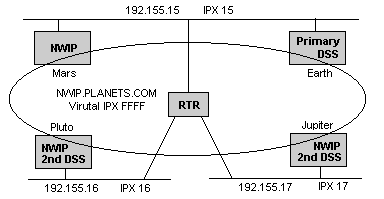
Pluto and Jupiter are both providing NetWare/IP and Secondary DSS services directly. Overloading these servers is not a problem, since both are located on small regional networks with underutilized servers. However, at the main network we chose to run NetWare/IP on Mars and not Earth; In this case, Earth is heavily loaded with DSS duties.
NetWare/IP to the Desktop
By now, we have implemented an entirely IP-driven IPX network. SAPs and RIPs across the backbone WAN have all but been eliminated. The only time they will be transmitted (via IP) is when a new IPX device or network comes on the wire. As long as the IPX network remains static, the DSS servers' databases will not change, and no repropagation will occur. Also, all local IPX devices on each segment appear much as they did before. The NetWare/IP servers continue to broadcast SAP and RIP updates, provide routes to other IPX networks and even encapsulate IPX packets into IP packets, delivering them to their destination.
However, this may not be good enough for you. You may want to roll NetWare/IP services out to your entire network (or as much as possible). Novell allows you to run a NetWare/IP VLM as part of the standard DOS client, so you can get this functionality at the desktop if you wish. We've used this software over SLIP dial-up lines; it works as well as could be expected. We could log in to our server, and found that all IPX applications worked flawlessly.
In terms of configuration at the client level, the NetWare/IP VLM follows the same basic rules as the NetWare/IP servers: They ask DNS for the name servers responsible for the NetWare/IP domain they are associated with, locate the nearest DSS server and communicate with the rest of the network using the virtual IPX network number assigned earlier.
If you choose to do this, you'll need to use Novell's LAN Workplace or FTP Software's PC/TCP as the client's TCP/IP stack. No other stacks are currently supported, although the Windows95 NetWare requester will support any Transport Driver Interface (TDI)-compliant TCP/IP stack. This should include Microsoft's native TCP/IP stack, as well as FTP's OnNet32 and TGV's MultiNet for Windows, when they are available. Additionally, Windows NT support is available through Novell's requester. Currently, there is no support for Macintosh, OS/2 or Unix NetWare clients.
Even if you can get rid of IPX on your DOS PCs, you probably won't be able to get it off your network entirely. Remember that all of your network printers, CD-ROM servers and pre-NetWare 3.12 servers will not be able to use NetWare/IP at all. The best you can hope for is localized IPX traffic and an IP-based WAN backbone.
Some Limitations
NetWare/IP is an amazingly cool technology. But many limitations are inherent in the architecture. Notable is its inability to support multiple virtual IPX networks. You can't have a virtual network EEEE and another virtual network DDDD, unless you separate them using an IPX network! The IPX network in the middle would have to see the SAP and RIP broadcasts from the EEEE network and route the data over to the DDDD network for re-encapsulation. Using IPX to connect IP nets is a poor way to build your WAN.
This limitation also applies to the NetWare/IP network names. You can't bridge an organizational site in NWIP.PLANETS.CA with NWIP.PLANETS.UK. The NetWare/IP clients and servers can only be in one domain, so they must be joined across a real IPX network. Although this is an administrative problem for sites with multiple domains, you can get around this limitation by having a single domain for just the NetWare/IP traffic: You would have to implement a NWIP.PLANETS.COM domain that applied to all of your international sites, regardless of the IP domain they are really in. Remember, nodes that are part of the NetWare/IP domain do not actually have to be in that domain. They only have to query DNS for the name servers.
Another problem that arises quite often is that the DNS servers provided by Novell are somewhat flaky. They are based on BIND 4.8.3, while the newest official release is 4.9.3. Common NSLOOKUP queries often fail, and the ROOT.DB cache file is at least a year out of date. The good news is that you do not have to run the Novell-supplied DNS to run the NetWare/IP services. The bad news is that you do have to run it on the DSS servers, although it can be configured to forward all DNS requests to a specific set of hosts, bypassing many of its weaknesses.
There is a dearth of integration into the NetWare Directory Services tree, so if you're an NDS fan, don't look for NetWare/IP to provide you with a new set of schema services with which to play. The 4.1-specific product is configured just like the 3.12-specific version, using console menus and commands.
Despite these implementation-related shortcomings, NetWare/IP is a great way to get rid of SAP and RIP traffic on your wide area network while still maintaining a representation of an IPX-oriented network. You'll be able to utilize your entire organizations' remote computing resources without having to give up bandwidth or a lot of time spent reconfiguring IPX.

Copyright © 2010-2017 Eric A. Hall.
Portions copyright © 1996 CMP Media, Inc. Used with permission.